OSCP Training

Get started with the OSCP Certification training to master the skills and knowledge you need to become OSCP certified.

Join the cohortGet instant access (self-paced)

(4.8)
3672 learners
Trusted by 130+ corporates
Join the cohortGet instant access (self-paced)
OSCP Training

Course Features

100% Money back guarantee
  • Real-time Use cases

  • 24/7 Lifetime Support

  • Certification Based Curriculum

  • Flexible Schedules

  • One-on-one doubt clearing

  • Career path guidance

About OSCP Course

MindMajix offers comprehensive 30-hour OSCP (Offensive Security Certified Professional) training in various learning modes - Instructor-led Classroom, Live Online, and Self-paced with real-time use-cases and practical Labs, which equip the learners with all the essential skills to pass the OSCP Certification Exam. After completing the OSCP Certification training, learners can apply for various Penetration Testing jobs through the included job-search assistance and Mock Interviews.

Prerequisites :

All learners better have:

  • Basic understanding of any scripting languages - Bash or Python scripting
  • TCP/IP networking concepts
  •  Windows and Linux administration concepts

Note: Covered as part of the course

Learning Outcomes:

  • Become an expert at performing penetration testing Tasks
  • Skills needed to pass OSCP Certification
  • Develop job-ready skills with hands-on Labs
  • Earn a shareable career certificate

Difficulty Level & Target Audience: 

Our OSCP Course is for Beginner and advanced security professionals as it covers basic and advanced penetration testing with Kali (PWK)concepts.

OSCP Training
demo play

Course Coverage

YOUR LEARNER JOURNEY - From Enrolment to Employment

How to Prepare for a Career in OSCP

Six guided stages take you from your first training class to your first offer — each one backed by a specific MindMajix support service.

Stage 1

Enrol & Get Set Up

Pick live online or self-paced, and set up a free OSCP Instance so you practice from day one.

  • Live or self-paced
  • 1-year LMS access
  • Agile & Scrum add-on
Stage 2

Learn & Build Real Skills

Master OSCP concepts with 30 hrs of current-release content, applying every concept in hands-on labs and real-time projects throughout.

  • Instructor-led + labs
  • 1-on-1 doubt clearing
  • Recording access
Stage 3

Earn Your Certificate

Clear the assessments for your shareable MindMajix completion certificate. Modules map to official OSCP exam topics for exam-aligned prep.

  • MindMajix certificate
  • Practice questions
Stage 4

Polish Your Profile

Turn skills into a profile recruiters notice — build an interview-ready resume and a strong LinkedIn presence using proven OSCP templates.

  • Resume building
  • LinkedIn optimisation
  • Resume templates
Stage 5

Practice Interviews

Walk in already rehearsed. Sit structured mock-interview rounds with experienced SMEs and get focused feedback on your OSCP skills and scenario questions.

  • Real-time Scenarios
  • Personalised feedback
  • OSCP mock interviews
Stage 6

Land Your Role

Apply with confidence using job-search assistance and referrals to hiring partners across India & the USA. (Career support provided; placement not guaranteed.)

  • Job-search assistance
  • Hiring-partner referrals
  • Role guidance

Start the journey today - choose the format that fits you.

Offensive Security Certified Professional (OSCP) Course Content

Experts in penetration testing and cybersecurity designed this OSCP course curriclum based on the latest Job Requirements, including the OSCP Certification topics. Please find the topics below.

24Modules
283Topics
Open any module to view the full topic list.
  1. 01Module1: Penetration Testing with Kali Linux11 topics
    • Accessing the internal VPN Lab Network
    • Offensive Security Student Form
    • Introduction to Penetration Testing
    • MegaCorpone.com and Sandbox.local Domains
    • PWK VPN Labs
    • Reverts
    • Control Panel
    • Client Machines
    • Kali Virtual Machine
    • Reporting
    • PWK Report
  2. 02Module2: Kali Linux15 topics
    • Botting Up Kali Linux
    • Kali Menu
    • Kali Linux Support Forum
    • Kali Linux Bug Tracker
    • Linux Filesystem
    • Linux Commands
    • Finding Files in Kali Linux
    • Handling the Kali Linux Services
    • HTTP Service
    • SSH Service
    • Installing, Searching, and Removing the Tools
    • Apt update and upgrade
    • Apt - cache search and apt show
    • apt remove - purge
    • dpkg
  3. 03Module3: Command Line28 topics

    Section 3.1: Bash Environment

    • Environment Variables
    • Bash History Tricks
    • Tab Completion

    Section 3.2: Piping and Redirection

    • Redirecting to the new file
    • Redirecting to the Existing File
    • Redirecting from the File
    • Redirecting STDERR
    • Piping

    Section 3.3: Text Searching and Manipulation

    • sed
    • grep
    • awk
    • cut

    Section 3.4: Editing Files from a command file

    • Vi
    • nano

    Section 3.5: Comparing Files

    • diff
    • comm
    • vimdiff

    Section 3.6: Handling Processes

    • Background Process
    • Process Control: kill and ps
    • Jobs Control: jobs and fg

    Section 3.7: File Monitoring and Command Monitoring

    • Watch
    • Tail

    Section 3.8: Downloading the files

    • curl
    • axel
    • wget

    Section 3.9: Customizing Bash Environment

    • Customizing Bash History
    • Persistent  Bash Customization
    • Alias
  4. 04 Module4: Practical Tools23 topics

    Section 4.1: Netcat

    • Connecting to the TCP/UDP Port
    • Listening on the TCP/UDP Port
    • Transferring the Files with Netcat
    • Remote Administration with Netcat

    Section 4.2: Socat

    • Differentiate Netcat and Socat
    • Socat Reverse Shells
    • Socat File Transfers
    • Socat Encrypted Bind Shells

    Section 4.3: Powercat and PowerShell

    • PowerShell Reverse Shells
    • PowerShell File Transfers
    • PowerShell Bind Shells
    • Introduction to Powercat
    • Powercat Reverse Shells
    • Powercat File Transfers
    • Powercat Bind Shells
    • Powercat Stand-Alone Payloads

    Section 4.4: Wireshark

    • Wireshark Fundamentals
    • Starting Wireshark
    • Display Filters
    • Capture Filters
    • Following TCP Streams

    Section 4.5: TCPdump

    • Filtering the Traffic
    • Advanced Header Filtering
  5. 05 Module5: Bash Scripting8 topics
    • Variables
    • Arguments
    • If, If-Else, Else Statements
    • Reading User Input
    • Boolean Logical Operations
    • For Loops
    • While Loops
    • Functions
  6. 06Module6: Passive Information Gathering19 topics
    • Website Recon
    • Google Hacking
    • Whois Enumeration
    • Recon-ng
    • Netcraft
    • Open-Source Code
    • Security Headers Scanner
    • Shodan
    • SSL Server Test
    • Pastebin
    • Email Harvesting
    • User Information Gathering
    • Password Dumps
    • Email Harvesting
    • Site-Specific Tools
    • Social Media Tools
    • Stack Overflow
    • OSINT Framework
    • Maltego
  7. 07Module7: Active Information Gathering16 topics

    Section 7.1: DNS Enumeration

    • Interaction with the DNS Server
    • Forward Lookup Brute Force
    • Automating Lookups
    • Reverse Lookup Brute Force
    • Relevant Tools in Kali Linux
    • DNS Zone Transfers

    Section 7.2: Port Scanning

    • UDP/TCP Scanning
    • Port Scanning with the Nmap
    • Masscan

    Section 7.3: SMB Enumeration

    • Scanning for NetBIOS Service
    • Nmap SMB NSE Scripts

    Section 7.4: NFS Enumeration

    • Scanning for the NFS Shares
    • Nmap NFS NSE Scripts

    Section 7.5: SMTP Enumeration

    Section 7.6: SNMP Enumeration

    • SNMP MIB Tree
    • Scanning for the SNMP
    • Windows SNMP Enumeration
  8. 08Module8: Vulnerability Scanning9 topics

    Section 8.1: Introduction to Vulnerability Scanning 

    • How Vulnerability Scanners Work
    •  Manual vs. Automated Scanning
    • Internal Scanning vs. Internet Scanning
    • Unauthenticated vs. Authenticated Scanning

    Section 8.2: Vulnerability Scanning with Nessus

    • Nessus Installation
    • Specifying Targets
    • Configuring Scan Definitions
    • Unauthenticated and Authenticated Scanning with Nessus
    • Scanning with Individual Nessus Plugins

    Section 8.3: Vulnerability Scanning with Nmap

  9. 09 Module9: Web Application Attacks12 topics

    Section 9.1: Web Application Enumeration

    • Inspection URLs
    • Inspecting Page Content
    • Inspecting the SiteMaps
    • Locating the Administration Consoles

    section 9.2: Web Application Assessment Tools

    • Burp Suite
    • Nikto
    • DIRB

    Section 9.3: Web-Based Vulnerabilities

    • Exploiting the Admin Consoles
    • File Inclusion Vulnerabilities
    • Cross-Site Scripting
    • Directory Traversal Vulnerabilities
    • SQL Injection
  10. 10Module10: Buffer Overflows6 topics

    Section 10.1: x Architecture

    • Program Memory
    • CPU Registers

    Section 10.2: Buffer Overflows

    • Sample Vulnerable Code
    • Immunity Debugger
    • Navigating Code
    • Overflowing the Buffer
  11. 11Module11: Windows Bufferflows11 topics

    Section 11.1: Discovering the Vulnerability

    • Fuzzing HTTP Protocol
    • Win Buffer Overflow Exploitation

    Section 112: DEP, ASLR, and CFG

    • Replicating the Crash
    • Controlling EIP
    • Discovering Space for Our Shellcode
    • Checking for the Bad Characters
    • Redirecting the Execution Flow
    • Finding the Return Address
    • Generating Shellcode with Metasploit
    • Getting the Shell
    • Enhancing the Exploit
  12. 12Module12: Linux Buffer Overflows7 topics
    • DEP, ASLR, and Canaries
    • Controlling EIP
    • Replicating the Crash
    • Checking for the Bad Characters
    • Discovering Space for the Shellcode
    • Finding the Return Address
    • Getting the Shell
  13. 13Module13: Client-Side Attacks8 topics

    Section 13.1: Client Information Gathering

    • Passive Client Information Gathering
    • Active Client Information Gathering

    Section 13.2: Leveraging the HTML Applications

    • HTA Attack in Action
    • Exploring the HTML Application

    Section 13.3: Exploring Microsoft Office

    • Microsoft Office Installation
    • Object Embedding and Linking
    • Microsoft Word Macro
    • Evading the Protected View
  14. 14Module14: Locating Public Exploits2 topics
    • Searching Online Exploit Resources
    • Searching Offline Exploit Resources
  15. 15Module15: Fixing the Exploits10 topics

    Section 15.1: Fixing the Memory Corruption Exploits

    • Introduction and Considerations
    • Importing and Reviewing the Exploits
    • Cross-Compiling the Exploit Code
    • Modifying the Socket Information
    • Modifying the Return Address and Payload
    • Modifying the Overflow Buffer

    Section 15.2: Fixing the Web Exploits

    • Introduction and Considerations
    • Choosing the Vulnerability
    • Modifying the Connectivity Information
    • Troubleshooting “index out of range” error
  16. 16Module16: File Transfers8 topics

    Section 16.1: Preparations and Considerations

    • Dangers of Transmitting the Attack Tools
    • Installing the Pure - FTPd
    • Non-Interactive Shell

    Section 16.2: Transferring the Files the Windows Hosts

    • Non-Interactive FTP Download
    • Windows Downloads using the Scripting Language
    • Windows Downloads with exe2hex and PowerShell
    • Windows Uploads using the Windows Scripting Languages
    • Uploading Files with TFTP
  17. 17Module17: Antivirus Evasion5 topics

    Section 17.1: Define Antivirus Software

    Section 17.2: Methods of Identifying the Malicious Code

    • Signature-Based Detection
    • Behavioral and Heuristic-Based Detection

    Section 17.3: Eluding the Antivirus Detection

    • On-Disk Evasion
    • In-Memory Evasion
    • AV Evasion
  18. 18Module18: Privilege Escalation11 topics

    Section 18.1: Information Gathering

    • Manual Enumeration
    • Automated Enumeration

    Section 18.2: Examples for Windows Privilege Escalation

    • Windows Privileges and Integrity Levels
    • User Account Control
    • User Account Control Bypass
    • Insecure File Permissions
    • Leveraging the Unquoted Service Paths

    Section 18.3: Linux Privilege Escalation Examples

    • Linux Privileges
    • Insecure File Permissions: /etc/passwd case study
    • Insecure File Permissions: Cron Case Study
    • Kernel Vulnerabilities: CVE-7-2 Case Study
  19. 19Module19: Password Attacks8 topics

    Section 19.1: Wordlists

    • Standard Wordlists

    Section 19.2: Brute Force Wordlists

    Section 19.3: Common Network Service Attack Methods

    • HTTP htaccess Attack with Medusa
    • Remote Desktop Protocol Attack with the Crowbar
    • HTTP POST Attack with THC-Hydra
    • SSH Attack with THC - Hydra

    Section 19.4: Leveraging the Password Hashes

    • Retrieving the Password Hashes
    • Password Cracking
    • Passing the Hash in Windows
  20. 20Module20: Port Redirecting and Tunneling4 topics

    Section 20.1: Port Forwarding

    • RINETO

    Section 20.2: SSH Tunneling

    • SSH Local Port Forwarding
    • SSH Remote Port Forwarding
    • SSH Dynamic Port Forwarding

    Section 20.3: PLINK.exe

    Section 20.4: NETSH

    Section 20.5: HTTPTunnel-ing Through the Deep Packet Inspection

  21. 21Module21: Active Directory Attacks16 topics

    Section 21.1: Active Directory Theory

    Section 21.2: Active Directory Enumeration

    • Conventional Approach
    • A Modern Approach
    • Resolving Nested Groups
    • Currently Logged on the users
    • Enumeration using the Service Principal Names

    Section 21.3: Active Directory Authentication

    • Kerberos Authentication
    • NTLM Authentication
    • Service Account Attacks
    • Cached Credential Storage and Retrieval
    • Slow and Low Password Guessing

    Section 21.4: Active Directory Lateral Movement

    • Pass the Hash
    • Overpass the Hash
    • Distributed Component Object Model
    • Pass the Ticket

    Section 21.5: Active Directory Persistence

    • Domain Control Synchronization
    • Golden tickets
  22. 22Module22: Metasploit Framework15 topics

    Section 22.1: Metasploit Setup and User Interface

    • Getting Familiarised with MSF Syntax
    • Metasploit Database Access
    • Auxiliary Modules

    Section 22.2: Exploit Modules

    • SyncBreeze Enterprise

    Section 22.3: Metasploit Payloads

    • Non-Staged vs Staged Payloads
    • Experimenting the Meterpreter
    • Meterpreter Payloads
    • Executable Payloads
    • Client-Side Attacks
    •  Metasploit Exploit Multi Handler
    • Advanced Features and Transports

    Section 22.4: Building Own MSF Module

    Section 22.5: Post-Exploitation with Metasploit

    • Core Post-Exploitation Features
    • Post-Exploitation Modules
    • Migrating Processes
    • Pivoting with the Metasploit Framework

    Section 22.6: Metasploit Automation

  23. 23Module23: Powershell Empire6 topics

    Section 23.1: Installation, Usage, and Setup

    • PowerShell Empire Syntax
    • Stagers and Listeners
    • Empire Agent

    Section 23.2: PowerShell Modules

    • Situational Awareness
    • Credential and Privilege Escalation
    • Lateral Movement

    Section 23.3: Switching Between Empire and Metasploit

  24. 24Module24: Penetration Test Breakdown25 topics

    Section 24.1: Public Network Enumeration

    Section 24.2: Targeting the Web Application

    • SQL Injection Exploitation
    • Web Application Enumeration
    • Cracking the Password
    • Enumerating Admin Interface
    • Obtaining the Shell
    • Post-Exploitation Enumeration
    • Creating the Stable Pivot Point

    Section 24.3: Targeting Database

    • Enumeration
    • Trying to Exploit the Database

    Section 24.4: Depper Enumeration of Application Server

    • More Deeper Post Exploitation
    • Searching for the DB Credentials
    • Privilege Escalation

    Section 24.5: Targeting Database Again

    • Exploitation
    • Post-Exploitation Enumeration
    • Creating the Stable Reverse Tunnel

    Section 24.6: Targeting the Poultry

    • Exploitation (or just logging in)
    • Enumeration
    • Post-Exploitation Enumeration
    • Unquoted Search Path Exploitation

    Section 24.7: Internal Network Enumeration

    • Reviewing the Results

    Section 24.8: Targeting Jenkins Server

    • Exploiting Jenkins
    • Application Enumeration
    • Privilege Escalation
    • Post Exploitation Enumeration

    Section 24.9: Targeting Domain Controller

    • Exploiting Domain Controller

Hands-on OSCP Projects & Assignments

Our OSCP Training course aims to deliver quality training that covers solid fundamental knowledge on core concepts with a practical approach. Such exposure to the current industry use-cases and scenarios will help learners scale up their skills and perform real-time projects with the best practices.

    Key Skills & Tools Covered

    • Kali Linux
    • Bash Environment
    • Metasploit
    • NetCat
    • Socat
    • PowerCat
    • PowerShell
    • WireShark
    • TCPDump
    • Burp Suite
    • Nikto
    • DIRB
    • Pure - FTPd
    • THC-Hydra

    logoTraining Options

    Choose how you learn best

    Both options cover the full curriculum and include most of the certification topics

    Most flexible

    Self-paced

    30 hrs

    Learn anytime, at your own pace — complete the course in weeks or months.

    What you get
    • 30 hours of OSCP Training videos
    • Curated and delivered by SME
    • Hands-On Lab sessions
    • Resources/materials
    • Sample Resumes
    • Get one year access to the LMS
    • Community forum support
    • Free Agile & Scrum add-on course
    Not included
    • Live instructor & Q&A sessions
    • 1-on-1 doubt clearing calls
    • Mock interview & resume review

    20% Off

    14,400

    Rs 18,000

    Get Full Access

    Most Popular

    Live online (instructor-led)

    30 hrs

    Real-time classes with a certified expert — ask questions, get instant feedback, and walk away job-ready

    Everything in self-paced, plus
    • Live Zoom/Meet sessions with instructor
    • 1-on-1 doubt clearing sessions
    • Live project walkthroughs
    • certification guidance
    • Mock interviews with SME panel
    • Resume & LinkedIn profile review
    • Job referral to hiring partners
    • Session recordings to rewatch anytime
    • Agile & Scrum add-on course free
    Next batch starts
    Jul21
    Jul 21 - Aug 05Next batchIST (IND)

    07:00 AM IST · Weekday · Only 4 seats left

    20% Off

    32,000

    Rs 40,000

    OSCP Training Schedule

    30 hrs · Live online · Recordings included

    Weekday (Mon-Fri)

    Jul 21 - Aug 05

    2 weeks · 30 hrs total

    Time07:00 AM IST
    ModeLive online

    Zoom / Google Meet

    Weekend (Sat-Sun)

    Jul 25 - Aug 09

    3 weekends · 30 hrs total

    Time08:00 PM IST
    ModeLive online

    Zoom / Google Meet

    i

    Need a different time? We offer and at any timezone. Contact a course advisor to set one up.

    For Corporates

    Empower your team with new skills to Enhance their performance and productivity.

    Corporate Training

    • Customized course curriculum as per your team's specific needs
    • Training delivery through self-Paced videos, live Instructor-led training through online, on-premise at Mindmajix or your office facility
    • Resources such as slides, demos, exercises, and answer keys included
    • Complete guidance on obtaining certification
    • Complete practical demonstration and discussions on industry use cases
    Learn MoreContact us

    Served 130+ Corporates

    Corporate Clients
    Honest Comparison

    MindMajix OSCP Training vs Other Institutes

    We believe in transparency. Here's how MindMajix stacks up against typical OSCP training providers so you can compare value, support, and practical depth clearly.

    Our CourseMindMajix

    OSCP Training

    (4.8)
    learners3672 learners
    Other Institutes

    Generic OSCP Training Providers

    Avg rating3.2(avg. across providers)
    CurriculumCourse Content

    Updated to the latest exam pattern with real-world modules, guided labs, and implementation depth.

    Always current

    Often outdated basics with limited real-world coverage and shallow practical context.

    Frequently outdated
    CurriculumHands-On Lab Access

    Sandbox-style practice with guided exercises, projects, and replay-friendly learning support included.

    Included at no extra cost

    Slides-first teaching with restricted lab time or paid add-on practical access.

    Limited / paid extra
    InstructorTrainer Credentials

    Certified trainers with real implementation experience and structured teaching support.

    Verified expertise

    Trainer quality varies widely and may depend on availability rather than specialization.

    Varies widely
    InstructorTrainer Continuity

    A stable trainer journey with consistent delivery, doubt support, and batch continuity.

    Consistent trainer

    Trainer substitutions can happen mid-course and interrupt learning continuity.

    Frequent changes
    SupportDoubt Clearing

    Ongoing help through trainer sessions, community support, and guided clarification after class.

    Extended support

    Support often stops after sessions, leaving little structured post-class help.

    No post-training help
    PlacementJob Assistance

    Resume reviews, mock interviews, hiring guidance, and practical interview preparation support.

    Active placement support

    Placement support is often limited to generic guidance or an email list.

    Mostly nominal
    PlacementMock Interviews

    Structured mock interview rounds with domain-focused feedback before interviews.

    Included

    Students are usually expected to prepare independently without guided mock rounds.

    Not included
    ScheduleBatch Flexibility

    Weekday, weekend, and flexible learning paths with guidance on the best fit.

    Fully flexible

    Fixed schedules with fewer alternatives once a batch begins.

    Limited options
    CertificationExam Preparation

    Practice questions, revision guidance, and exam-focused preparation aligned to current objectives.

    Comprehensive prep

    Generic question banks that may not reflect the latest exam priorities.

    Outdated mock tests
    ValuePrice Range

    Strong value with training, support, and practical learning included as a single package.

    Best value for inclusions

    Lower headline pricing can still lead to add-on costs for labs, support, or extras.

    Hidden add-on costs
    ValueRecording Access

    Long-term access to recordings and study materials for revision after batch completion.

    Lifetime-style access

    Access is often time-limited and may not include refreshed supporting material.

    Time-limited access
    Curriculum

    Course Content

    MindMajix

    Updated to the latest exam pattern with real-world modules, guided labs, and implementation depth.

    Always current
    Other Institutes

    Often outdated basics with limited real-world coverage and shallow practical context.

    Frequently outdated
    Curriculum

    Hands-On Lab Access

    MindMajix

    Sandbox-style practice with guided exercises, projects, and replay-friendly learning support included.

    Included at no extra cost
    Other Institutes

    Slides-first teaching with restricted lab time or paid add-on practical access.

    Limited / paid extra
    Instructor

    Trainer Credentials

    MindMajix

    Certified trainers with real implementation experience and structured teaching support.

    Verified expertise
    Other Institutes

    Trainer quality varies widely and may depend on availability rather than specialization.

    Varies widely
    Instructor

    Trainer Continuity

    MindMajix

    A stable trainer journey with consistent delivery, doubt support, and batch continuity.

    Consistent trainer
    Other Institutes

    Trainer substitutions can happen mid-course and interrupt learning continuity.

    Frequent changes
    Support

    Doubt Clearing

    MindMajix

    Ongoing help through trainer sessions, community support, and guided clarification after class.

    Extended support
    Other Institutes

    Support often stops after sessions, leaving little structured post-class help.

    No post-training help
    Placement

    Job Assistance

    MindMajix

    Resume reviews, mock interviews, hiring guidance, and practical interview preparation support.

    Active placement support
    Other Institutes

    Placement support is often limited to generic guidance or an email list.

    Mostly nominal
    Placement

    Mock Interviews

    MindMajix

    Structured mock interview rounds with domain-focused feedback before interviews.

    Included
    Other Institutes

    Students are usually expected to prepare independently without guided mock rounds.

    Not included
    Schedule

    Batch Flexibility

    MindMajix

    Weekday, weekend, and flexible learning paths with guidance on the best fit.

    Fully flexible
    Other Institutes

    Fixed schedules with fewer alternatives once a batch begins.

    Limited options
    Certification

    Exam Preparation

    MindMajix

    Practice questions, revision guidance, and exam-focused preparation aligned to current objectives.

    Comprehensive prep
    Other Institutes

    Generic question banks that may not reflect the latest exam priorities.

    Outdated mock tests
    Value

    Price Range

    MindMajix

    Strong value with training, support, and practical learning included as a single package.

    Best value for inclusions
    Other Institutes

    Lower headline pricing can still lead to add-on costs for labs, support, or extras.

    Hidden add-on costs
    Value

    Recording Access

    MindMajix

    Long-term access to recordings and study materials for revision after batch completion.

    Lifetime-style access
    Other Institutes

    Access is often time-limited and may not include refreshed supporting material.

    Time-limited access
    1 / 11
    MindMajixWins or ties in 9 of 11 categories
    9/11

    Industry-focused delivery with stronger support, consistency, and practical learning value.

    Other InstitutesUsually win only on headline pricing
    2/11

    Lower upfront pricing can hide trade-offs in labs, trainer continuity, and support quality.


    Offensive Security Certified Professional certification Certification

    Passing Offensive Security Certified Professional certification Quizzes & Assessment exams is mandatory to attain the Offensive Security Certified Professional certification Course Completion certificate

    • An Industry-recognized certificate by Mindmajix.
    • Shareable certificate - add to your LinkedIn profile

    What is the cost of the OSCP certification exam?

    The OSCP Certification exam contains two modules :

    • PEN-103 & 1 KLCP Exam
    • PEN-210 & 1 OSWP Exam

    You should pass the above two exams to become OSCP Certified.

    Cost :

    The cost of OSCP certification in India is 1 Lakh INR, and in the USA - $1599.
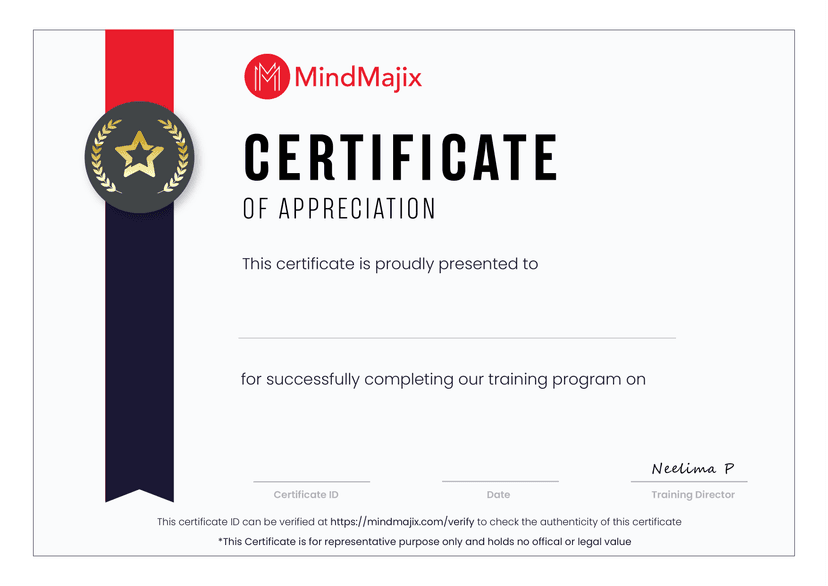
    MindMajix certificate
    Zoom

    OSCP Training FAQs

    What are the main objectives of this OSCP training?

    The main objective of this OSCP training is to impart the skills required to find vulnerabilities and build comprehensive penetration testing reports. It covers the concepts like testing the information system’s defenses and building proactive approaches to protect the applications and websites. With our extensive course curriculum, instructor-led training sessions, LMS, and certified instructors, you can become a successful penetration tester.


    What are the prerequisites to take this Offensive Security Certified Professional course?

    Individuals who want to take this OSCP course should have a fundamental knowledge of Cybersecurity, Network Security, Python, Bash Scripting, Linux, and TCP/IP Networking.

    Who Should take this Offensive Security Certified Professional Training?

    This OSCP training is suitable for windows administrators, cybersecurity professionals, system administrators, and network engineers.

    What are the OSCP Training locations of Mindmajix?

    Besides providing OSCP Online training, Mindmajix offers OSCP courses at physical locations across the globe.


    OSCP Training in Hyderabad :
     
     
    OSCP Training USA Locations :
     
     
    OSCP Training Canada Locations:
     
     
    OSCP Training UK Locations:

    What skills will you learn in this OSCP training?

    In this OSCP training, you will master the following skills: 

    • Finding Files in Kali Linux
    • Redirecting to the existing file
    • Connecting to the TCP/UDP Port
    • Nessus Installation
    • Scanning the Vulnerabilities
    • Retrieving the Password Hashes
    • Exploiting SQL Injection
    • Passing the Hash in Windows
    • Choosing the Vulnerability
    • Targeting the Database

    Which Jobs will you get with this OSCP training?

    With this OSCP training, you can achieve the job roles like Penetration Tester, Security Analyst, Security Engineer, Cybersecurity Researcher, Information Security Specialist, Information Security Engineer, and Cyber Security Engineer.

    Why Should You Learn OSCP?

    The OSCP(Offensive Security Certified Professional) is one of the primary certifications in Cybersecurity and Ethical Hacking released by Offensive Security. It validates your ability to perform advanced penetration testing on corporate networks. Penetration testing is one of the most in-demand job roles in the speedily growing information security market. More and more enterprises are seeking professionals who can demonstrate the expertise required to intentionally hack into their systems to detect vulnerabilities before malicious attackers do. As per Mindmajix Market Analysts, a penetration tester can earn more than $113K per annum.

    TESTIMONIALS
    What Learners say about Mindmajix
    Quote

    The OSCP course curriculum is well-suited...

    (5/5)

    The OSCP course curriculum is well-suited and well-designed for the market requirements. The LMS is intelligently designed with relevant examples and great explanations. It provided me the opportunity to work with proper scenarios that enhanced my expertise. It is worth it.

    S

    Swetha

    Student

    Quote

    This OSCP online training provided enough...

    (5/5)

    This OSCP online training provided enough hands-on demonstrations. All the concepts were taught theoretically and practically by experienced trainers. Great Job MindMajix and I would suggest it to anyone who is willing to learn OSCP.

    R

    Raj

    Student

    logoOn-Job Support Service

    Online Work Support for your on-job roles.

    jobservice
    @Learner@SME

    Our work-support plans provide precise options as per your project tasks. Whether you are a newbie or an experienced professional seeking assistance in completing project tasks, we are here with the following plans to meet your custom needs:

    • Pay Per Hour
    • Pay Per Week
    • Monthly
    Learn MoreContact us
    Teams across the globe run on MindMajix
    +
    Learners, Careers Upskilled
    • +
      Courses, Largest LMS
    • +
      Corporates, Global Clients
    STILL GOT QUERIES?

    Get a Live FREE Demo

    • Explore the trending and niche courses and learning maps
    • Learn about tuition fee, payment plans, and scholarships
    • Get access to webinars and self-paced learning videos
    Name
    Course *
    Email *
    Phone Number

    Find OSCP Online Training in Other Cities

    To meet the learning needs of people spread across various geographical locations, we are offering our high-quality training services at the location of your choice to ensure you obtain maximum impact for your training investment. Choose your city below.


    BangaloreChennaiHyderabad

    Training_Location

    Cyber Security and SIEM CoursesView All