
NetSuite is a leading cloud business management suite that includes ERP/financials, CRM, and eCommerce software. That’s why NetSuite skills are in demand across multiple industries.
In this NetSuite tutorial, we will start with the basics and cover the key concepts a NetSuite professional must know.
Now, let’s explore it in detail.
Table of Contents
- NetSuite Overview
- History
- Why is it best
- NetSuite Next
- AI Capabilities
- Products
- SuiteCloud Developer Platform
- Certifications
- Conclusion
- FAQs
What is NetSuite?
NetSuite is a unified business management suite encompassing ERP/financials, eCommerce, CRM, Inventory, HR, professional services automation, and more via a single, fully integrated system. NetSuite reports that the platform is used by more than 43,000+ customers worldwide.
Let’s learn NetSuite in more detail.
- NetSuite helps enterprises achieve business growth and progress by efficiently optimizing business processes.
- It automates business processes and delivers significant benefits through a cloud platform.
- NetSuite customers across multiple industries use NetSuite modules to streamline their business operations.
- You can access NetSuite from any device, anywhere, since it is a cloud-based platform.
NetSuite History
NetSuite was founded in 1998 by Evan Goldberg under the original name NetLedger, which offered web-hosted accounting management software. The company received initial funding from Oracle CEO Larry Ellison and from other key people.
NetSuite is regarded as a pioneer in cloud computing ERP software platforms. Zach Nelson was appointed CEO of NetSuite in 2002 and led the company from about $1 million in revenue to a billion-dollar run rate before its acquisition by Oracle Corp.
Why NetSuite?
From startups to enterprises, NetSuite is the number one cloud ERP business software solution. The following section provides the reasons why NetSuite is the best solution:
- Native Business Intelligence – Real-time analytics is available in the NetSuite user interface. You can view vital business data directly within the system.
- Built-in Flexibility – NetSuite enables you to adapt quickly to changing business models. With every upgrade, your configurations and customizations migrate seamlessly.
- Commerce-ready ERP – Your core business system becomes a customer-facing commerce system with a customer-specific, customizable, and pixel-perfect experience.
- Single Platform for Multiple Services – NetSuite offers a single cloud platform for services such as Accounting/ERP, CRM, eCommerce, HRMS, and more. It reduces the need for separate systems across business units.
- Global Access to Your Business – NetSuite’s Cloud-based business management solution allows you to access core business metrics anywhere.
- AI-first Architecture – The platform is embedded with AI to modernize financial operations, forecasting, pricing, reporting, and more. The important thing is that there is no extra licensing cost.
Netsuite Next
NetSuite Next is Oracle’s next-generation platform. It offers three capabilities, including:
- Redwood UI: A fully redesigned user interface that improves navigation and the overall user experience. This UI is offered as an opt-in toggle and doesn't need data migration.
- Ask Oracle: It is a conversational AI assistant you can use to query NetSuite data in natural language. You can avoid using saved searches and SuiteScript for ad-hoc questions.
- AI Canvas: A scenario-planning workspace where you can model business outcomes using AI-driven projections. This tool connects to real-time NetSuite data, enabling what-if analysis without spreadsheets.
Key Fact: NetSuite Next requires no full migration. Existing customizations, SuiteApps, and data remain fully compatible.
AI Capabilities of NetSuite
NetSuite‘s robust AI capabilities help companies to drive automation and boost productivity.
- Intelligent Performance Monitoring – NetSuite uses its AI power to monitor your plans, forecasts, and variances. It helps you uncover trends, anomalies, and hidden correlations that improve performance.
- AI-driven Bank Transaction Matching – NetSuite uses generative AI to automatically match imported bank transactions to NetSuite records. It helps reduce manual efforts and improve accuracy.
- Narrative Reporting – NetSuite uses AI to create narratives and visuals in reports using all types of financial data.
- NetSuite Expert – It is an AI agent that guides you in resolving issues quickly and boosts productivity.
- Text Enhance – It is a generative AI tool you can use to create and refine content for the NetSuite platform.
- NetSuite Prompt Studio – This tool helps configure the format and tone of the Text Enhance AI responses.
NetSuite Products
The following are the key NetSuite Products.
1. NetSuite ERP
NetSuite ERP (Enterprise Resource Planning) solution helps organizations streamline critical financial business processes and back-office operations in the cloud. It enables them to manage IT costs, manage procurement processes, improve productivity, and more.
The important features of the NetSuite ERP solution are listed below:
- Intelligent Close Manager: an AI-powered financial close dashboard. You can use this tool to track task completion across subsidiaries in real time. It helps finance teams to reduce the time spent on month-end close tasks.
- NetSuite Cash 360: It is NetSuite’s cash management hub. This tool uses ML-driven payment prediction to provide finance teams with short-term cash flow forecasting.
- Advanced Pricing Engine: It is a new rules-based pricing engine that helps organizations optimize margins, define complex pricing structures, and generate AI-generated pricing summaries.
- Financial Management: NetSuite’s built-in Business Intelligence drives quicker, smarter decision-making.
- Order Management: You can accelerate order-to-cash processes by integrating finance and sales with pricing and returns management.
- Financial Planning: With intuitive budgeting, planning, and forecasting solutions, organizations can engage business users, shorten cycle times, and improve business planning.
- Production Management: You can get your products to market quickly by integrating real-time visibility into production management processes.
- Supply Chain Management: You can execute supply chain plans from a single, collaborative platform.
- Warehouse and Fulfillment: You can handle end-to-end inventory and inbound/outbound logistics to minimize total costs.
- Procurement: You can enhance the accuracy of procure-to-pay processes using this feature.
Key Benefits:
- NetSuite ERP improves the efficiency of financial operations with a single integrated system.
- It centralizes the management of all ERP activities, reduces time and resources, and helps resolve errors.
- It offers effective compliance and controls.
2. NetSuite CRM
NetSuite CRM (Customer Relationship Management) is a comprehensive solution that delivers a 360-degree view of your customers in real-time.
It provides a seamless flow of information across the entire customer lifecycle from lead through opportunity, sales order, renewal, fulfillment, upsell, cross-sell, and support to improve productivity.
Features:
- Real-time Access – NetSuite CRM enables sales teams with real-time access to customer, prospects, and order records.
- Reporting and Analytics – Its real-time dashboards provide role-based, customizable reports for sales, marketing, and service teams.
- Sales Forecasting – It builds reliability and predictability into sales processes.
- Upsell, Quote, and Order Management – It converts quotes into approved sales orders easily and automatically processes them.
- Partner Relationship Management – It effectively controls every aspect of the partnering process.
- Marketing Automation – It automates multi-channel campaigns in response to sales efforts.
- eCommerce – NetSuite CRM integrates with NetSuite’s eCommerce solution to create a single-record system for customers, transactions, and activities.
Key Benefits:
- NetSuite CRM streamlines lead-to-cash processes.
- It improves sales performance through upselling, forecasting, and commission management.
- It allows you to access CRM data remotely on your mobile device.
3.NetSuite OneWorld

NetSuite OneWorld provides a unified, integrated business management platform for enterprises that seamlessly handles multinational and multisubsidiary operations worldwide.
It drives operational and financial efficiencies for global businesses by providing flexibility for corporate-specific and subsidiary customizations. Financials are the backbone of NetSuite OneWorld.
Importantly, NetSuite’s commerce layer includes native support for VAT, GST, and PST for web store transactions. It simplifies global trades through SuiteCommerce.
Features:
- Global Accounting and Consolidation: NetSuite OneWorld enables seamless financial and operational processes by eliminating subsidiary restrictions.
- Accounting Hub: It handles specific functions within a business entity when a company has subsidiaries that are not using NetSuite.
- Multi-Currency Management: This feature supports more than 190 currencies and exchange rates, as well as various payment options. It gives real-time currency conversion and financial consolidation for global operations.
- Audit and Compliance Reporting: It supports global standards and country-specific requirements. This framework ensures security, scalability, and globalization. It provides built-in support for keeping software versions up to date.
- Configurable Tax Engine: NetSuite SuiteTax provides a flexible, scalable tax determination, calculation, and reporting engine to support any tax rule anywhere in the world.
Key Benefits:
- Allows effortless management for multiple subsidiaries, legal entities, and business units.
- Delivers real-time global business insight
- Manage global compliance of internal and external processes.
- Supports consistent processes across subsidiaries and countries.

4. NetSuite SuitePeople (HR)
NetSuite SuitePeople offers powerful functionality to manage HR processes across the Suite, providing complete control over business operations.
SuitePeople HR manages human resources and workforce processes, delivering exceptional employee experiences that enable employees to complete most everyday tasks.
Features:
- Flexible: The SuitePeople platform can be easily customized and integrated with the latest releases.
- Role-based Security: Sophisticated role-based security enables employees to support their teams.
- Universal Data: It provides employee information across the enterprise, enabling compato to develop their workforce betterforce.
- Global Reach: It is built on a global platform, so companies can manage their global workforce effectively.
Key Benefits:
- It provides a centralized solution for managing global employee records.
- It provides real-time people analytics alongside financial analytics.
- It’s a unified NetSuite solution that connects HR data with financial, payroll, planning, project, procurement, and budgeting processes.
- It helps redefine employee experiences with easy-to-use tools.
| Preparing for NetSuite Interview? Here’s Best NetSuite Interview Questions and Answers |
5. NetSuite PSA (Professional Services Automation)
NetSuite Professional Services Automation (PSA) maximizes your business services performance. It is a complete web-based PSA that includes project accounting, resource management, and expense management, all integrated with SaaS-based accounting, eCommerce, and CRM capabilities.
NetSuite PSA allows you to manage and automate key aspects of business across the complete bid-to-bill lifecycle.
Features
- Project Management: NetSuite PSA enables project managers and team members to collaborate on projects and view project status in real time. It helps them recognize and resolve potential issues as they arise.
- Resource Management: This feature allows project managers to optimize staffing and utilization, ensuring resources are assigned to the right projects.
- Timesheet Management: This feature allows users to easily capture detailed timesheets.
- Project Accounting: This feature connects all project activities to the company's financials.
- Billing: NetSuite PSA offers comprehensive, flexible billing options.
- Expense Management: This feature optimizes productivity, maximizes the accuracy and timeliness of expense reporting, enables better tracking and compliance, and enhances the overall user experience
- Analytics: It delivers real-time, on-demand data, enabling organizations to monitor, report on, and analyze overall project performance.
Key Benefits:
- NetSuite PSA provides real-time visibility into the organization’s performance and profitability.
- It optimizes resource utilization through advanced resource management functionality.
- Its cloud-based delivery enables easy upgrades and reduces hardware maintenance costs.
- It provides mobile access for service teams and expense management functions.
6.NetSuite OpenAir
The NetSuite OpenAir solution supports the complete professional services delivery lifecycle in the cloud. It also empowers organizations to deliver mobile services anytime, anywhere, with cloud access.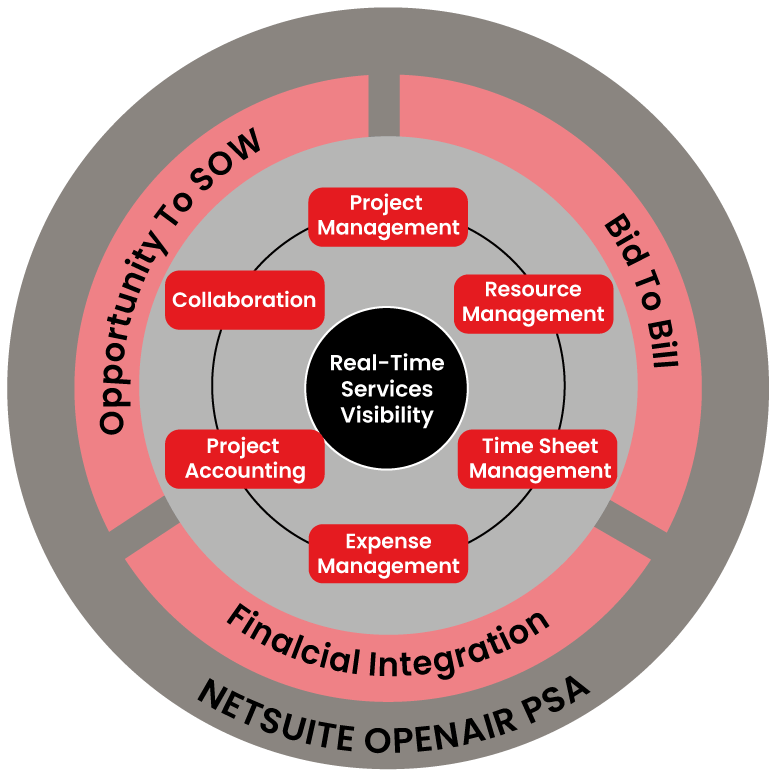
Key Features:
- Project Management: This feature provides high web-based project management capabilities that improve project delivery and profitability by making it easy to update, manage, and report on project status from anywhere at any time.
- Resource Management: This feature provides advanced resource optimization functionality to manage valuable resources across the globe more effectively.
- Project Accounting: This feature enables efficient monitoring and management of project revenues, profitability, and expenses, ensuring the project stays on time and on budget.
- Timesheet Management: You can easily create detailed timesheets with NetSuite OpenAir.
- Expense Management: It optimizes employee productivity by enabling employees to submit expenses from anywhere.
- Dashboards and Reporting: These features provide users with instant access to vital information.
- Collaboration: It helps teams, business leaders, project managers, and even customers stay in closer contact, improve operational visibility, and deliver higher-quality work.
- Integrate with Enterprise Systems: It enables seamless integration with existing front-office and back-office business systems.
Key Benefits
- NetSuite OpenAir’s Drag-and-drop resource management enables us to assign the right resource at the best cost.
- It tracks the availability of resources.
- It helps deliver projects on time and within budget.
Note: As of 2026, NetSuite OpenAir is classified as the platform’s legacy module. No new enhancements will be made on this module. However, existing users can receive ongoing technical support.
7. NetSuite SuiteCommerce (Omnichannel)
NetSuite offers a complete commerce solution, SuiteCommerce, to deliver a unified customer experience. This tool is built on top of the NetSuite ERP solution and shares the same data model used by the ERP.
The key highlights of this solution are:
- SuiteCommerce delivers innovative customer experiences.
- It provides a 360-degree view of all customer activities across touchpoints and channels.
- It manages all orders and inventory across all channels and supply chains.
- It unleashes your potential for growth and expansion.
The latest version of Commerce Suite supports native VAT, GST, and PST taxes, ensuring global compliance. It strengthens B2B operations with B2B pricing tiers, gated catalogs, and geo-IP localization.
8. NetSuite SuiteAnalytics
NetSuite offers an embedded analytics solution, SuiteAnalytics, that enables you to make critical business decisions by uncovering hidden insights. This tool provides real-time reporting, dashboards, saved searches, KPIs, and many other features.
The key highlights of this solution are:
- SuiteAnalytics Workbook: Easily explore data and create filters with real-time visualizations. You can also chart, update data models, dashboard portlets, templates, and datasets
- SuiteAnalytics Saved Search: A saved search is a set of real-time results based on criteria and filters. NetSuite Analytics' Saved Search functionality provides a valuable tool for filtering and matching data to answer a wide range of business queries.
- SuiteAnalytics Reports: NetSuite supports generating standard and customizable reports for all transaction types. You can create and modify custom reports based on business needs using various tools.
- SuiteAnalytics KPI: SuiteAnalytics KPIs improve business efficiency and agility. You can visualize KPIs in different ways to drill down into and interact with data.
- SuiteAnalytics Dashboard: You can customize these dashboards to maximize productivity. They also deliver actionable insights that meet your business's dynamic needs.
- SuiteAnalytics Connect: This service allows you to analyze, archive, and report NetSuite data using any custom-built application or third-party tool.
- NetSuite Analytics Warehouse: NetSuite’s analytics data layer is different from the transactional database. You can use this feature for long-term data retention.
9. NetSuite Business Intelligence
NetSuite Business Intelligence provides built-in real-time dashboards, analysis, and reporting across all integrated processes within the software suite.
Key Benefits:
- It provides real-time transparency across all company business functions, from the summary level to the transaction level.
- It offers a comprehensive view and granular control of global inventory demand and supply with supply chain management.
- It uses Multi-Subsidiary Customer to provide a clear, single view of the customer and eliminate duplication across multiple subsidiaries.
10. Enterprise Business Management (EPM)
NetSuite EPM is a suite of tools for planning, budgeting, and performance monitoring. EPM uses AI-powered planning agents to perform the following:
- It provides a unified performance view by connecting financial planning with operational data.
- It helps large-scale organizations to consolidate data across subsidiaries to gain group-level insights.
Further, EPM’s AI agents can flag deviations, recommend corrective actions, and automate routine planning tasks. These agents alert users about potential issues before they make any impact.
11. NetSuite SuiteSuccess
NetSuite SuiteSuccess is a transformative customer engagement methodology that drives customer success through leading practices in cloud ERP implementation.
SuiteCloud Developer Platform
SuiteCloud is NetSuite’s developer and customization platform that allows businesses to extend, integrate, and automate the platform seamlessly. It doesn't change core code and ensures customizations are not affected by any upgrades.
1. SuiteScript
You can build custom business logic, automations, and integrations with NetSuite’s JavaScript-based scripting language. SuiteScript supports multiple script types, including client scripts, user event scripts, scheduled scripts, Map/Reduce scripts, and RESTlets.
2. SuiteFlow
It is a visual, point-and-click workflow builder that lets you automate various business processes without writing a single line of code. Particularly, you can automate approvals, notifications, record updates, and state transitions.
3. SuiteBuilder
You can use this builder to create custom record types, fields, forms, lists, and centers with point-and-click customization.
4. SuiteAgents
Developers can use this tool to build custom AI agents using NetSuite data and the SuiteCloud Developer Network (SDN).
By using SuiteAgents, you can:
- Build agentic workflows to monitor and automate operations across finance, supply chain, and others.
- Connect to external LLM services using the AI Connector Service.
5. SuiteApp Marketplace
This is the platform where you can find hundreds of third-party applications that help to extend NetSuite’s capabilities. For example, the marketplace has payroll, advanced manufacturing, e-commerce integrations, and more.
NetSuite Certifications
| Certification | Overview and Target Audience |
| NetSuite SuiteFoundation | This is the entry-level certification essential for all NetSuite roles. |
| NetSuite Administrator Professional | This certification validates your skills in managing and configuring the NetSuite platform and in maintaining it. |
| NetSuite ERP Consultant Professional | The NetSuite ERP Consultant Certification is intended for implementation professionals. If you have completed the Suite Foundation certification and have at least 2 years of experience in NetSuite implementations, that will be a plus. |
| NetSuite Application Developer Professional | Candidates with 1–2 years of experience are eligible to appear for this exam. Passing this certification exam proves your expertise in SuiteScript, SuiteFlow, SuiteBuilder, and the SuiteCloud development framework. |
| SuiteCloud Developer II | It is an advanced developer certification. You need to have good knowledge of SuiteScripts, user event scripts, and SuiteFlow to pass this exam. |
| NetSuite SuiteFoundation Specialist | If you have 6–12 years of experience in NetSuite implementation, you can take this certification exam. This certification validates your knowledge of NetSuite core concepts and functionalities. |
| NetSuite SuiteAnalytics User | Passing this certification exam demonstrates that the candidate has a solid understanding of NetSuite's data structure and the skills to create reports and analytics. |
| NetSuite Financial User | Passing this certification exam ensures that the candidate has the necessary knowledge to navigate the NetSuite system and understand the software's core finance and accounting functionality. |
Conclusion
We hope this NetSuite tutorial has provided you with comprehensive knowledge of the NetSuite platform, from basics to advanced concepts. You should have gained a good understanding of various NetSuite tools, certifications, their uses, and more.
If you want to deepen your understanding of the NetSuite platform, you can check out a NetSuite course by MindMajix. By the end of the training, you will have the skills to advance your career quickly.
Frequently Asked Questions
1. Is learning NetSuite easy for beginners?
Yes, anyone can learn NetSuite easily. If you stay focused and consistent in your learning, then learning the software becomes much easier.
2. Does NetSuite include CRM features?
Yes, NetSuite includes CRM features. Particularly, it helps manage customer relationships, marketing campaigns, and customer support all in one place.
3. What is the future scope for NetSuite careers?
It is excellent. More than 43,000 customers use NetSuite across industries such as retail, manufacturing, financial services, education, and healthcare services. So you will have a promising future by learning the platform.
4. How long will it take to learn NetSuite for beginners?
You can learn NetSuite in 3–4 weeks. If you work through hands-on exercises consistently, you can quickly gain NetSuite expertise.
5. How can I register for NetSuite certification exams?
You can register for NetSuite certification exams through the NetSuite MyLearn portal using the link below.
 On-Job Support Service
Online Work Support for your on-job roles.

Our work-support plans provide precise options as per your project tasks. Whether you are a newbie or an experienced professional seeking assistance in completing project tasks, we are here with the following plans to meet your custom needs:
- Pay Per Hour
- Pay Per Week
- Monthly
| Name | Dates | |
|---|---|---|
| NetSuite Training | Oct 20 to Nov 04 | View Details |
| NetSuite Training | Oct 24 to Nov 08 | View Details |
| NetSuite Training | Oct 27 to Nov 11 | View Details |
| NetSuite Training | Oct 31 to Nov 15 | View Details |

Ravindra Savaram is a Technical Lead at Mindmajix.com. His passion lies in writing articles on the most popular IT platforms including Machine learning, DevOps, Data Science, Artificial Intelligence, RPA, Deep Learning, and so on. You can stay up to date on all these technologies by following him on LinkedIn and Twitter.


