ServiceNow Service Mapping Training

Leverage the Growing Demand for ServiceNow Professionals
Join the cohortGet instant access (self-paced)

(4.9)
388 learners
Trusted by 130+ corporates
Join the cohortGet instant access (self-paced)
ServiceNow Service Mapping Training

Course Features

100% Money back guarantee
  • Real-time Use cases

  • 24/7 Lifetime Support

  • Certification Based Curriculum

  • Flexible Schedules

  • One-on-one doubt clearing

  • Career path guidance

Course Overview

MindMajix’s ServiceNow service mapping certification training is designed by certified instructors to allow you to automate the service mapping process and create a detailed record of your digital services in ServiceNow. It teaches you how to enhance the services by detecting the sources of changes and issues in IT infrastructure. Our ServiceNow service mapping course covers hands-on projects and industry scenarios to help you learn to select the MID server algorithm, configure the default MID server, Map the multiple application services from the CSV file, and Fix the service application errors. Join our ServiceNow service mapping online training to launch your career as a certified ServiceNow Service Mapping Developer or Administrator. 

ServiceNow Service Mapping Training
demo play

Course Coverage

YOUR LEARNER JOURNEY - From Enrolment to Employment

How to Prepare for a Career in ServiceNow Service Mapping

Six guided stages take you from your first training class to your first offer — each one backed by a specific MindMajix support service.

Stage 1

Enrol & Get Set Up

Pick live online or self-paced, and set up a free ServiceNow Service Mapping Instance so you practice from day one.

  • Live or self-paced
  • 1-year LMS access
  • Agile & Scrum add-on
Stage 2

Learn & Build Real Skills

Master ServiceNow Service Mapping concepts with 30 hrs of current-release content, applying every concept in hands-on labs and real-time projects throughout.

  • Instructor-led + labs
  • 1-on-1 doubt clearing
  • Recording access
Stage 3

Earn Your Certificate

Clear the assessments for your shareable MindMajix completion certificate. Modules map to official ServiceNow Service Mapping exam topics for exam-aligned prep.

  • MindMajix certificate
  • Practice questions
Stage 4

Polish Your Profile

Turn skills into a profile recruiters notice — build an interview-ready resume and a strong LinkedIn presence using proven ServiceNow Service Mapping templates.

  • Resume building
  • LinkedIn optimisation
  • Resume templates
Stage 5

Practice Interviews

Walk in already rehearsed. Sit structured mock-interview rounds with experienced SMEs and get focused feedback on your ServiceNow Service Mapping skills and scenario questions.

  • Real-time Scenarios
  • Personalised feedback
  • ServiceNow Service Mapping mock interviews
Stage 6

Land Your Role

Apply with confidence using job-search assistance and referrals to hiring partners across India & the USA. (Career support provided; placement not guaranteed.)

  • Job-search assistance
  • Hiring-partner referrals
  • Role guidance

Start the journey today - choose the format that fits you.

Course Content

Our ServiceNow Service Mapping Course curriculum is prepared by experts who have vast experience working with the ServiceNow Service Mapping. It enables you to automate the service mapping processes and optimise IT infrastructure. Go through the below ServiceNow Service Mapping course modules: test

11Modules
90Topics
Open any module to view the full topic list.
  1. 01Module1: Overview of ServiceNow Mapping6 topics
    • Traffic-Based Discovery in the service mapping
    • Pattern-Based Discovery in the service mapping
    • service  mapping and domain separation
    • Discovery and Service Mapping supported applications
    • Discovering the application services on the cloud through service mapping
    • Elements installed with service mapping flow and roles
  2. 02Module2: Service Mapping16 topics
    • Request Service Mapping
    • Configuring MID Server for the Service Mapping
      1. Select MID Server selection algorithm
      2. Configuring MID Server for the service mapping in the upgraded deployments
      3. Configuring the default MID Server for the service mapping for the upgraded deployments
      4. Creating the dedicated WMI Collector for the MID Servers working on the same server
    • Prerequisites to perform the top-down discovery through service mapping
      1. Credentials needed for the host discovery
      2. Service Mapping Commands demanding the privileged user
      3. Service Mapping Commands do not demand the privileged user
      4. SNMP-based queries
    • Creating the discovery behavior for the UNIX-oriented load balancers
    • Verifying whether the service mapping is set up
    • Properly quick start. tests for the service mapping
  3. 03Module3: Application Service Mapping17 topics
    • Mapping the multiple application services advised by the service mapping
    • Mapping the multiple application services from the CSV file
      1. Preparing the CSV file for mapping the candidates
    • Mapping the Single Application Services
      1. Entry Point Attributes
      2. Offer the entry points to map in the application service
      3. Mapping the application services, including Citrix XenApp and the Presentation server
      4. Mapping the Application Services, including
        1. SAP Applications
        2. Microsoft Exchange Server
        3. Oracle Glassfish servers
        4. TIBCO EMS and Business Works
        5. Orcale Tuexdo Platform

                    5. Fixing the application service errors in bulk

  4. 04Module4: Fixing the Service Application Errors in the Bulk

    Detailed topics for this module will be shared in the latest syllabus.

  5. 05Module5: Fixing the Errors in an Individual Application4 topics
    • Fixing the errors in individual application services through the discover messages
    • Skipping the errors for discovering the application service
    • Resolving the pattern-related mapping errors
    • View the status of the application services discovered using service mapping
  6. 06Module6: Review and Approval of the Application Service Maps3 topics
    • Sending the application service maps for review
    • Reviewing the application service maps
    • Refining the application services for implementing the owner requests
  7. 07Module7: Completing the Application Service6 topics
    • Specifying the cruciality of the application services
    • Enabling the traffic-based discovery for the application service
    • Grouping the application services
    • Controlling the user access to the application services
    • Scheduling the top-down discovery by the service mapping
    • Service definition transfer from one instance to another instance
  8. 08Module8: Application Service Maintenance and Analysis through Maps9 topics
    • Application service maps
    • Viewing the CI attributes in the application service a=map
    • Viewing the CI connection attributes in the application service map
    • Viewing the change history of the application services
    • Comparing two versions of the application service
    • Checking the CI dependencies storage path or View the network
    • Viewing the list of the CIs associated with the application service
    • Converting the application service maps into the PDFs 
    • Modify view for the application service map
  9. 09Module9: Keyboard shortcuts for operating service mapping in the Accessibility Mode

    Detailed topics for this module will be shared in the latest syllabus.

  10. 10Module10: Configuring Advance Service Mapping15 topics
    • Enable the traffic-based discovery for the CI kinds or particular CIs
    • Configuring the file tracking
      1. Modifying tracking modifications in the configuration files
    • Collecting and discovering the data through Netflow
      1. Configuring the one-time data import through Netflow for testing
      2. Configuring the data collection through Netflow
    • Data Discovery and Collection through VPC flow logs
      1. Configuring the data collection through VPC flow logs
    • Configuring the search assistant for windows
    • Modifying the display for the CI attributes
    • Configuring support for the windows servers with non-English OS
    • Uploading the rctrix.exe file to the MID servers
  11. 11Module11: Planning the Application Services14 topics
    • Creating the empty phases
    • Phase population
      1. Importing the planned application services from the CSV file
      2. Importing the planned application services from the load-balancers
      3. Adding the planned application services to the phases manually
    • Creating the actual application services during the planning
      1. Collecting the data
      2. Check the entry point connectivity
      3. Creating the actual application services during the planning
      4. ‘Reviewing the application services
      5. Fixing the actual application services during planning
      6. Approving the application services during planning

Projects

Our ServiceNow Service Mapping Training course aims to deliver quality training that covers solid fundamental knowledge on core concepts with a practical approach. Such exposure to the current industry use-cases and scenarios will help learners scale up their skills and perform real-time projects with the best practices.

    logoTraining Options

    Choose how you learn best

    Both options cover the full curriculum and include most of the certification topics

    Most flexible

    Self-paced

    30 hrs

    Learn anytime, at your own pace — complete the course in weeks or months.

    What you get
    • 30 hours of ServiceNow Service Mapping Training videos
    • Curated and delivered by SME
    • Hands-On Lab sessions
    • Resources/materials
    • Sample Resumes
    • Get one year access to the LMS
    • Community forum support
    • Free Agile & Scrum add-on course
    Not included
    • Live instructor & Q&A sessions
    • 1-on-1 doubt clearing calls
    • Mock interview & resume review
    self-paced

    Get Pricing

    Most Popular

    Live online (instructor-led)

    30 hrs

    Real-time classes with a certified expert — ask questions, get instant feedback, and walk away job-ready

    Everything in self-paced, plus
    • Live Zoom/Meet sessions with instructor
    • 1-on-1 doubt clearing sessions
    • Live project walkthroughs
    • certification guidance
    • Mock interviews with SME panel
    • Resume & LinkedIn profile review
    • Job referral to hiring partners
    • Session recordings to rewatch anytime
    • Agile & Scrum add-on course free
    Next batch starts
    Aug04
    Aug 04 - Aug 19Next batchIST (IND)

    07:00 AM IST · Weekday · Limited seats available

    online

    ServiceNow Service Mapping Training Schedule

    30 hrs · Live online · Recordings included

    Weekday (Mon-Fri)

    Aug 04 - Aug 19

    2 weeks · 30 hrs total

    Time07:00 AM IST
    ModeLive online

    Zoom / Google Meet

    Weekend (Sat-Sun)

    Aug 08 - Aug 23

    3 weekends · 30 hrs total

    Time08:00 PM IST
    ModeLive online

    Zoom / Google Meet

    i

    Need a different time? We offer and at any timezone. Contact a course advisor to set one up.

    For Corporates

    Empower your team with new skills to Enhance their performance and productivity.

    Corporate Training

    • Customized course curriculum as per your team's specific needs
    • Training delivery through self-Paced videos, live Instructor-led training through online, on-premise at Mindmajix or your office facility
    • Resources such as slides, demos, exercises, and answer keys included
    • Complete guidance on obtaining certification
    • Complete practical demonstration and discussions on industry use cases
    Learn MoreContact us

    Served 130+ Corporates

    Corporate Clients

    ServiceNow Service Mapping Training Certification

    Passing ServiceNow Service Mapping Training Quizzes & Assessment exams is mandatory to attain the ServiceNow Service Mapping Training Course Completion certificate
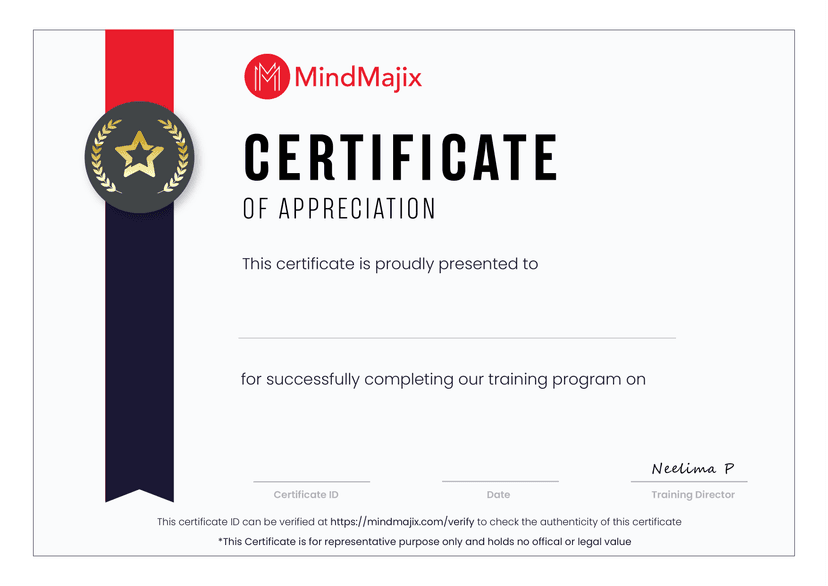
    • An Industry-recognized certificate by Mindmajix.
    • Shareable certificate - add to your LinkedIn profile
    MindMajix certificate
    Zoom

    ServiceNow Service Mapping Training FAQs

    What are the main objectives of this ServiceNow service mapping training?

    The primary objective of this ServiceNow service mapping training is to equip you with the ability to organize the applications and associated IT systems of an enterprise. It contains all the traffic-based actions to develop the service map and more integrated infrastructure. With our industry experts, well-designed course curriculum, live instructor-led training sessions, and Simulation learning, you will be able to progress your ServiceNow career. 

    What are the Prerequisites to take this ServiceNow service mapping course?

    To take this ServiceNow service mapping, you must have a basic understanding of networking and firewalls and working experience with windows or Unix services.

    Who Should Take this ServiceNow service mapping training?

    Students, IT Professionals, and ServiceNow professionals who seek to implement service mapping can join this ServiceNow service mapping training.

    Why Should You learn ServiceNow service mapping?

    ServiceNow service mapping discovers all the application services of your enterprise and develops an extensive map of all the applications, configurations, and device profiles utilized in the application services. It works with ServiceNow Discovery to build the discovered infrastructure data to discover all the configuration relationships that support the service and service-specific relationships. Leading organizations like Infosys, L&T Infotech, DXC Technology, Luxoft, and Deloitte recruit ServiceNow Service Mapping Developers. As per Ziprecruiter.com, the average salary of a ServiceNow Service Mapping Developer in the US is around $156K per annum. 

    What are the essential skills covered in this ServiceNow service mapping training?

    During this ServiceNow service mapping training, trainees will master the following skills:

    • Configuring the MID Server for service mapping
    • Mapping the Single Application Services
    • Importing the planned application services from the CSV files
    • Modifying the display for the CI attributes
    • Configuring the search assistant for the windows
    • Configuring the file tracking
    • Configuring the Advance service mapping
    • Reviewing the application services

    Which Jobs will you get with this ServiceNow service mapping course?

    Our ServiceNow service mapping course makes you eligible for the job roles like

    1. ServiceNow Discovery Analyst,
    2. ServiceNow Service Mapping Administrator, and
    3. ServiceNow Service Mapping Developer.
    TESTIMONIALS
    What Learners say about Mindmajix

    logoOn-Job Support Service

    Online Work Support for your on-job roles.

    jobservice
    @Learner@SME

    Our work-support plans provide precise options as per your project tasks. Whether you are a newbie or an experienced professional seeking assistance in completing project tasks, we are here with the following plans to meet your custom needs:


    • Pay Per Hour
    • Pay Per Week
    • Monthly
    Learn MoreContact us
    Teams across the globe run on MindMajix
    +
    Learners, Careers Upskilled
    • +
      Courses, Largest LMS
    • +
      Corporates, Global Clients
    STILL GOT QUERIES?

    Get a Live FREE Demo

    • Explore the trending and niche courses and learning maps
    • Learn about tuition fee, payment plans, and scholarships
    • Get access to webinars and self-paced learning videos
    Name
    Course *
    Email *
    Phone Number

    IT Service Management CoursesView All