
- Cassandra vs MongoDB
- MongoDB Aggregate
- MongoDB Commands
- MongoDB Create Collection
- MongoDB Create Database
- MongoDB Create Index
- MongoDB Docker Container Creation
- MongoDB Find Queries
- Top 7 MongoDB GUI Tools In 2024
- Installation of MongoDB on Windows
- MongoDB Interview Questions and Answers
- MongoDB Port - How to Change MongoDB Default Port
- MongoDB Query With Examples
- MongoDB Show Collections
- Sorting data with MongoDB
- MongoDB Tutorial - Beginners Guide
- MongoDB Update Document
- MongoDB vs CouchDB
- MongoDB vs DynamoDB
- MongoDB vs Elasticsearch
- MongoDB Vs MySQL - Which Is A Better Database?
- MongoDB vs PostgreSQL
- What is MongoDB?
- MongoDB Projects and Use Cases
- How to Install MongoDB on Windows?
- MongoDB Connection in Java
MongoDB is a popular NoSQL database that is widely used by organizations to store and manipulate their crucial business data. The key capabilities of this database are flexible schema, a rich set of queries, and strong aggregation.
MongoDB states that more than 67,000 companies use MongoDB worldwide. It indicates that it is a key player in the database domain. This article compares MongoDB with other key databases in detail.
Table of Contents:
- MongoDB vs Alternatives
- Master Comparison Table
- MongoDB vs Alternatives – Detailed Comparison
- Frequently Asked Questions
MongoDB vs Alternatives
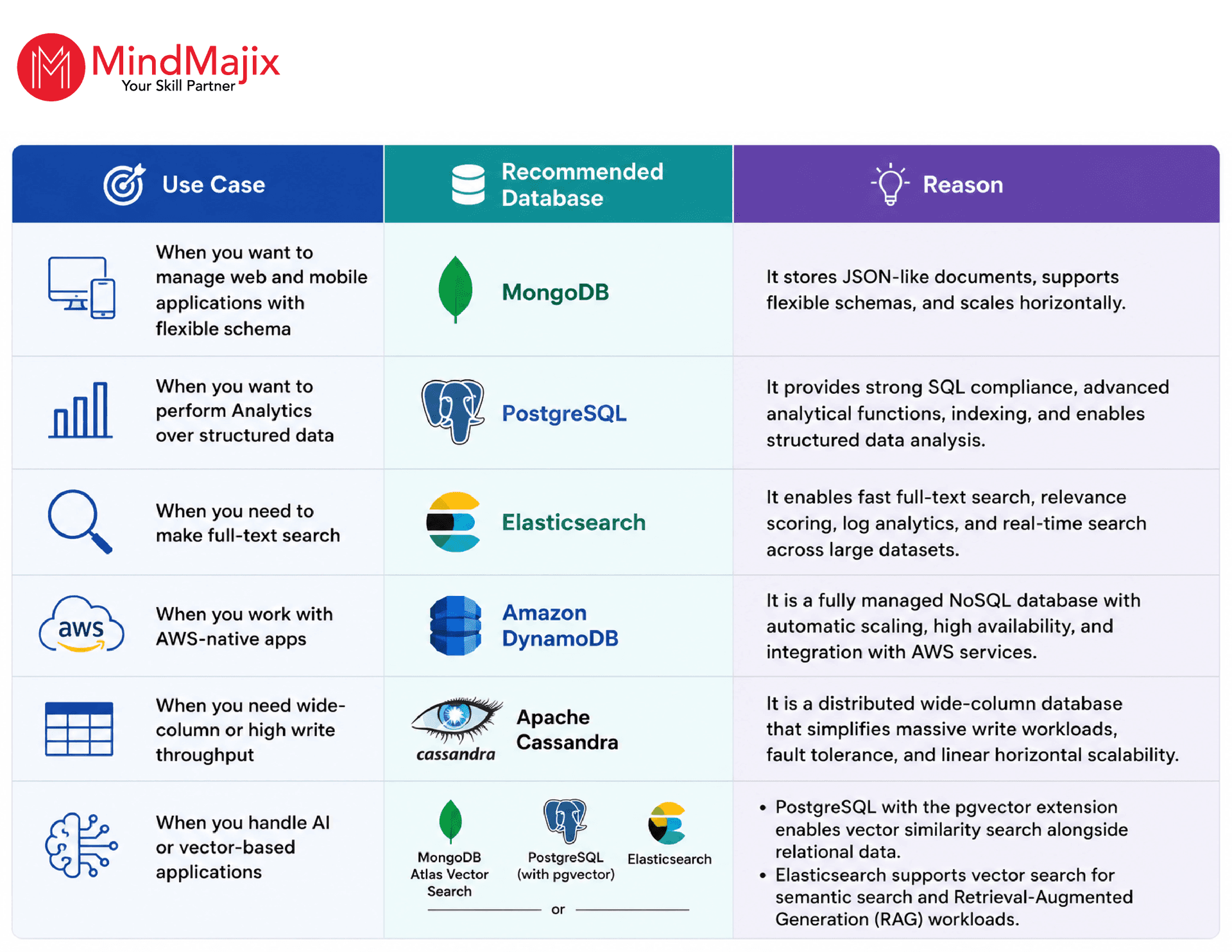
Before moving into a detailed comparison between MongoDB and its alternatives, let’s review the quick decision matrix and master comparison table below to help you choose the right database quickly.
- Quick Decision Matrix
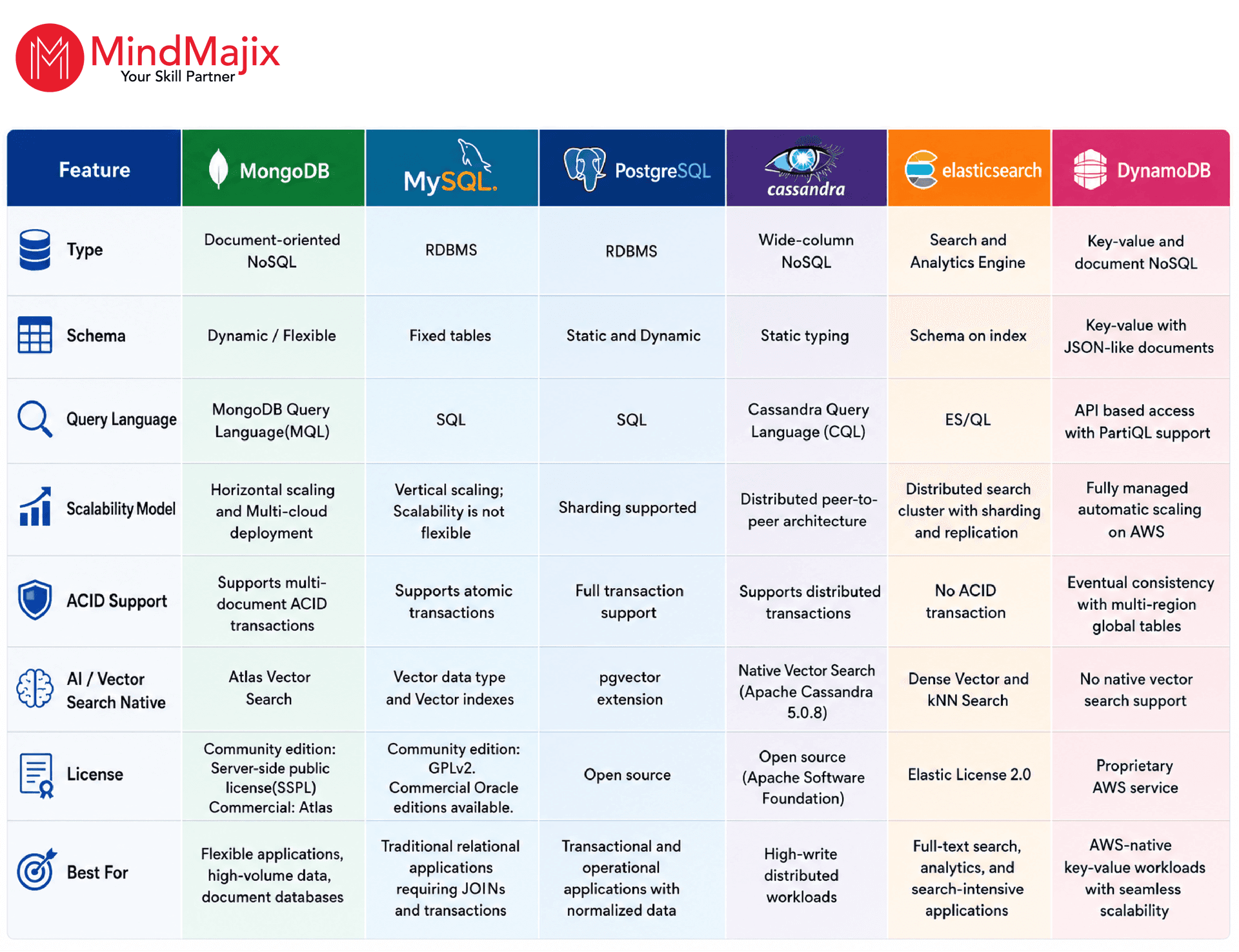
MongoDB vs Alternatives – Master Comparison Table:
The table below summarizes the comparison between MongoDB and its alternatives across multiple factors.

MongoDB vs Alternatives – Detailed Comparison:
MongoDB vs Cassandra:
Both Cassandra and MongoDB look similar, but they differ in many ways. Before diving into the comparison, we will understand what MongoDB and Cassandra are at a glance.
MongoDB – An Overview
MongoDB is a document-oriented NoSQL database used for high-volume data storage. It uses collections and documents. Collections contain sets of documents, which are the equivalent of relational database tables. A document is a basic unit of data in MongoDB and consists of key-value pairs.
It generally stores its data in structures that don’t follow a fixed schema. Related data or information is generally stored together. Documents store related data together, reducing joins and enhancing retrieval efficiency.
Users are always free to build and maintain records, and for this, there is no need to define the structure.
If you’re interested in learning more about MongoDB, click on this MongoDB tutorial.
Cassandra – An Overview
To understand Cassandra a little bit, it was introduced in 2008 by a couple of developers from Facebook, and it was later released as an open-source project. It is currently backed by the Apache Software Foundation, which maintains the project for further enhancements.
Apache Cassandra 5.0.8, released in April 2026, is the latest version of Cassandra. It comes with vector search,storage-attached indexes (SAI), and kubernetes operator support, and Accord—a new distributed consensus protocol for transactions.
In this section, we will take a look at the differences between Cassandra and MongoDB.
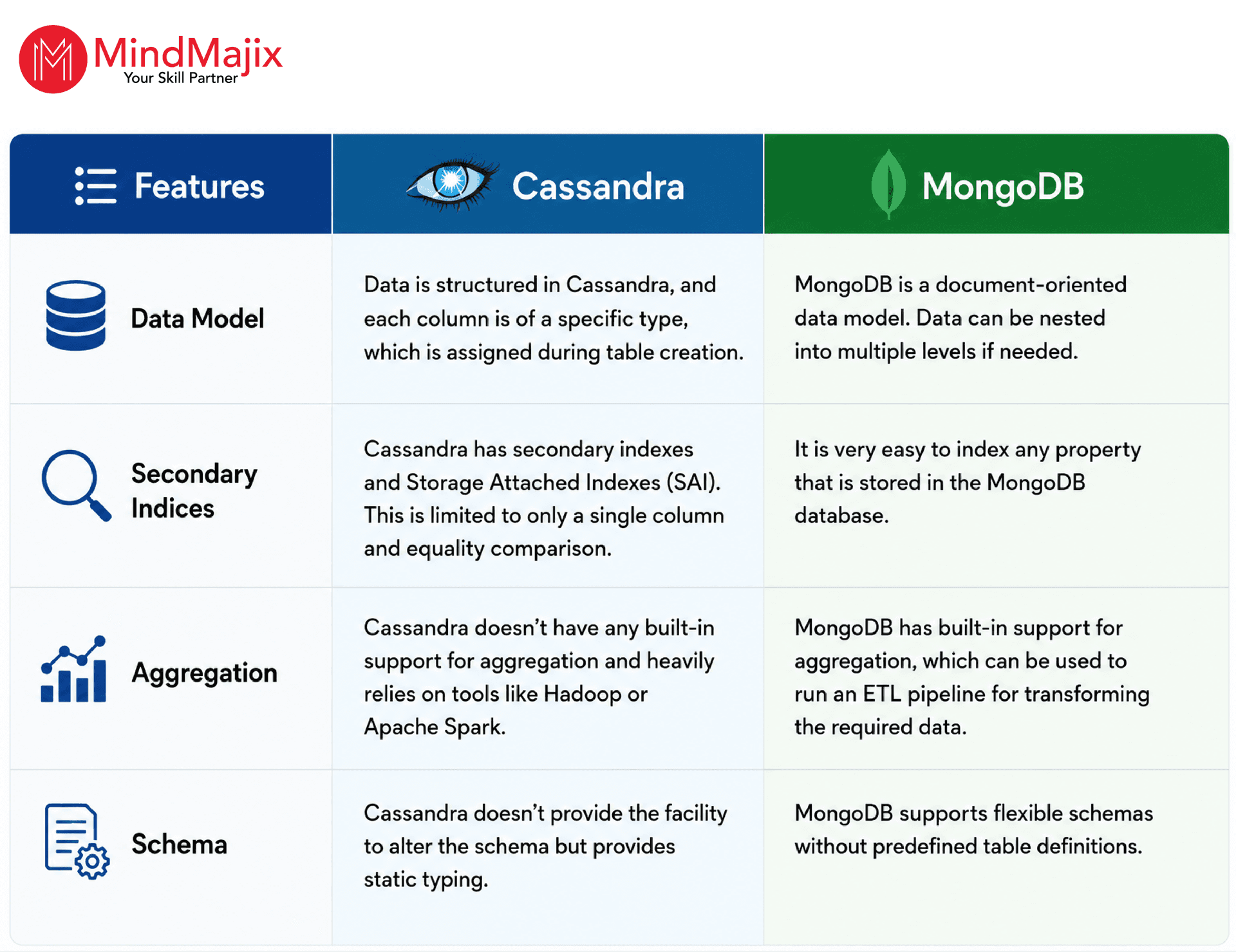
In summary, we have taken a detailed look at the differences between these two database products and understood where these products are used most.

MongoDB vs DynamoDB:
In this section, we have highlighted the essential aspects of MongoDB vs DynamoDB, which will help you understand both MongoDB and DynamoDB.
DynamoDB - An Overview
Amazon DynamoDB is a NoSQL database service that offers seamless scalability with faster performance. It allows you to offload the administrative burden of operating a distributed database without worrying about hardware provisioning, replication, cluster scaling, and setup and configuration.
DynamoDB can integrate seamlessly with Amazon S3 and Amazon Redshift, support global table improvements, and support attribute-based access controls.
MongoDB vs DynamoDB - What Are the Differences?
- Deployment:
MongoDB can run anywhere from a laptop to an on-premises data center to a public cloud environment.
In contrast, DynamoDB is available only on Amazon Web Services (AWS). It is now tightly integrated with the AWS ecosystem, whereas MongoDB is explicitly a multi-cloud platform. - Data Model:
MongoDB stores the data in the JSON-like format called BSON and supports multiple data types, including dates, timestamps, 64-bit integers, & Decimal128. A MongoDB document can go up to 16 MB; with GridFS, larger data sets can be stored natively within the database.
DynamoDB stores AttributeValue documents. It supports JSON to provide document-like data structures to match objects in application code. It exposes JSON through SDKs and PartiQL. Also, a record/item cannot exceed 400KB in size.
DynamoDB supports limited data types, resulting in application complexity and minimizing the scope of data reuse across different applications. Also, DynamoDB does not have native data validation capabilities. - Queries and Indexes:
MongoDB 8.0 introduced range queries in queryable encryption. It allows you to encrypt data and run queries directly on encrypted data without decryption.
As a result, users can avoid latency caused by syncing data between the analytical and operational engine. It also supports multi-document transactions and combines the ACID guarantees of traditional relational databases.
DynamoDB supports key-value and document data models. For queries requiring aggregations or search, additional tools such as Redshift or Elastic MapReduce are used, which increases latency, cost, and developer work.
It supports two types of indexes: local secondary indexes (LSIs) and Global secondary indexes (GSIs). Users can define up to 5 LSIs and 20 GSIs per table. - Pricing:
DynamoDB charges users for reading, writing, and storing data in tables. It offers two capacity modes with specific billing options to process reads and writes on tables: on-demand and provisioned.
In the on-demand mode, DynamoDB charges for the data reads and writes performed by the application on the tables. Users do not need to specify the expected read and write throughput that the application can perform because DynamoDB instantly accommodates workloads as they ramp up or down.
The on-demand capacity mode might be best if you have unpredictable application traffic, create new tables with unknown workloads, and prefer the ease of paying for only what you use.
In provisioned capacity mode, the user has to specify the expected number of reads and writes per second needed by the application. Autoscaling automatically adjusts the table's capacity as per the specified utilization rate for better application performance while reducing costs.
The provisioned capacity mode might be best for predictable application traffic, applications with consistent traffic or traffic that is gradually reducing, and forecasting capacity requirements to maintain costs. - Operational efficiency:
Users can deploy, scale, and manage clusters using MongoDB’s built-in operational and security best practices, such as role-based access control, end-to-end encryption, network isolation, VPC peering, and more. Atlas deployments are guaranteed and durable with distributed and auto-healing replica set members.
On the other hand, DynamoDB allows cross-region replication in multi-primary global tables. - When to use DynamoDB:
DynamoDB might work for organizations that are:
- Seeking a database that supports key-value workloads
- Invested in AWS and not planning to switch the deployment environment in the future
- When to use MongoDB:
MongoDB might work for organizations that are:
- Seeking a database to support a broader range of use cases
- Seeking deployment flexibility and no platform lock-in
We hope you have understood the difference between MongoDB and DynamoDB very clearly.
MongoDB vs PostgreSQL:
Many features of MongoDB and PostgreSQL are similar, but certain differences make them different from one another. Let’s understand PostgreSQL first.
PostgreSQL – An Overview:
Currently, PostgreSQL is maintained by the PostgreSQL Global Development Group. The best thing about this database is that it uses SQL to store data in tables and access the database.
PostgreSQL 17 is the latest version of PostgreSQL released in September 2024. It offers enhancements such as SQL/JSON support, logical replication, backup, and monitoring, and more.
Users can customize their database to meet their exact needs and design policies to control the relationships among the fields in a table. Added information can be stored in other tables.
It is equipped with one of the best features, i.e., eliminating repeated content or data. This can be done with the help of normalization.
Let’s look at the key differences between MongoDB and PostgreSQL
- Flexibility:
When it comes to flexibility, both these technologies are equally powerful. MongoDB uses Binary JSON for storing data. It is a binary representation, and documents with a common structure are organized as collections.
With PostgreSQL, you must define the table structure before inserting data. Although data can be collected and integrated, making changes to it can be expensive.
- Performance
MongoDB Atlas Vector Search accelerates query times significantly by offering dedicated independent infrastructure for search workloads. Besides, vector quantization reduces vectors by 73-96%, which significantly supports AI search.
- Data Models
MongoDB is better suited for document-oriented workloads. It also supports dynamic schemas, while PostgreSQL doesn’t. In addition, MongoDB is easier for programmers than PostgreSQL.
On the other hand, MongoDB is a powerful approach that is very friendly with JSON. It supports JSON and all its features. Users can perform many tasks without worrying much. It also works well, and several JSON drivers are available for MongoDB, which enhances functionality.
- Query Language
When MongoDB and PostgreSQL are compared in terms of their query language, both are almost equally powerful. Programmers can easily understand both, and full support for both technologies is available.
Although both technologies have their own pros and cons, as already mentioned, many users prefer MongoDB. That’s mainly because it can handle many tasks easily. Organizations, irrespective of their size, can consider it for building reliable applications at a very fast speed.
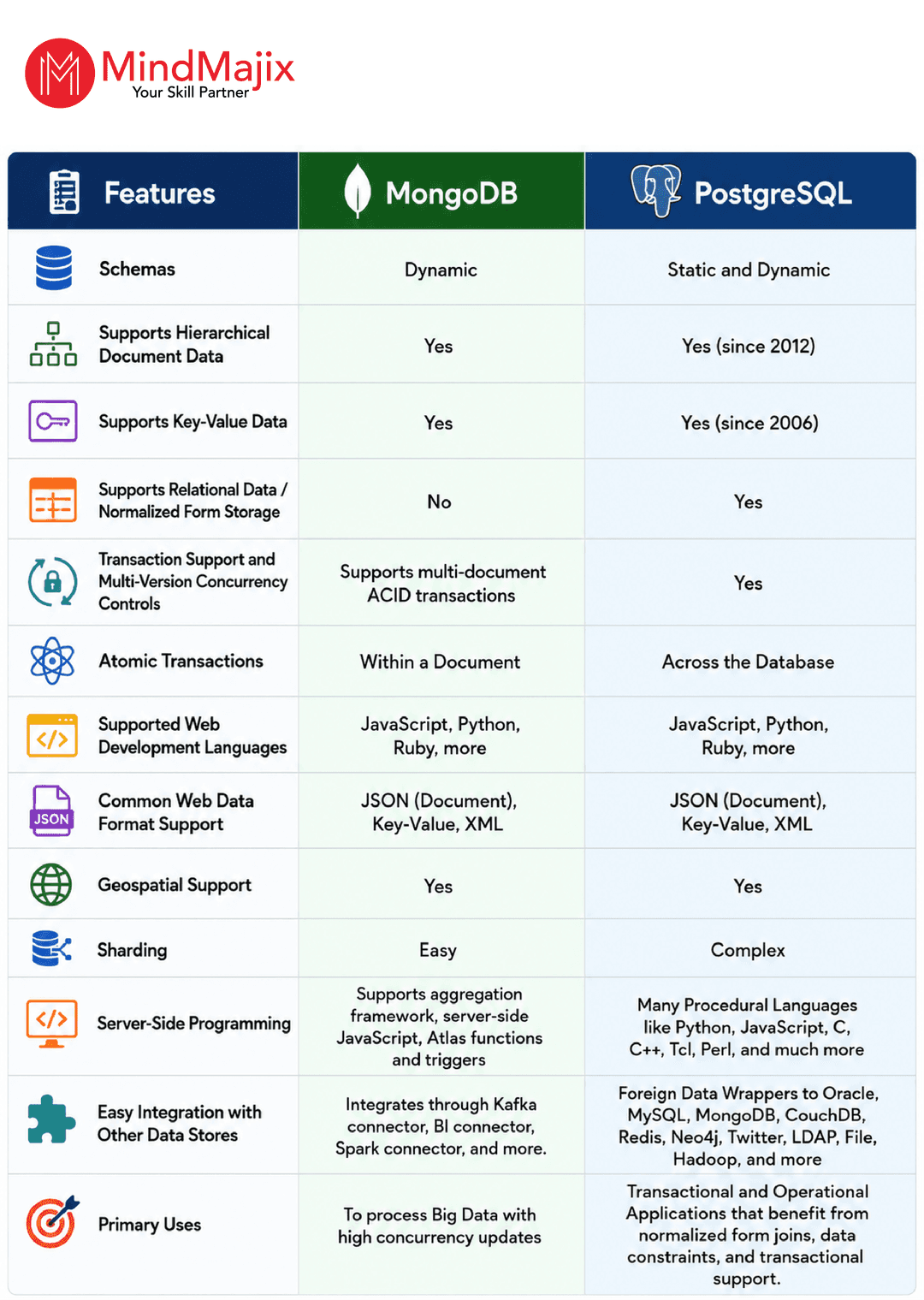
- PostgreSQL vs MongoDB: A Quick Summary
Also Read: PostgreSQL Interview Questions
MongoDB vs Elasticsearch:
Before jumping into the comparison, we will take an overview of Elasticsearch.
Elasticsearch – An Overview
Elasticsearch is a distributed search and analytics engine built on Apache Lucene. Elasticsearch 9.4.4 is the latest stable release of Elasticsearch. It has ES/QL enhancements, improved vector search, hybrid search, and AI-based retrieval features.
Elasticsearch can be considered to enable clients to utilize information simultaneously without interfering with each other. This is regarded as one of the best things about Elasticsearch. To put it plainly, most of the benefits that databases have over ordinary file systems are supported with the assistance of several programs.
Let’s compare MongoDB with Elasticsearch in this section.
- JSON Adaptability
MongoDB is a modern document database. It can handle JSON documents in its collections. It is also possible to convert them all into BSON. BSON is nothing but a binary version of JSON.
Elasticsearch is also a powerful approach. Compared with MongoDB, it has an excellent search library that makes it easy for users to manage their tasks. Just like MongoDB, it is also capable of handling JSON documents in the indices.
- Indexing and search performance
When it comes to indexing and search performance, Elasticsearch is a good option. It is capable of digging data in different ways and thus ensures reliability. It must be noted here that the overall number of Indexes is extremely important in any database.
Indexes update themselves whenever a new record is inserted. The complexity of tasks entirely depends on the size of the Indexes. Elasticsearch faces this issue to a great extent, while MongoDB doesn’t.
Of course, this makes you think Elasticsearch is a wise option to consider as your database. However, you need to keep in mind that most applications in the present scenario don’t need indexes to a great extent.
Just because MongoDB has limited indexes compared to Elasticsearch, it is still quite fast and reliable. Thus, you can proceed with them in case the application size is not too large.
- Data handling capacity
Many programmers and experts call MongoDB a wise choice over Elasticsearch. This is because almost every business operating currently has to handle a huge volume of data to manage operations effectively.
MongoDB doesn’t create any issues even when there is a need to handle a huge volume of data. It uses the aggregation framework for workloads.
- Data search
Elasticsearch has also become a search and analytics platform, whereas MongoDB Atlas Search is the embedded-search option for applications already using MongoDB.
A strong protocol is required if you need complete access to the data in MongoDB. Although there are several third-party software solutions available, they cannot be trusted due to security regulations.
You cannot act reliably on the indexing parameters because no proper, in-depth text search is possible.
ElasticSearch is also capable of performing an advanced search. Its unique feature is the availability of data even if nodes are turned off for any reason. It stores data automatically, so users don’t have to worry about it.
This gives you enough information on both MongoDB and Elasticsearch. You can consider it while choosing the primary database in your organization. In most aspects, both these approaches are powerful and simple to consider.
Also Read: Elasticsearch Tutorial
MongoDB Vs MySQL:
Let’s understand what MySQL is before diving into the comparison.
MySQL - An Overview:
MySQL is a feature-rich RDBMS, which Oracle Corporation presently owns. MySQL stores data in tables and uses SQL to access data and execute commands like Select, Insert, Update, and Delete.
MySQL 9.7 is the latest version of MySQL. It comes with JavaScript stored procedures and improved JSON handling features. MySQL supports operating systems, including Windows, macOS, Linux, UNIX, etc.
Apart from that, MySQL supports a wide range of storage engines, such as Merge, Blackhole, Memory, and InnoDB, to name a few.
MongoDB vs MySQL - Which one is better?:
Comparing MongoDB and MySQL is not a cakewalk, as both systems are useful on their own, and their core differences shape their initial approach and basic operations. In general terms, both are open-source and can be approached easily.
Along with that, both systems come in commercial versions offering a plethora of additional features. However, the comparison between the two has been ongoing for a while now.
Let’s check out their advantages and disadvantages:
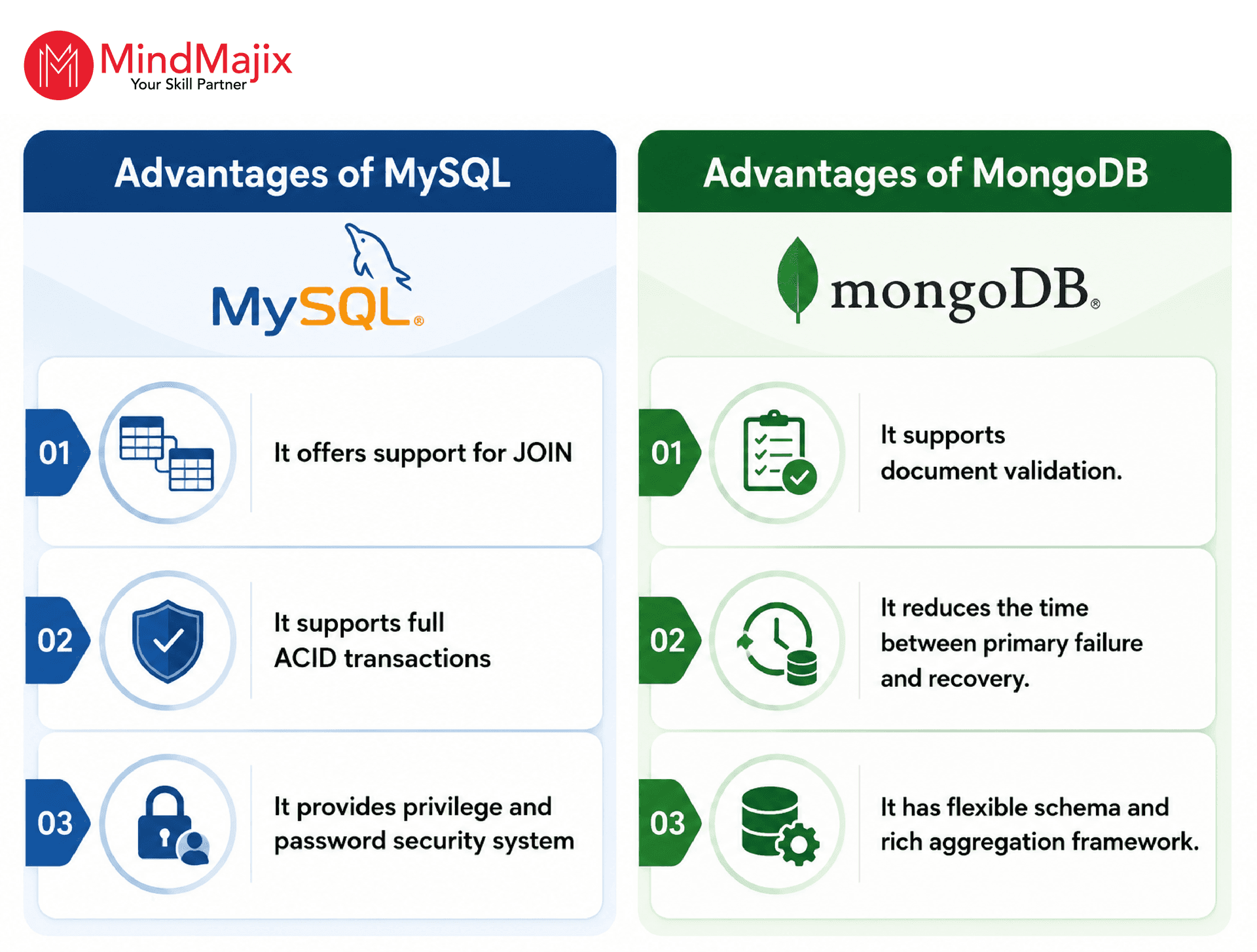
Also Read: MongoDB Interview Questions
Frequently Asked Questions
1) Is MongoDB faster than MySQL?
Ans: MongoDB is typically faster for applications that deal with large amounts of semi-structured or unstructured data, need flexible schemas, or perform frequent read/write operations on document-based data.
MySQL is usually faster for applications with highly structured data, complex JOIN queries, and transaction-heavy workloads.
2) MongoDB vs PostgreSQL — which is better for structured data?
Ans: If your application mainly stores structured data with complicated relationships, PostgreSQL is often the better option. If your data model changes often or depends a lot on JSON documents, MongoDB provides more flexibility while still supporting transactions and schema validation.
3) Can MongoDB replace Elasticsearch?
Ans: Not necessary. MongoDB may replace Elasticsearch for applications that need basic or improved search features. However, Elasticsearch is still the better option for large-scale full-text search and log analysis.
4) MongoDB vs DynamoDB: which is better for AWS?
Ans: If your application relies on the AWS ecosystem and focuses on serverless scalability with little management, Amazon DynamoDB is often the best choice. If you need more complex querying, a flexible document model, the ability to run on multiple clouds, or enhanced search and AI features, MongoDB Atlas is the preferred option, even when used on AWS.
5) Is Cassandra or MongoDB better for high write volume?
Ans: If you need to manage large write volumes with constant availability, Apache Cassandra is usually the better option. If your application requires flexible schemas, advanced querying, aggregation, and support for transactions, MongoDB provides more features while still maintaining strong write performance for most enterprise tasks.
6) Does MongoDB support vector search?
Ans: MongoDB supports Vector Search in MongoDB Atlas. This feature is ideal for modern AI applications like RAG systems, semantic search, intelligent recommendations, and conversational AI. When used with Atlas Search, developers can conduct hybrid searches that combine semantic similarity and keyword matching within a single application.
Conclusion:
We hope that this article helped you understand the strengths and limitations of MongoDB, DynamoDB, Cassandra, MySQL, PostgreSQL, and Elasticsearch. It is clear that no tool is superior to the others, but they serve their intended purpose neatly. So you must choose the right tool based on your business needs.
If you want to explore more about the databases discussed above, no worries— MindMajix can help you. You can take courses on MongoDB, Cassandra, MySQL, DynamoDB, and Elasticsearch, and more. It will help you choose the right tool with confidence.
 On-Job Support Service
Online Work Support for your on-job roles.

Our work-support plans provide precise options as per your project tasks. Whether you are a newbie or an experienced professional seeking assistance in completing project tasks, we are here with the following plans to meet your custom needs:
- Pay Per Hour
- Pay Per Week
- Monthly
| Name | Dates | |
|---|---|---|
| MongoDB Training | Nov 10 to Nov 25 | View Details |
| MongoDB Training | Nov 14 to Nov 29 | View Details |
| MongoDB Training | Nov 17 to Dec 02 | View Details |
| MongoDB Training | Nov 21 to Dec 06 | View Details |

Madhuri is a Senior Content Creator at MindMajix. She has written about a range of different topics on various technologies, which include, Splunk, Tensorflow, Selenium, and CEH. She spends most of her time researching on technology, and startups. Connect with her via LinkedIn and Twitter .


