- Home
- Blog
- Kubernetes
- Kubernetes Interview Questions

- Kubernetes Architecture
- Kubernetes Deployment Vs Kubernetes Services
- Kubernetes Ingress
- Kubernetes Load Balancer Services
- Kubernetes (K8s) Tutorial
- Kubernetes Vs Docker swarm
- Kubernetes Vs Openshift
- Kubernetes Overview
- Detailed Study On Kubernetes Dashboard
- What is Kubernetes?
- Cloud Deployment Models
- Fluentd Kubernetes
- Kubernetes Tools
- Kubernetes Projects and Use Cases
- How To Install Kubernetes on Ubuntu?
- Installing Kubeadm
- Kubernetes Secrets
- Kubernetes Storage Class
- Kubernetes Deployment YAML
- Install Kubernetes on Windows
- Kubernetes VS Openstack
- Kubectl Connect to Cluster
- Kubernetes Vs Terraform
- ECS Vs Kubernetes
- Kubernetes Pod Vs Node
- Kubernetes vs Alternatives: ECS, OpenShift, Terraform
- Kubernetes Dashboard to Headlamp
In this Kubernetes interview guide, we have compiled the latest Kubernetes Interview Questions and Answers for freshers and experienced professionals. By going through these interview questions, you can prepare more effectively.
We've compiled these questions in the following levels:
Interview Topics Covered
| Key Topic Areas | Coverage |
| Kubernetes Fundamentals and Architecture | Kubernetes basics, containers, cluster architecture, control-plane and worker-node components, kubelet, kube-controller-manager, kube-scheduler, kube-apiserver, and Kubernetes workflow. |
| Core Kubernetes Objects and Workloads | Pods, multi-container Pod patterns, native sidecars, Namespaces, Deployments, ReplicaSets, ReplicationControllers, StatefulSets, DaemonSets, CronJobs, and workload resource management. |
| Networking, Services, and Traffic Management | Services and their types, Ingress, Ingress controllers, Gateway API, label selectors, Pod-to-Pod communication, mTLS, and internal/external service exposure. |
| Scaling, Scheduling, Monitoring, and AI/ML Workloads | HPA, KEDA, in-place Pod resource resizing, gang scheduling, DRA, Karpenter, Metrics Server, Heapster, Prometheus, monitoring tools, GKE Inference Gateway, and resource sizing. |
| Tools, Platforms, and Kubernetes ecosystem | Kubectl, Helm, Minikube, Docker relationship, GKE, container runtimes, Helm chart management, and GitOps tools such as Argo CD and Flux. |
| Security, Troubleshooting, and Operations | RBAC, Role vs ClusterRole, Secrets and network controls, etcd troubleshooting, zero-downtime cluster upgrades, cluster health, workload validation, and production-oriented Kubernetes operations. |
Kubernetes Interview Questions For Freshers
1. What is Kubernetes?
Quick take: Kubernetes (K8s) is an open-source container orchestration platform.
Organisations use Kubernetes to deploy, scale, and manage containerised applications and workloads across clusters of physical or virtual machines.
It helps teams maintain the desired state of applications by automatically scheduling Pods, restarting failed workloads, managing networking, scaling applications, and supporting rolling updates and rollbacks.
2. What is a container?
Quick take: A container is an isolated process that packages an application and its required dependencies.
Containers can run consistently across supported environments. It separates the application from the underlying host infrastructure, making deployment easier on cloud platforms.
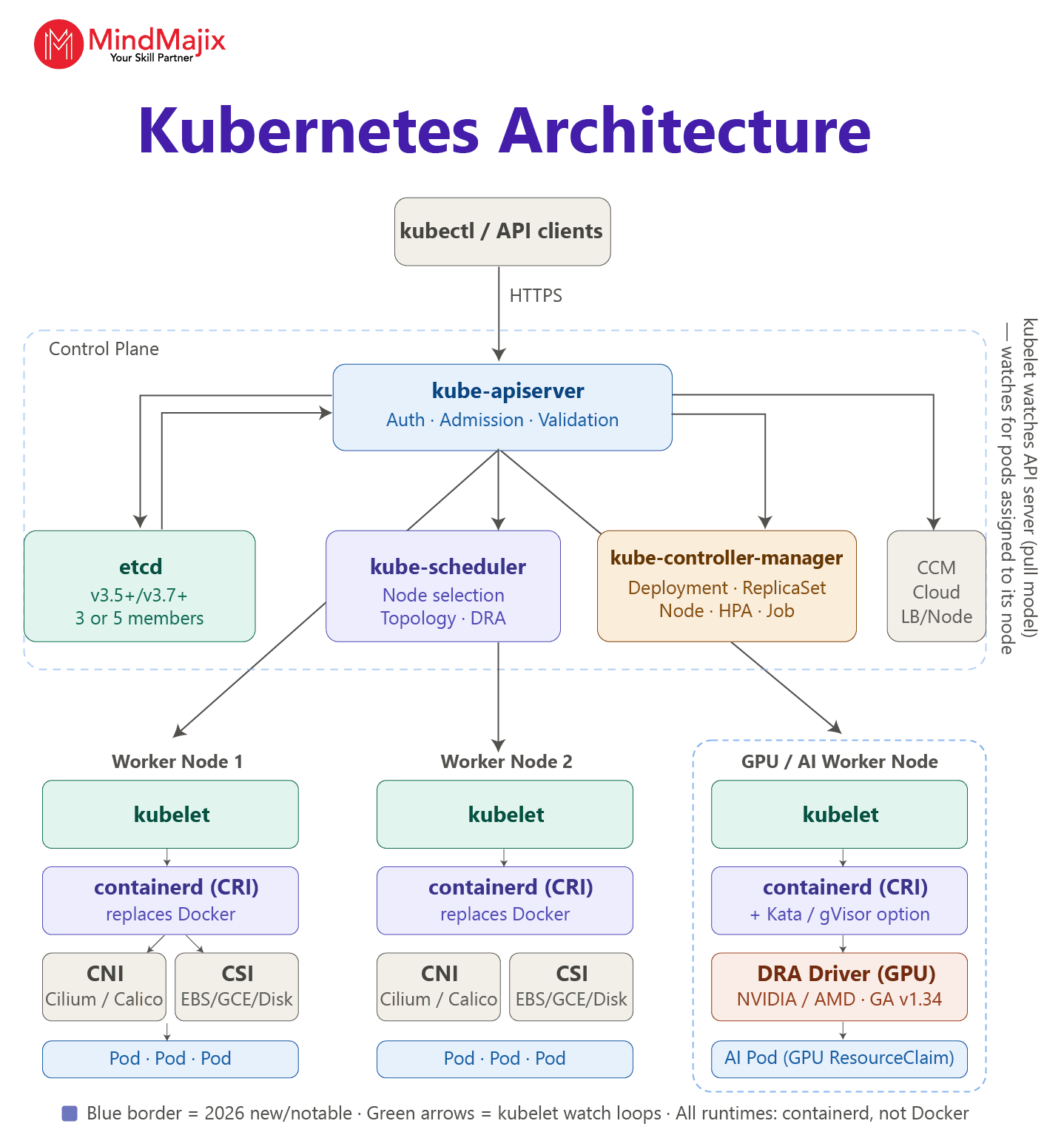
3. Explain Kubernetes architecture.
Quick take: A Kubernetes cluster consists of a control plane and one or more worker nodes.
A node is a physical or virtual machine that runs Kubernetes workloads. The control-plane node includes components such as the API server, scheduler, etcd, and controller manager.
Worker nodes run workloads and typically contain a container runtime, kubelet, and optionally kube-proxy.
4. What are the main components of the control plane node?
The main control plane components are kube-controller-manager, kube-apiserver, kube-scheduler, etcd and cloud-controller-manager.
5. What are the Kubernetes worker node components and how are they used?
Quick take: Worker node components include the kubelet, container runtime, kube-proxy, and Pods.
The kubelet ensures that containers described by PodSpecs run normally. The container runtime pulls images and runs containers. Pods run the actual application containers.
kube-proxy maintains network rules used for Kubernetes Services when it is deployed. You can use kube-proxy to implement Service networking, although some network implementations provide equivalent functionality without kube-proxy.
6. How does Kubernetes work?
Kubernetes works in the following way:
- Deployment: You define the desired application state in a YAML manifest, such as the number of replicas and container image.
- Schedule: The Kubernetes Scheduler selects suitable worker nodes for running Pods.
- Run: The kubelet on each node works with the container runtime. It creates and manages containers inside Pods.
- Maintain: Controllers continuously compare the actual state with the desired state and take corrective action.
- Expose: Services provide stable network access to Pods, and Ingress routes external HTTP/HTTPS traffic.
- Scale: Kubernetes can increase or decrease Pod replicas manually or automatically based on configured metrics.
- Update and recover: Kubernetes supports rollbacks, rolling updates, and automatic replacement of failed Pods.
7. How do Kubernetes control plane components interact with each other?
The control plane components interact with each other in the following way:
- A user or tool submits a desired-state configuration through the kube-apiserver.
- The API server validates the request and stores the relevant cluster state in etcd.
- If the request creates an unscheduled Pod, the kube-scheduler watches the API server and selects a suitable worker node.
- The kube-controller-manager monitors resources through the API server and creates or manipulates resources to match the desired state.
- Worker-node components, such as the kubelet, receive the required workload information and ensure Pods run as specified.
- Changes in cluster state are reported back through the API server, allowing controllers and other components to continuously reconcile the cluster.
8. What is a pod and what does it do?
Quick take: A Pod is the smallest deployable unit in Kubernetes.
A Pod represents one or more containers scheduled together on the same node that share network and storage resources, as configured.
9. What are common multiple-container Pod patterns?
Quick take: The multi-container Pod patterns are sidecar, adapter, and ambassador.
- Sidecar: It extends the main application container with supporting functionalities such as logging, monitoring, or proxying. These are secondary containers that run alongside the main application container. Note that Native sidecar containers became stable in Kubernetes v1.33.
- Ambassador: It provides a proxy interface to external services.
- Adapter: It transforms application output into a standard format.
- Init Containers: run to completion before the app starts.

10. How does Kubernetes 1.33 implement sidecar containers natively, and why does this matter?
Sidecars are implemented as a special class of init containers with restartPolicy. This ensures sidecars:
- Start before application containers
- Remain running throughout the pod's lifecycle
- Terminate automatically after main containers exit.
This replaces the manual workarounds that teams used previously.
11. What is the Namespace? How many namespaces are there in Kubernetes?
Quick take: A namespace provides a logical scope for Kubernetes resources within a cluster. It helps you work with multiple teams or projects.
Kubernetes creates four initial namespaces in a standard cluster: default, kube-node-lease, kube-public, and kube-system. Kubernetes allows you to create additional namespaces.
12. How is Kubernetes related to Docker?
Quick take: Docker is a container platform that builds container images and runs containers. Kubernetes orchestrates containerised workloads.
Note that modern Kubernetes no longer uses Docker as a runtime because it removed the dockershim integration. Kubernetes nodes use a CRI-compatible container runtime such as containerd or CRI-O.
13. What are some alternatives to Kubernetes for container orchestration?
- HashiCorp Nomad
- Amazon ECS
- Serverless container platforms such as Cloud Run
- OpenShift, which is a Kubernetes distribution rather than a true alternative
- Docker Swarm (Deprecated in 2024).
Check out Kubernetes vs Alternatives
14. What is kubectl?
Quick take: kubectl is the Kubernetes command-line tool you use to communicate with a cluster's control plane through the Kubernetes API.
kubectl communicates with the Kubernetes API server to create, inspect, update, and delete Kubernetes resources.
Example:
- To list Pods, you can use the
kubectl get podscommand. - To list cluster nodes, use
kubectl get nodes. - To view container logs, use the
kubectl logs <pod-name>command.
15. What is Google Kubernetes Engine (GKE)?
Quick take: GKE is Google Cloud's managed Kubernetes service that organisations use to run Kubernetes clusters and containerised workloads.
GKE supports managed node pools and automated node operations. It also supports IAM, encryption, workload identity, and Kubernetes security controls. It seamlessly integrates with Google Cloud Observability for logs, metrics, and monitoring.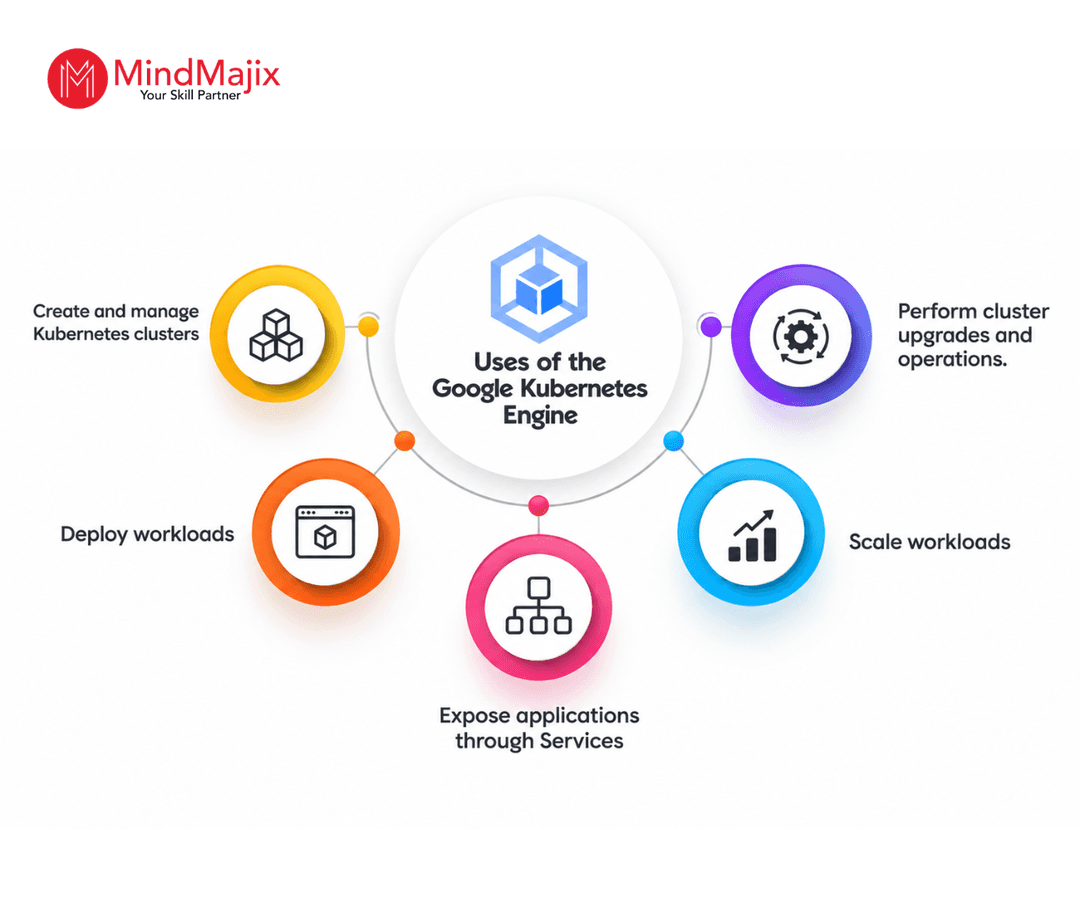
16. What are the key functions of Kubelet as a node service component in Kubernetes?
The key functions of Kubelet are as follows:
- The kubelet runs on each node and ensures the containers described in PodSpecs run smoothly.
- It communicates with the Kubernetes control plane through the API and manages Pods assigned to the Node.
17. What is a ReplicaSet?
Quick take: A ReplicaSet maintains a stable number of Pod replicas. You can use a ReplicaSet to specify the desired number of Pod replicas.
A ReplicaSet creates new Pods when existing Pods fail. It helps remove excess Pods when there are more replicas than necessary. Deployments normally manage ReplicaSets and provide declarative updates and rollout or rollback capabilities.
18. Can you list the various container resource monitoring tools?
- Prometheus
- Grafana
- OpenTelemetry
- cAdvisor.
19. What is a DaemonSet?
Quick take: A DaemonSet ensures that a Pod runs on each eligible Node.
A DaemonSet can run on a selected subset of nodes. You can use a DaemonSet for node-level functions such as log collection, monitoring agents, and storage-related agents.
For example, a DaemonSet ensures that node-level logging agents, monitoring agents, security agents, networking components, and other services run on selected nodes.
20. Explain Prometheus in Kubernetes.
Quick take: Prometheus is an open-source monitoring and alerting system.
Prometheus collects time-series metrics and provides PromQL for querying them. In Kubernetes environments, Prometheus can collect metrics from applications and cluster components. Alertmanager handles alerts, while Grafana provides visualisation.
Kubernetes Interview Questions For Experienced
21. What are some common Kubernetes workload resources?
- Cron Job
- Pod
- Replicaset
- Deployment
- Statefulset
- Daemonset
- Job.
22. How does HPA work internally in Kubernetes?
The Horizontal Pod Autoscaler (HPA) automatically changes the number of Pod replicas in a workload, such as a Deployment or StatefulSet, based on observed metrics.
- The HPA controller periodically reads workload metrics.
- It calculates the desired replica count.
- It uses resource requests when calculating resource utilisation.
- It updates the target workload's scale subresource, such as the Deployment's desired replica count.
- It includes mechanisms to reduce rapid oscillation.
- If HPA is configured with multiple metrics, it calculates a desired replica count for each metric and uses the largest recommended replica count.
23. What is the Kubernetes Gateway API, and how does it differ from Ingress?
Quick take: Gateway API is a more expressive, extensible API for routing traffic into Kubernetes clusters. In Kubernetes 1.33, select distributions enabled Gateway API by default.
Gateway API is a newer, more expressive alternative to Ingress with three resource types:
- GatewayClass: Cluster-scoped; defines a controller.
- HTTPRoute/TCPRoute: Namespace-scoped and defines routing rules.
- Gateway: It is namespace-scoped, defines the listeners/entry point.
24. What is KEDA and how does it differ from HPA?
KEDA (Kubernetes Event-Driven Autoscaling) scales based on external event sources such as Kafka message lag, custom metrics, SQS queue depth, and schedules.
In contrast, HPA (Horizontal Pod Autoscaler) scales based on CPU or memory utilisation. HPA also supports custom and external metrics. KEDA works alongside HPA and adds event-driven scaling and scale-to-zero.
25. How to determine the status of a deployment?
To determine the status of the deployment, use the command below:
kubectl rollout status deployment/<deployment-name>
Example:
kubectl rollout status deployment/nginx
26. What is in-place Pod resource resize, and when does it matter?
Before Kubernetes 1.35, changing CPU or memory resources required deleting and recreating a Pod. In-place resize lets you adjust CPU or memory without restarting the Pod. This approach is critical for databases, stateful workloads, and AI/ML inference services.
27. Explain StatefulSets in Kubernetes.
Quick take: A StatefulSet manages stateful applications that require stable Pod identities, predictable ordering, and persistent storage.
Each Pod has a stable identity and DNS name. StatefulSets create, update, and delete Pods in a controlled way. You can use StatefulSets for applications such as databases, ZooKeeper, Apache Kafka, and Elasticsearch.
Example:
A three-replica StatefulSet may create:
db-0, db-1, db-2. If db-1 fails, Kubernetes recreates it while preserving its identity.
28. What is Karpenter and how does it improve upon the Cluster Autoscaler?
Quick take: Karpenter is a node provisioning and autoscaling system.
Karpenter automatically provisions right-sized compute nodes quickly when Pods are pending, or terminates nodes when they become underutilised. It replaces the Cluster Autoscaler for most production workloads.
29. What is the difference between a ClusterRole and a Role in Kubernetes RBAC?
ClusterRoleBinding can bind a ClusterRole to users cluster-wide, whereas RoleBinding binds a Role to users within a namespace. Role-Based Access Control (RBAC) is the only supported authorisation model for Kubernetes. Node, ABAC, and Webhook modes exist, though RBAC is the standard.
30. What is mTLS in Kubernetes?
mTLS (Mutual TLS) in Kubernetes secures communication between services by requiring both the client and server to authenticate each other using digital certificates.
You can use mTLS in Kubernetes environments to secure Pod-to-Pod or service-to-service communication through a service mesh such as Istio.
Example:
Suppose a Payment Service needs to communicate with an Order Service. With mTLS, both services present certificates and verify each other's identity before exchanging data.
31. What is DRA in Kubernetes 1.34 and why is it important for AI/ML workloads?
DRA replaces the rigid GPU resource limit model with a granular API for requesting, sharing, and allocating hardware accelerators such as TPUs, GPUs, and FPGAs between Pods.
DRA reduces GPU costs significantly through flexible allocation and sharing. Workloads no longer need exclusive GPU allocation if they can share.
32. Explain the Metrics Server in Kubernetes?
Quick take: Metrics Server is a lightweight, cluster-wide resource metrics API. Kubernetes uses it to collect CPU and memory usage from nodes and Pods.
Metrics Server provides resource metrics for Kubernetes components such as the Horizontal Pod Autoscaler and kubectl top. It retrieves metrics from the kubelet running on each node.
Note that it is not a complete monitoring or observability solution; it does not replace Prometheus for detailed metrics, alerting, and long-term monitoring.
Example:
You can use the following commands to retrieve CPU and memory usage.
- kubectl top nodes
- kubectl top pods
33. Explain the Ingress controller.
Quick take: An Ingress controller is an inbound traffic handler that closely monitors Ingress resources.
An Ingress controller also configures a load balancer, proxy, or other traffic-handling mechanism to route HTTP/HTTPS traffic according to the specified rules. Examples are Traefik, HAProxy, vendor NGINX controllers and cloud ALB controllers.
34. How do label selectors work in Kubernetes?
You can use label selectors to identify and group resources based on their labels. Controllers and services use selectors to determine which Pods they should manage.
35. How can a Kubernetes Service be exposed internally and externally?
A Kubernetes Service can be exposed in different ways depending on whether it needs to be accessible only within the cluster or from outside the cluster:
- Internal: ClusterIP (or headless).
- External: NodePort, LoadBalancer, or Ingress/Gateway API for HTTP routing.
- Debugging only:
kubectl port-forward.
36. What is gang scheduling and why is it important for AI training workloads?
Gang scheduling introduces a new Workload API that enables all-or-nothing scheduling. Either all Pods in a group are scheduled together, or none are. Kueue and Volcano are commonly used tools, and Kubernetes is adding native support for the Workload API.
For example, a 64-GPU training job cannot run with only 40 GPUs available.
37. How does Kubernetes maintain the desired state of a cluster?
You can define the desired state using Kubernetes API objects. The control plane stores and processes this state, whereas controllers reconcile the actual state toward the desired state.
38. What controllers can kube-controller-manager run?
kube-controller-manager runs multiple Kubernetes control loops, including controllers associated with Nodes, ServiceAccounts, Namespaces, ReplicaSets, and other resources.
Kubernetes Scenario-Based Interview Questions
39. How can you troubleshoot etcd issues in Kubernetes?
You can follow the procedure below:
- Checking etcd health: You can use the following command to check for unhealthy endpoints, high latency, or inconsistent cluster status:
etcdctl --endpoints=https://127.0.0.1:2379 \
  --cacert=/etc/kubernetes/pki/etcd/ca.crt \
  --cert=/etc/kubernetes/pki/etcd/server.crt \
  --key=/etc/kubernetes/pki/etcd/server.key \
endpoint health # and: endpoint status -w table- Checking etcd logs: Use the command below to verify etcd logs for errors:
kubectl logs -n kube-system etcd-<node>
- Check quorum and leader stability, disk latency and DB size. Defragment if needed.
- Restore from a snapshot if the data is corrupted.
Common Mistake
Assuming that etcdctl endpoint health alone is enough to diagnose an etcd problem.
40. How do Pods communicate across nodes in Kubernetes?
Kubernetes gives each Pod a unique, cluster-wide IP address. This lets Pods communicate directly across nodes without requiring NAT for normal Pod-to-Pod communication.
- Pod A sends traffic to Pod B's IP address.
- The CNI network plugin provides Pod networking and configures the required routes, tunnels, interfaces, or other networking mechanisms.
- The CNI transports the traffic from node 1 to node 2 using its networking implementation.
- Pod B receives the traffic using its Pod IP.
Common Mistake:
Oversimplifying the networking path and implying that every CNI uses the same mechanism, such as tunnels or routes.
41. How do you deploy an app using Helm?
Helm is a Kubernetes package manager. It uses charts to define and deploy Kubernetes resources.
The typical deployment steps include:
- Add a Helm repository using the command shown below:
helm repo add <name> <url>
- Create a new chart using the command below:
helm install <release> <chart> -f values.yaml
- Install a chart using the command below:
# or: helm upgrade --install
- Verify the deployment using the commands below:
helm list
kubectl get pods, svc
- Upgrade the application:
helm upgrade <release> <chart> -f values.yaml
- Uninstall the application:
helm uninstall <release>
Common Mistake:
Using incomplete or incorrect Helm commands without understanding the difference between a chart, release, repository, and values file.
42. One or more nodes in the cluster are in NotReady state. New Pods are not getting scheduled. What are the possible causes, and how will you resolve it?
First, identify the node condition. Then check the kubelet, container runtime, networking, and resource health.
1. Possible cause: kubelet is stopped or unhealthy.
Diagnose: Use the command below.
systemctl status kubelet
Resolution: Restart or fix the kubelet and resolve configuration or certificate errors.
2. Possible cause: Container runtime failure
Diagnose: Check containerd/CRI-O status and logs
Resolution:
- Restart or repair the runtime
- Verify that the CRI endpoint is correctly configured
3. Possible cause: Node resource exhaustion
Diagnose:
- Check node status using the command below.
kubectl describe TYPE NAME_PREFIX
- Check CPU, memory, disk, and inode usage.
Resolution: Free resources, remove unnecessary workloads/files, or add capacity.
Common Mistake:
Assuming that the kubelet is always the cause of errors.
43. How would you perform a zero-downtime Kubernetes cluster upgrade?
A zero-downtime upgrade keeps applications available while you upgrade the control plane and worker nodes in a controlled sequence.
- Check compatibility – Review the Kubernetes version-skew policy, CNI/CSI compatibility, admission webhooks, and add-ons.
- Check cluster health – Run kubectl get nodes, inspect workloads, and review cluster events.
- Back up etcd – Take and verify an etcd snapshot where applicable.
- Upgrade the control plane – Upgrade control-plane nodes according to the distribution's supported procedure. In HA clusters, upgrade them sequentially.
- Upgrade workers – Cordon and drain workers one at a time before upgrading.
- Upgrade the node – Upgrade kubelet, the container runtime or the node image as required.
- Remove barriers and verify – Run kubectl uncordon <node> and ensure that the node becomes ready.
- Repeat the process – Upgrade the remaining workers using the same process.
- Validate workloads – Check Pods, Services, Ingress, application health, and cluster events.
Common Mistake:
Upgrading nodes without first ensuring that workloads can be safely rescheduled onto other healthy nodes.
44. How to maintain Helm charts of multiple microservices on Kubernetes at scale?
When managing many Kubernetes microservices, the main goal is to avoid duplicating Helm templates while still allowing each service to have its own configuration.
The following approach can help:
- Maintain common templates for Deployments, Ingresses, Secrets, Services, ConfigMaps, HPAs, etc.
- Store image, ports, environment variables, replicas, resources, and other differences in values.yaml.
- Package common functionality into a shared chart
- Maintain environment-specific values, such as values-test.yaml, values-dev.yaml, and values-prod.yaml
- Store charts in Git and use semantic versioning
- Run helm lint and helm template in CI
- Add Kubernetes manifest validation and security scanning before deployment.
- Tools such as Argo CD or Flux can continuously reconcile Helm releases with the desired state stored in Git.
- Avoid putting passwords or sensitive credentials directly in values.yaml.
Common mistake:
Creating a separate, highly duplicated Helm chart for every microservice. This makes maintenance and upgrades difficult.
45. How do you size applications in Kubernetes?
Application sizing in Kubernetes is determining the appropriate CPU, memory, Pod replicas, and cluster capacity needed to run an application reliably without wasting resources.
The following approach will help you:
- Check CPU, memory, request rate, latency, and workload patterns.
- Define the CPU and memory a Pod needs for scheduling.
- Define the maximum CPU and memory a container can consume.
- Estimate the number of Pods required to handle normal and peak traffic.
- Use HPA to adjust replicas based on CPU, memory, or other metrics when appropriate.
- Ensure worker nodes have enough allocatable CPU and memory to accommodate workloads and system components.
- Perform load/stress testing and adjust resource requests, limits, and replicas based on observed behaviour.
- Monitor production usage and periodically revise the sizing as traffic and application behaviour change.
Common mistake:
Sizing the application based only on average CPU and memory usage, instead of considering peak traffic, latency, workload patterns, and resource limits, is a common mistake.
46. Explain how the Kube-proxy component works on a Kubernetes node.
Kube-proxy is a node-level component that runs on each node and directs network traffic destined for a Service to the appropriate backend Pods.
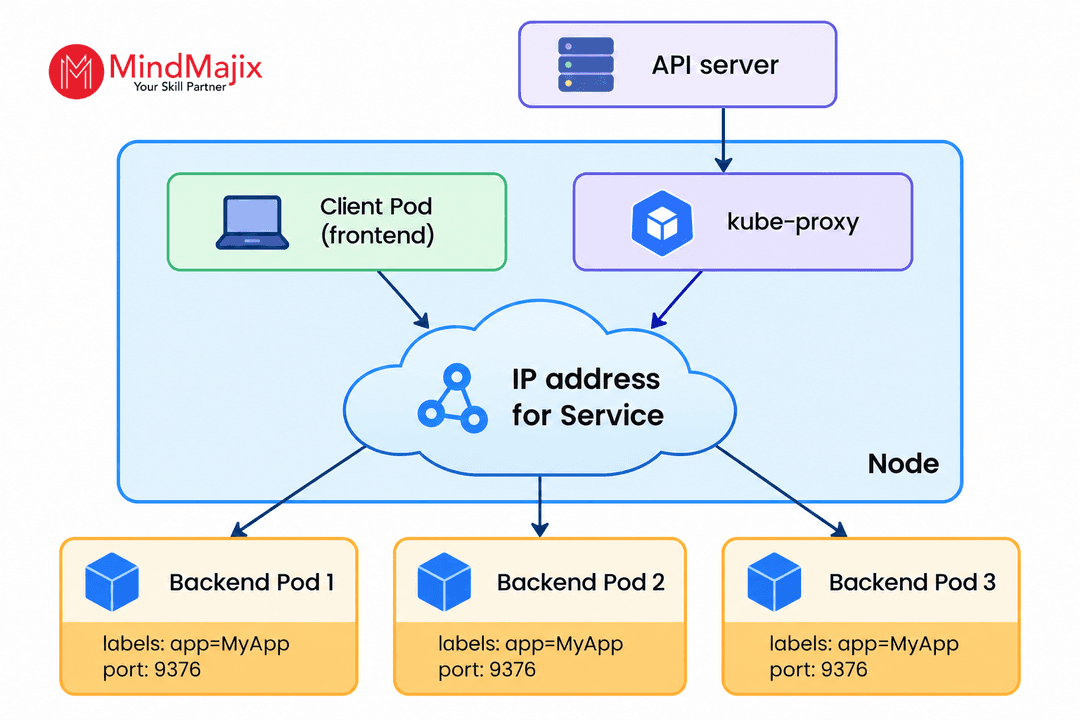
The kube-proxy component works in the following way:
- Each kube-proxy instance monitors the Kubernetes control plane for additions and removals of Service and EndpointSlice resources.
- Kube-proxy uses the appropriate APIs to monitor Services and EndpointSlices, depending on the kube-proxy mode in use.
- It supports configuring the Kubernetes node to capture traffic to the Service’s ClusterIP and port.
- It also supports redirecting traffic to Service endpoints, which can be Pods or arbitrary user-provided IP addresses.
- It learns the ports, Service virtual IP, and the IP addresses of the backend Pods.
- A control loop confirms that every node’s rules synchronise with the Service.
- It also ensures the EndpointSlice state matches what the API server reports.
47. How is traffic management implemented with a service mesh?
A service mesh manages communication between microservices by placing a proxy alongside each service instance. Its control plane defines and distributes traffic policies to these proxies.
Traffic management is implemented as follows:
- You can configure rules for routing, timeouts, retries, load balancing, and traffic splitting.
- The service mesh control plane distributes the policies to the data-plane proxies.
- When a service sends a request, the local proxy intercepts the traffic.
- The local proxy determines the appropriate destination based on rules such as service version, URI paths, HTTP headers, and weights.
- The proxy forwards the request to the selected service instance.
- The service mesh collects logs, metrics, and traces to help you monitor latency, errors, and traffic patterns.
Example: Canary deployments
A service mesh can gradually route traffic from an existing version to a new version.
The procedure is as follows:
- Deploy Version 2 alongside Version 1
- Configure a traffic-routing rule in the service mesh
- Send a small percentage (e.g., 5–10%) of requests to Version 2
- Monitor metrics such as latency, error rate, and availability
- Gradually increase traffic to Version 2 if it performs as expected
- Roll back by changing the routing rule if problems occur.
48. Discuss the security implications and best practices for implementing mutual TLS (mTLS) in a service mesh.
Mutual TLS (mTLS) supports encryption and mutual authentication for service-to-service communication. In a service mesh, data-plane proxies establish mTLS connections on the application's behalf. This allows services to authenticate each other without requiring application-level TLS implementation.
First, consider the security implications.
- Strong service identity: Both the client and server authenticate using certificates. It reduces the risk of unauthorised services communicating with protected workloads.
- Certificate management becomes critical: expired, compromised, or incorrectly issued certificates can disrupt communication or weaken authentication.
- Encryption in transit: mTLS protects service-to-service traffic from eavesdropping and tampering.
Below are the best practices:
- Configure short-lived workload certificates and automate their renewal.
- Assign unique identities to workloads and use them for authentication and authorisation.
- Secure the mesh CA and its signing keys because a compromised CA may allow fraudulent workload identities.
49. Explain how to implement and troubleshoot egress network policies.
Kubernetes NetworkPolicy can restrict egress traffic based on namespaces, destination Pods, and IP blocks. However, it only works when the cluster's network plugin supports the required NetworkPolicy features.
Implementing an egress policy:
Use the following procedure to implement an egress policy:
- Identify required destinations, including the services, APIs, DNS servers, databases, and external endpoints the application needs to access
- Verify that the cluster's network plugin supports NetworkPolicy and the specific egress features
- Define an egress policy that allows only the required destinations for sensitive workloads
- Allow DNS traffic to the cluster DNS service if the application resolves domain names
- Allow only the necessary namespaces, destination Pods, or IP ranges and ports
- Verify that legitimate connections continue to work while blocking unauthorised connections.
Troubleshooting egress policies:
- If a Pod cannot reach an external service, troubleshoot the issue as follows:
- Identify which policies select the Pod
- Confirm that the policy's podSelector actually matches the intended Pods.
- Verify that the namespace, destination IP/CIDR, or Pod selector is correct.
- Ensure that the required TCP/UDP port is allowed.
- Examine name resolution and verify that DNS traffic is permitted.
50. Describe how you would implement dynamic provisioning of persistent storage for stateful applications.
Dynamic provisioning eliminates the need to pre-provision storage. It automatically provisions storage when we create PersistentVolumeClaim objects.
Dynamic provisioning can be implemented as follows:
- First, create one or more StorageClass objects.
- Then, ensure that the StorageClass object has a valid DNS subdomain name.
- The manifest below creates a StorageClass named slow that provisions standard persistent disks.
apiVersion: storage.k8s.io/v1
kind: StorageClass
metadata:
  name: slow
provisioner: kubernetes.io/gce-pd
parameters:
type: pd-standard- The manifest below creates a StorageClass named fast that provisions SSD-like persistent disks.
apiVersion: storage.k8s.io/v1
kind: StorageClass
metadata:
  name: fast
provisioner: kubernetes.io/gce-pd
parameters:
  type: pd-ssd
51. How do you take and restore a snapshot of a persistent volume?
Kubernetes supports volume snapshots through the Container Storage Interface (CSI). The CSI driver supports the Kubernetes Volume Snapshot APIs.
1. First, verify that your storage platform's CSI driver supports volume snapshots. Also, verify that the VolumeSnapshot CRDs and snapshot controller are installed.
2. Use the following command to verify the available VolumeSnapshotClass resources.
kubectl get volumesnapshotclass
3. Create a new PVC and specify the snapshot as its data source.
apiVersion: v1
kind: PersistentVolumeClaim
metadata:
  name: mysql-restored-pvc
spec:
  # Reference the snapshot as the data source
  dataSource:
    name: mysql-snapshot-20260209
    kind: VolumeSnapshot
    apiGroup: snapshot.storage.k8s.io
  # Access mode should be compatible with the restored volume
  accessModes:
    - ReadWriteOnce
  resources:
    requests:
      # Size must be >= snapshot restore size
      storage: 10Gi
  # Use a StorageClass backed by the same CSI driver as the snapshot
  storageClassName: standard
Kubernetes asks the CSI driver to create a new volume from the snapshot.
4. Apply the restore using the following command:
kubectl apply -f restore-pvc.yaml

# Monitor the restoration progress
kubectl get pvc mysql-restored-pvc -w

# Check for completion
kubectl describe pvc mysql-restored-pvc
5. Finally, the PVC should show a Bound status once the restoration is complete, as follows:
Name:          mysql-restored-pvc
Namespace:     default
StorageClass:  standard
Status:        Bound
Volume:        pvc-xxxxx
Labels:        <none>
Capacity:      10Gi
Access Modes:  RWO
DataSource:
  APIGroup:  snapshot.storage.k8s.io
  Kind:      VolumeSnapshot
  Name:      mysql-snapshot-20260209
52. How would you design a secure multi-tenant Kubernetes cluster?
A secure multi-tenant Kubernetes cluster should isolate tenants at the identity, resource, namespace, network, and data layers.
A multi-tenant Kubernetes cluster can be designed as follows:
- Provide every team or application group with its own namespace. Prevent tenants from creating or modifying resources in other tenants' namespaces.
- Use Kubernetes Role and RoleBinding for namespace-scoped permissions. Grant only the permissions each tenant needs, and avoid unnecessary use of cluster-admin.
- Integrate Kubernetes with an enterprise identity provider and use unique identities for users and workloads. Enable strong authentication and review access regularly.
- Apply NetworkPolicies to restrict communication between tenant namespaces and explicitly allow only required traffic.
- Use Pod Security Admission with appropriate enforcement levels.
- Prevent tenants from running privileged containers or accessing host resources unnecessarily.
- Use ResourceQuota and LimitRange to prevent one tenant from consuming excessive CPU, Pods, memory, or other namespace resources.
- Minimise access to Kubernetes Secrets, encrypt sensitive data at rest where supported, and consider an external secrets manager or KMS-backed solution.
- Use admission policies to enforce organisational requirements, such as approved registries, resource limits, security contexts, required labels, and prohibited host-level access.
53. A Pod is stuck in the Pending state. How do you systematically troubleshoot it?
Possible causes of a Pod being stuck in the Pending state include:
- Insufficient resources
- Pod affinity rules block placements
- Taints without relevant tolerations
- PersistentVolumeClaim problems
- Node selector mismatch
- Unmet dependencies.
Troubleshoot the issue as follows:
- Check the Pod status using the command below:
kubectl get pod my-pod
- View detailed Pod information using the following command:
kubectl describe pod my-pod
- Check the events for the Pod:
kubectl get events --field-selector involvedObject.name=my-pod
- View events for the pending Pod using the following command:
kubectl describe pod pending-pod
- Check node resource capacity using the command below:
kubectl top nodes
- Check the Pod’s node selector using the command below:
kubectl get pod my-pod -o jsonpath='{.spec.nodeSelector}'
- Check node taints and Pod tolerations using the command below:
kubectl describe node worker-node-1 | grep Taints
kubectl get pod my-pod -o jsonpath='{.spec.tolerations}'
- Verifying Pod affinity rules:
kubectl get pod my-pod -o jsonpath='{.spec.affinity}'
- Check PersistentVolumeClaims:
kubectl get pvc my-pvc
54. How would you design a disaster recovery strategy for a production Kubernetes cluster?
An effective DR strategy should protect both the Kubernetes state and the application data. The strategy should define how to restore the environment after failures such as accidental deletion, cluster corruption, region outages, or storage failure.
- Define RPO (Recovery Point Objective) and RTO (Recovery Time Objective).
- Back up Kubernetes resources including Deployments, ConfigMaps, RBAC resources, StatefulSets, Services, Ingress/Gateway configuration, Secrets, and CRDs.
- Protect persistent application data.
- Store backups outside the primary failure domain.
- Use IaC tools such as Terraform to recreate network infrastructure, Kubernetes cluster, node pools, load balancers and more.
- Keep Helm charts, Kubernetes manifests, or GitOps configurations in version control.
- Configure a mechanism to redirect users to the recovery environment.
- Ensure that the DR environment follows the same security controls, including RBAC.
- Conduct regular restore and failover exercises, and verify cluster recreation, persistent data recovery, Kubernetes resource restoration, and other required checks.
- Create a runbook covering disaster detection, recovery cluster activation, failure scope, and traffic redirection.
55. A Pod is being terminated with exit code 137 (OOMKilled). How would you identify the root cause and prevent it?
Exit code 137 indicates the container was terminated due to OOMKilled. This happens when the container exceeds an applicable memory limit, or the node experiences memory pressure.
Troubleshooting
- Confirm that the Pod is actually OOMKilled
- Verify the container's memory limit and request
- Check actual memory consumption
- Examine whether the node is under memory pressure
- Investigate the application's memory behaviour
- Verify events and restart patterns.
Prevention
- Set appropriate memory requests and limits
- Fix the application’s memory management problem
- Configure the runtime correctly
- Continuously monitor memory usage and configure alerts
- Ensure sufficient node capacity.
56. Can you explain your Ingress-to-Gateway API migration project?
The safest approach is to run Ingress and Gateway API in parallel, validate the new routing, and then gradually move traffic.
The approach below can help you:
- Start by assessing the existing Ingress resources, including hosts, backend Services and ports, paths, listeners, TLS configurations, and Ingress annotations
- Install a Gateway API-compatible controller that fits the Kubernetes environment
- Ensure that the required Gateway API CRDs are installed and supported by the controller
- Create the required Gateway, GatewayClass, and HTTPRoute resources and map the existing Ingress rules to HTTPRoutes
- Move infrastructure-level configuration such as listeners and TLS into the Gateway
- Convert routing rules to HTTPRoutes
- Map Ingress annotations
- Deploy the Gateway API resources along with the existing Ingress setup
- Test HTTP/HTTPS connectivity, TLS certificates, health checks, host and path matching, authentication, redirects, and headers.
- Perform a controlled traffic cutover once validation is successful
- Monitor error rates, logs, latency, and metrics.
- Finally, remove the old Ingress configuration.
Main challenges:
Handling Ingress-controller-specific annotations, TLS configuration, routing behaviour differences, and minimising downtime are the main challenges during the migration.
57. How do you inject environment variables into Pods in Kubernetes?
Kubernetes provides many common approaches, including defining variables directly, using ConfigMaps, and using Secrets to inject environment variables into Pods.
- Define environment variables directly
- Store non-sensitive configuration values in a ConfigMap
- Inject individual values or all ConfigMap keys
- Store passwords, tokens, and API keys in a Kubernetes Secret
- Inject a specific value or all keys
- Use the Downward API.
58. A ConfigMap was updated, but the changes are not reflected in Pods. Why?
The most common reason is the way the Pod consumes the ConfigMap. Updating a ConfigMap does not automatically restart containers or refresh environment variables.
| Reasons | Solutions |
| The ConfigMap is used as environment variables. | Restart or roll out the workload. |
A subPath mount is being used | A Pod restart is required to get the updated file. |
| The Pod is using a different ConfigMap | Verify the ConfigMap name, key name, namespace, and mounted path. |
59. How do you roll back a failed Kubernetes Deployment?
If a Deployment rollout fails, I would first identify the failed revision. Then I would use Kubernetes built-in rollout history to return to a previous working version.
Below is the step-by-step procedure:
- Check the rollout status and examine the pods and deployment if the rollout is failing
- Check the rollout history and inspect the revisions
- Roll back to the previous revision
- Monitor the rollback and then verify the pods
- Investigate why the rollout failed once the service is restored.
Conclusion
We hope that the Kubernetes interview questions and answers have helped you gain a comprehensive understanding of the Kubernetes platform. The additional information should help you prepare effectively for interviews.
If you want to learn more about Kubernetes, you can sign up for the Kubernetes course on MindMajix. By the end of the training, you will gain a competitive edge in today’s cloud-centric world.
 On-Job Support Service
Online Work Support for your on-job roles.

Our work-support plans provide precise options as per your project tasks. Whether you are a newbie or an experienced professional seeking assistance in completing project tasks, we are here with the following plans to meet your custom needs:
- Pay Per Hour
- Pay Per Week
- Monthly
| Name | Dates | |
|---|---|---|
| Kubernetes Training | Nov 03 to Nov 18 | View Details |
| Kubernetes Training | Nov 07 to Nov 22 | View Details |
| Kubernetes Training | Nov 10 to Nov 25 | View Details |
| Kubernetes Training | Nov 14 to Nov 29 | View Details |

Vinod Kasipuri is a seasoned expert in data analytics, holding a master's degree in the field. With a passion for sharing knowledge, he leverages his extensive expertise to craft enlightening articles. Vinod's insightful writings empower readers to delve into the world of data analytics, demystifying complex concepts and offering valuable insights. Through his articles, he invites users to embark on a journey of discovery, equipping them with the skills and knowledge to excel in the realm of data analysis. Reach Vinod at LinkedIn.


