- Home
- Blog
- AI and Machine Learning
- n8n Tutorial

- Challenges Faced While Executing Real Life Scenarios With AI
- What is ACUMOS AI
- Artificial Intelligence Interview Questions
- Artificial Intelligence In Education
- Artificial Intelligence Revolution
- Top Artificial Intelligence Technologies 2026
- What Is Artificial Neural Network And How It Works?
- Benefits of Artificial Intelligence
- Genetic Algorithm in Artificial Intelligence
- Artificial Intelligence Neural Network
- Top 5 Reasons why you should learn Artificial Intelligence
- Skill Demands in Artificial Intelligence Job Market
- Whats new in SQL Server 2016
- Why is Artificial Intelligence Important
- The Ultimate Guide to Chatbots
- AI Framework
- Artificial Intelligence Tutorial
- Machine Learning (ML) Frameworks
- What is LSTM?
- Best Software Development Courses
- What is Cognitive Computing and How Does it Work?
- What is AIOps - The Beginner's Guide
- What Is ChatGPT
- Artificial Intelligence (AI) Projects and Use Cases
- How to Install TensorFlow?
- Highest Paying Tech Jobs
N8n is gaining popularity in the automation industry nowadays. Understanding the tool is highly crucial for securing jobs in leading companies. Keeping this in mind, we have prepared this n8n tutorial by subject matter experts.
This tutorial is ideal for beginners, developers, automation engineers and AI Engineers who want to gain expertise in building workflows using n8n.
Let’s get started!
Table of Contents
- What is n8n?
- Why Choose n8n?
- n8n Installation
- n8n Core Concepts
- Building Your First Workflow using n8n
- Real-time Use Cases of n8n automation
- Best Practices for n8n Workflow Automation
- Career Scope for n8n Automation Engineers
- FAQs
What is n8n?
n8n is an AI-driven, open-source workflow automation tool with which you can create AI agents and complex multi-agent systems. You can create complex AI agent workflows to automate business processes using n8n.
Importantly, we can manage data flow and integrate APIs using n8n without much programming expertise.
| Want to enhance your skills to become a master in n8n, Enroll in our Artificial Intelligence Training Certification Course |
Why Choose n8n?
Let’s start with the crucial aspects of the n8n low-code automation tool.
- n8n’s drag-and-drop visual workflow builder makes it easy to build workflows.
- n8n is also an integration platform that supports 1,000+ integrations to move data between different applications.
- n8n provides fast feedback loops, which allow you to develop workflows and agents incrementally.
- It allows workflows to be triggered from services without a dedicated app trigger node.
- It enables support teams to manage customer enquiries via Whatsapp with RAG.
Getting Started with n8n Installation
Let’s understand how to install n8n in the cloud and on self-hosted systems.
You can install the latest version, n8n@2.2.4 (as of January 2026), in the cloud or on a self-hosted instance.
Installing n8n Cloud
The link below will help you install a 14-day free trial of the n8n community edition to meet your basic automation needs.
This is n8n’s hosted solution, with no technical setup or maintenance required.
Installing Self-hosted n8n
You can install n8n on any platform using npm or Docker. Using Docker is the best approach for self-hosting, as it avoids operating system and tooling incompatibilities.
- First, install Docker Desktop on your Windows, Linux, or macOS machine. Docker Desktop includes the Docker engine and Docker Compose.
- You can install Docker Engine and Docker Compose on Linux separately based on your needs.
- Run the following commands to start n8n from your terminal. Note that you need to replace <YOUR_TIMEZONE> with your actual time zone.
- Running the code above helps store persistent data and download the required n8n image.
- When the container starts, you need to set the following.
- Maps and exposes port 5678 on the host
- Sets the time zone for the container
- Enables security file permissions for the n8n configuration file
- Enables task runners and loads the n8n data into/home/node/.n8n directory
- Finally, you can access n8n by opening the link below.
n8n Core Concepts
In this section, you will walk through the core concepts of the n8n automation tool.
n8n Architecture
Let’s understand the n8n architecture in this section.
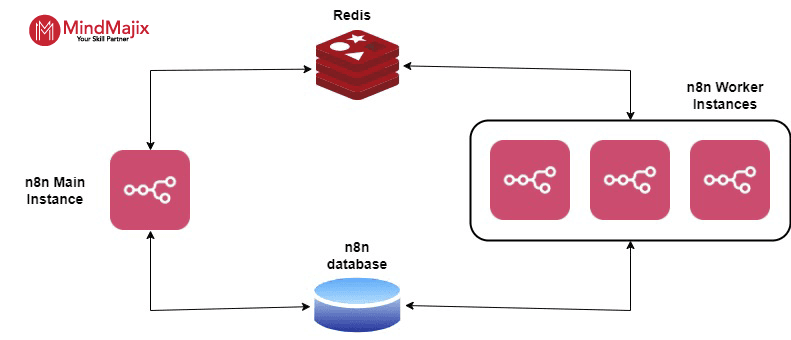
The n8n architecture includes the n8n editor, nodes, the workflow execution engine, the REST API, and databases.
- n8n Editor – It is a visual editor built on modern JavaScript frameworks. You can use this editor to create workflows and generate their corresponding JSON representations.
- Nodes – n8n provides built-in nodes and lets you create custom ones.
- Workflow Execution Engine – It runs workflows step by step based on JSON definitions. It manages data transfer between nodes, errors, and logging.
- n8n Database – This is where workflow definitions, user data, credentials, and execution logs are stored.
AI Tools in n8n
n8n offers three powerful AI tools, including:
- Call n8n workflow tool – You can use this tool to load any n8n workflow.
- HTTP request tool – You can use this tool to fetch a website or data from an API.
- Custom code tool – You can use this tool to write code that AI agents can run.
n8n Nodes
Let’s move forward by learning n8n nodes.
Nodes are the building blocks of an n8n workflow. By using nodes, you can perform the following actions:
- Starting workflows
- Fetching and sending data
- Processing and manipulating data
n8n lets you create custom nodes, though it also provides a set of built-in nodes.
- Node operations
An operation in n8n is an action performed by a node, such as sending or receiving data. You can perform two types of operations: triggers and actions.
Triggers initiate workflows based on events or conditions in your services.
Whereas actions represent specific operations within a workflow. Operations can include data manipulation, interactions with external systems, and so on.
- Core nodes
Core nodes support defining logic, scheduling, or making generic API calls. Triggers and actions can be core nodes.
- Cluster nodes
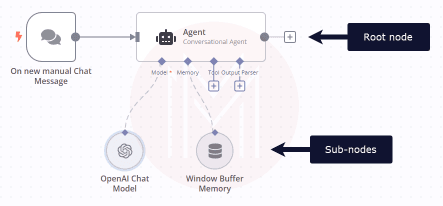
A Cluster node is a group of nodes, with a root node and a set of sub-nodes. Here, sub-nodes are used to extend the root node's functionality.
The image below shows the same.
Building Your First Workflow using n8n
Now, we are at the centerpiece of this n8n tutorial. Here, we will build an AI chat agent using n8n.
Below is a step-by-step procedure to create a sample workflow.
Prerequisites
- n8n cloud or self-hosted service
- Credentials for a chat model like OpenAI, Gemini, DeepSeek, or any other
Creating a new workflow
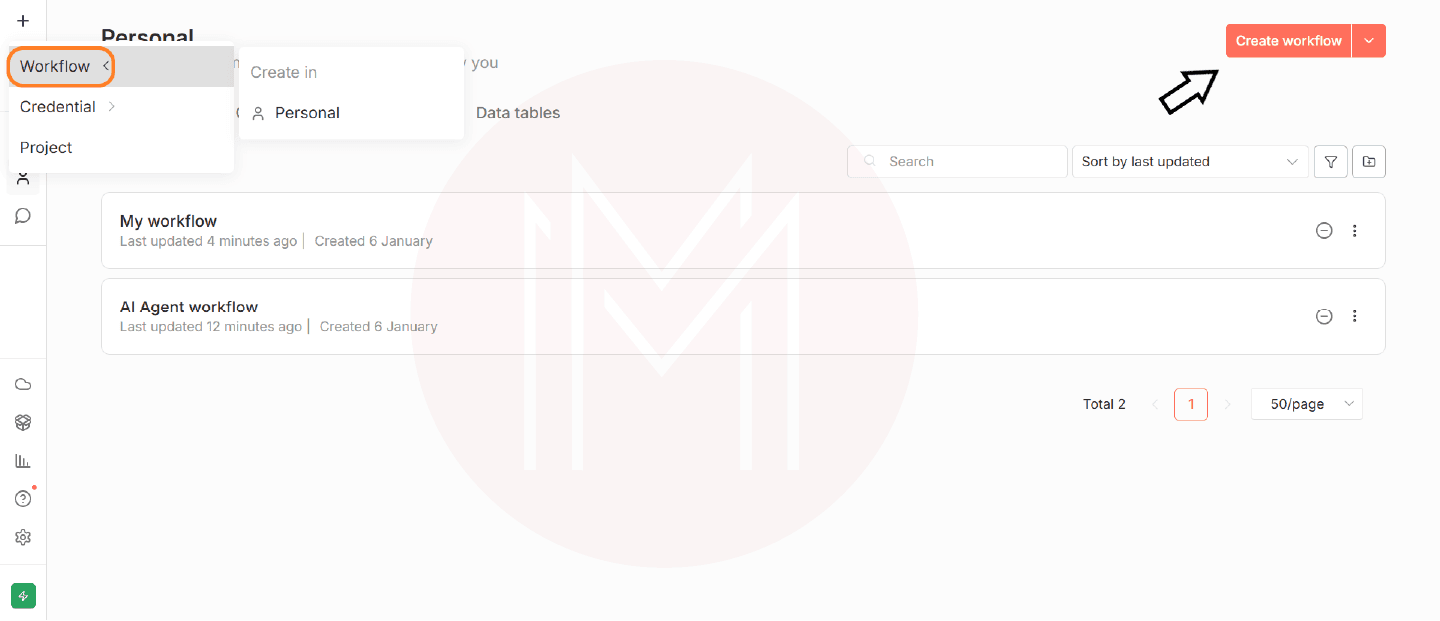
- First, click the ‘+’ button on the top-left of the page and select ‘Workflow’
- Or, you can click the new workflow on the top-right of the page.
Adding a trigger node
You need to create trigger nodes to start a workflow. The following step will help you add a trigger node.
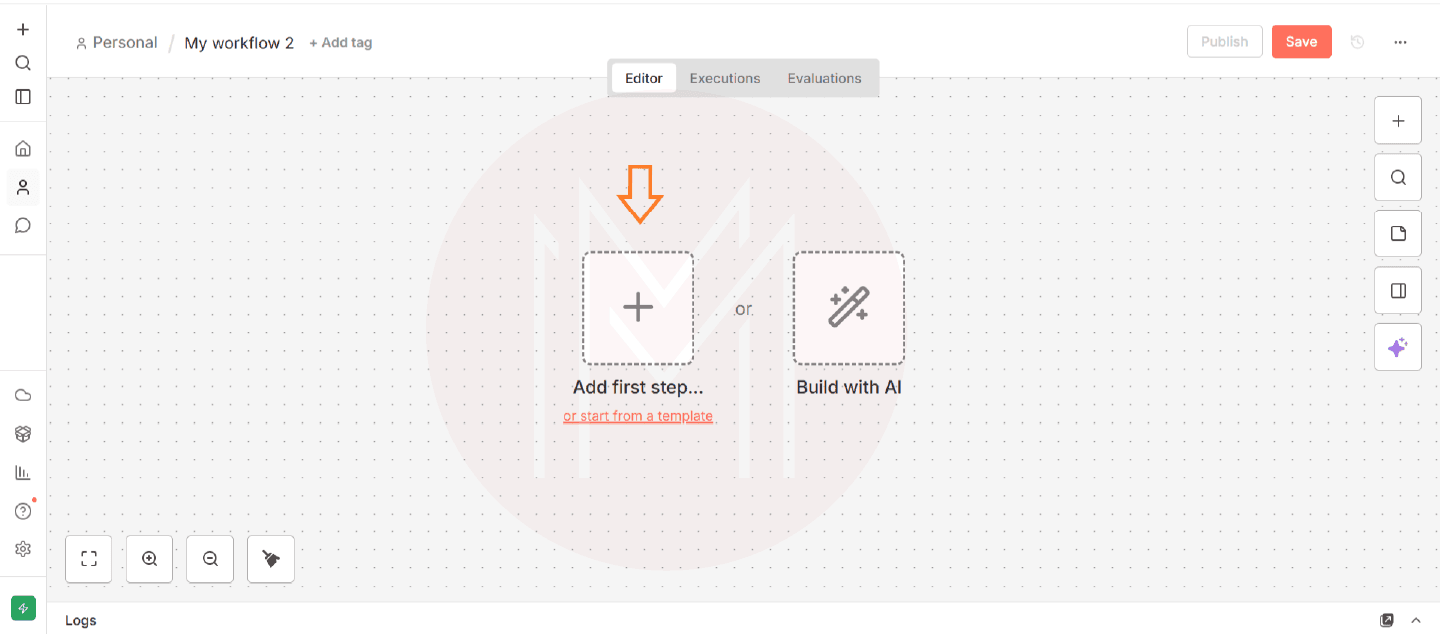
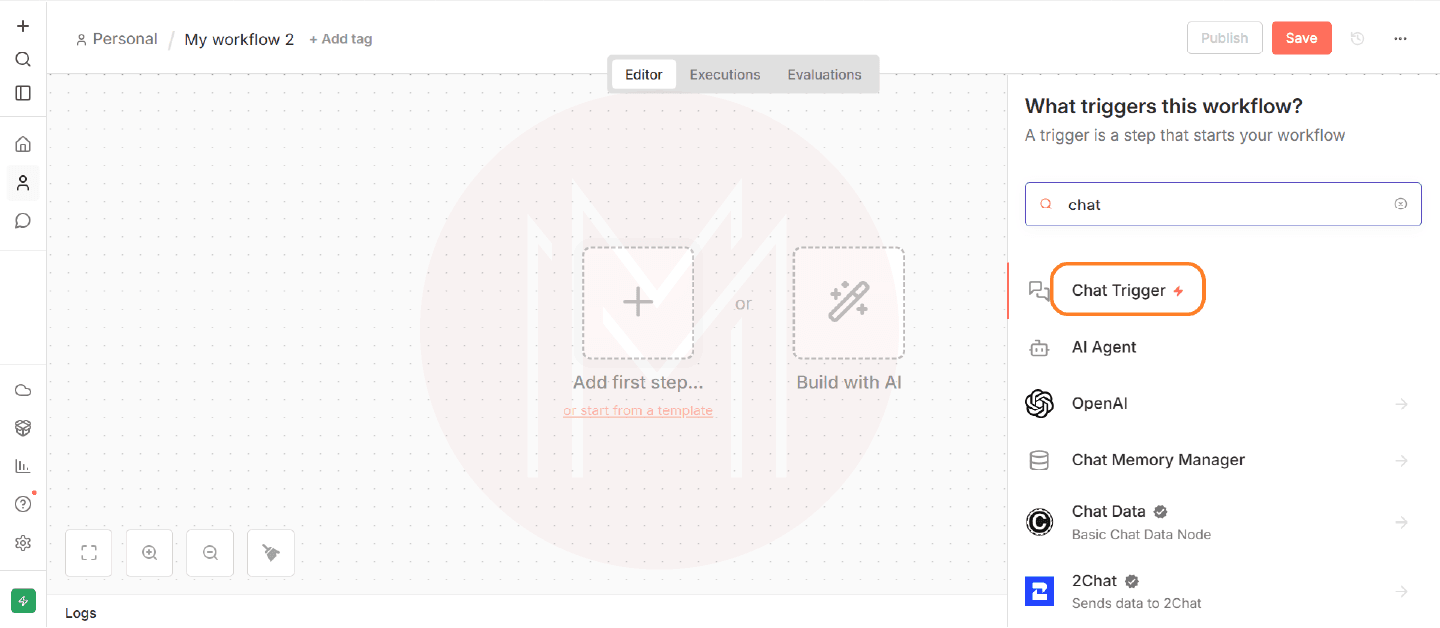
- Choose the ‘add first step’ displayed on the page, or Press Tab to open the node menu.
- Search for the chat trigger in the search box
- Select the chat trigger to add the trigger node to the canvas
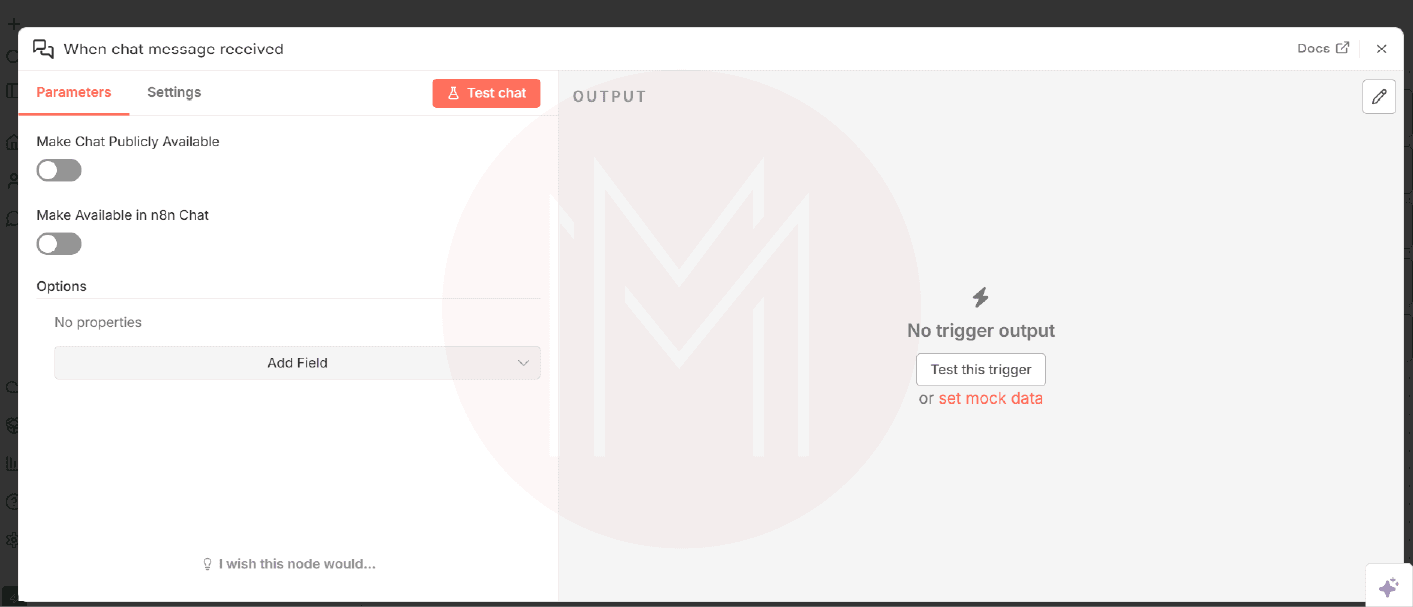
- Now, n8n opens the trigger node details window.
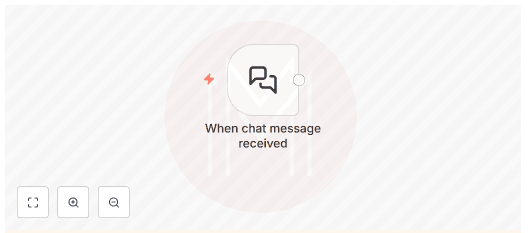
- Close the node details view and return to the canvas
Adding an AI agent node
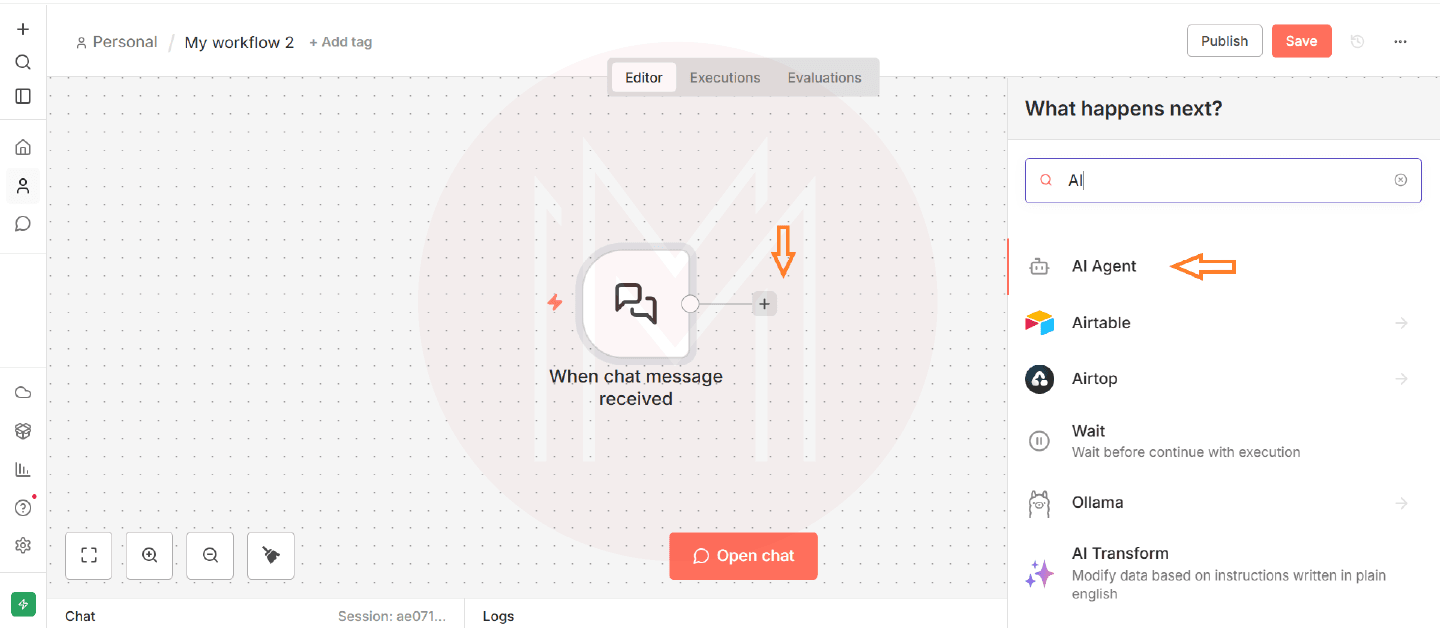
- Click the ‘add node connector’ (+ button) on the trigger node
- Type AI and select the AI agent node to add it
- Now, you will get the editing view of the AI agent
- Close the window without changing the default settings.
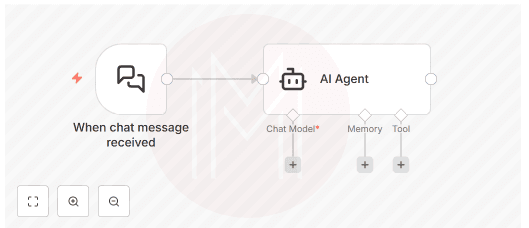
Configuring the node
- To add a chat model, click the ‘+’ button under the chat model connection on the AI agent node
- The search dialog will now appear—type OpenAI.
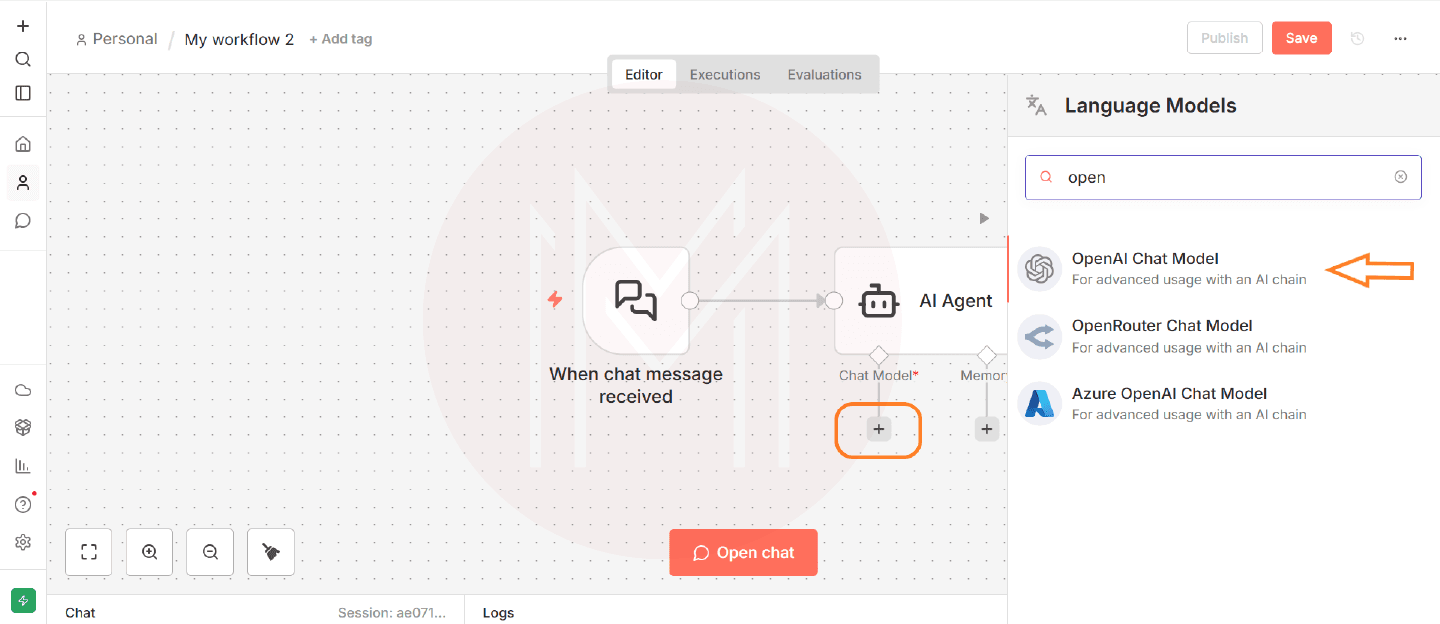
- Select the OpenAI chat model. This action will directly attach the model to the AI agent node
- Save the workflow.
- You can now open the node editor.
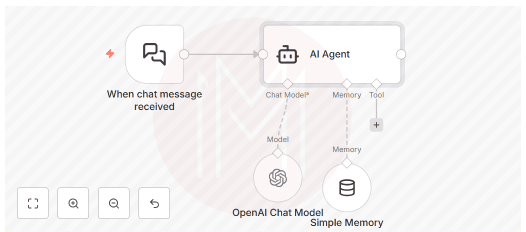
Adding credentials
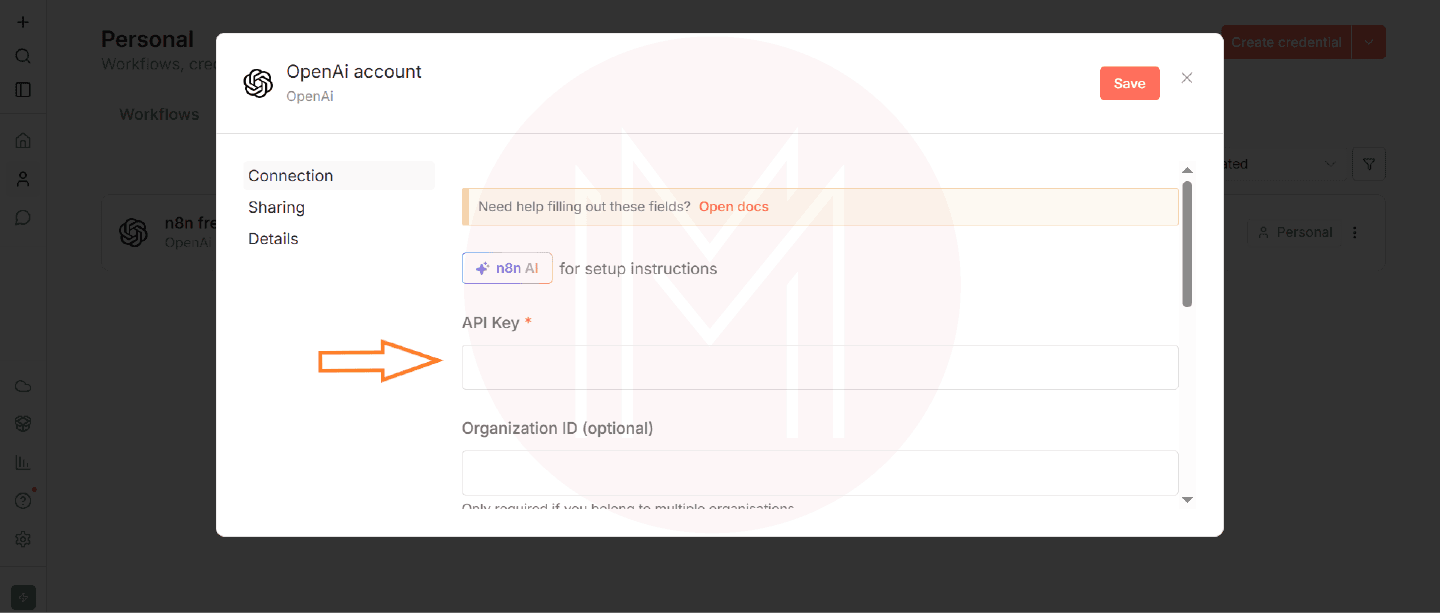
If you have your own OpenAI credentials, then you can use them here. Otherwise, you can add new credentials by using the credentials selector.
- Click the ‘+’ button on the top-left of the page and select ‘credential’.
- Or, click the ‘create credential’ button on the top left of the page.
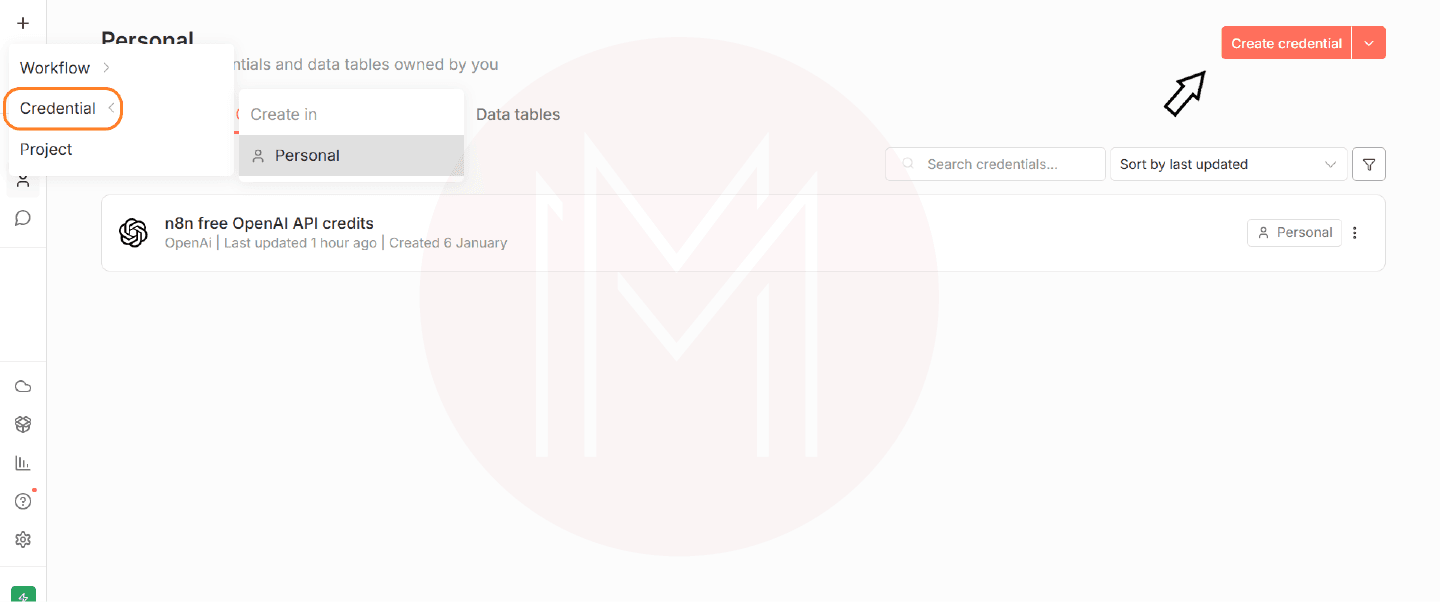
- Type OpenAI in the field shown
- Select OpenAI and hit the ‘Continue’ button
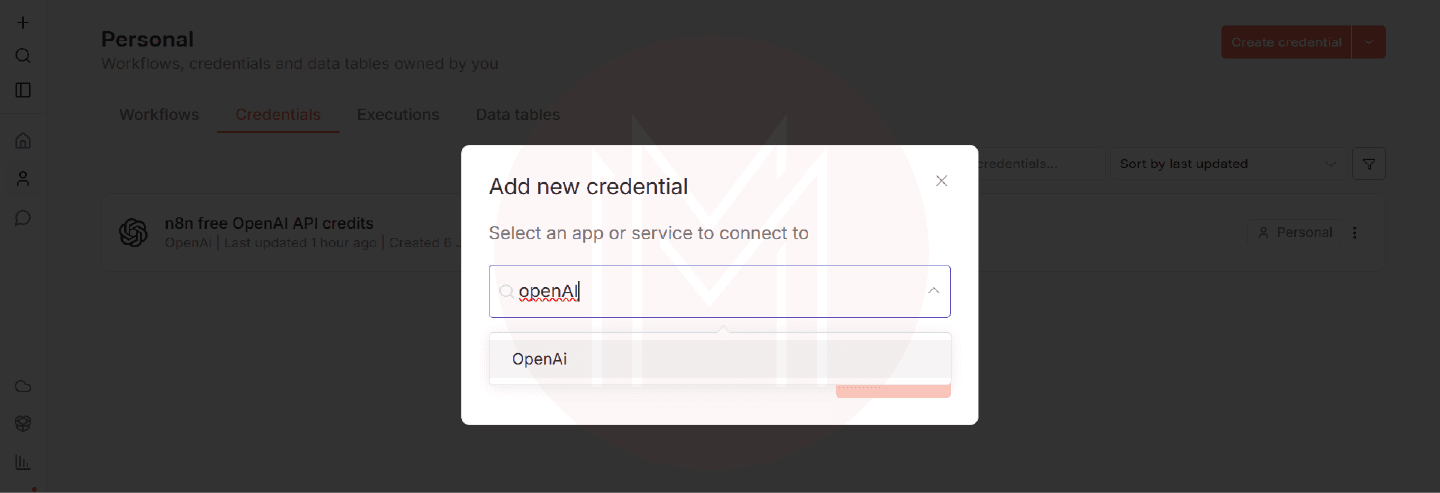
- Copy the API key from the OpenAI website and paste it into the API key section
Changing the prompt
You can change prompts to change the behaviour of the chat model.
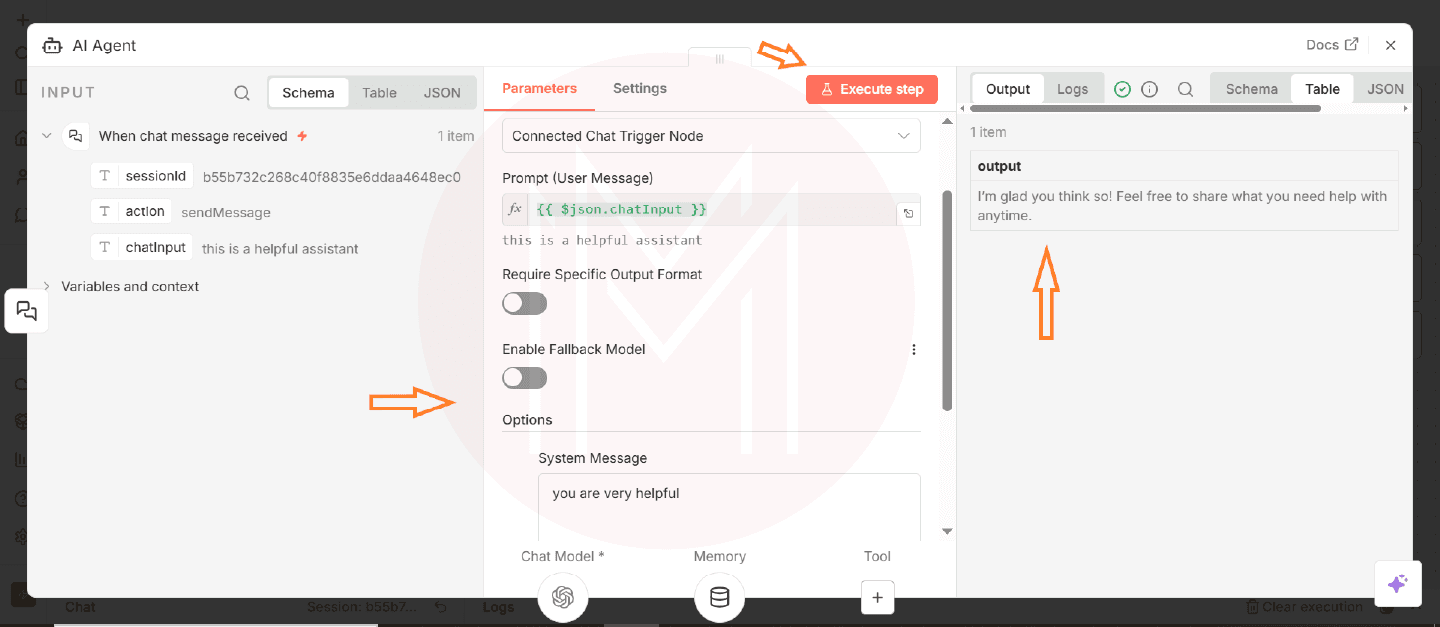
- Open the AI agent node. Navigate to ‘options’ and ‘add options’ in the panel at the bottom
- Select ‘system message’
- Now the system message is displayed. You can change the prompt now.
- Execute the step and close the agent node window
- Now, return to the chat window and see what output is displayed
Testing the node
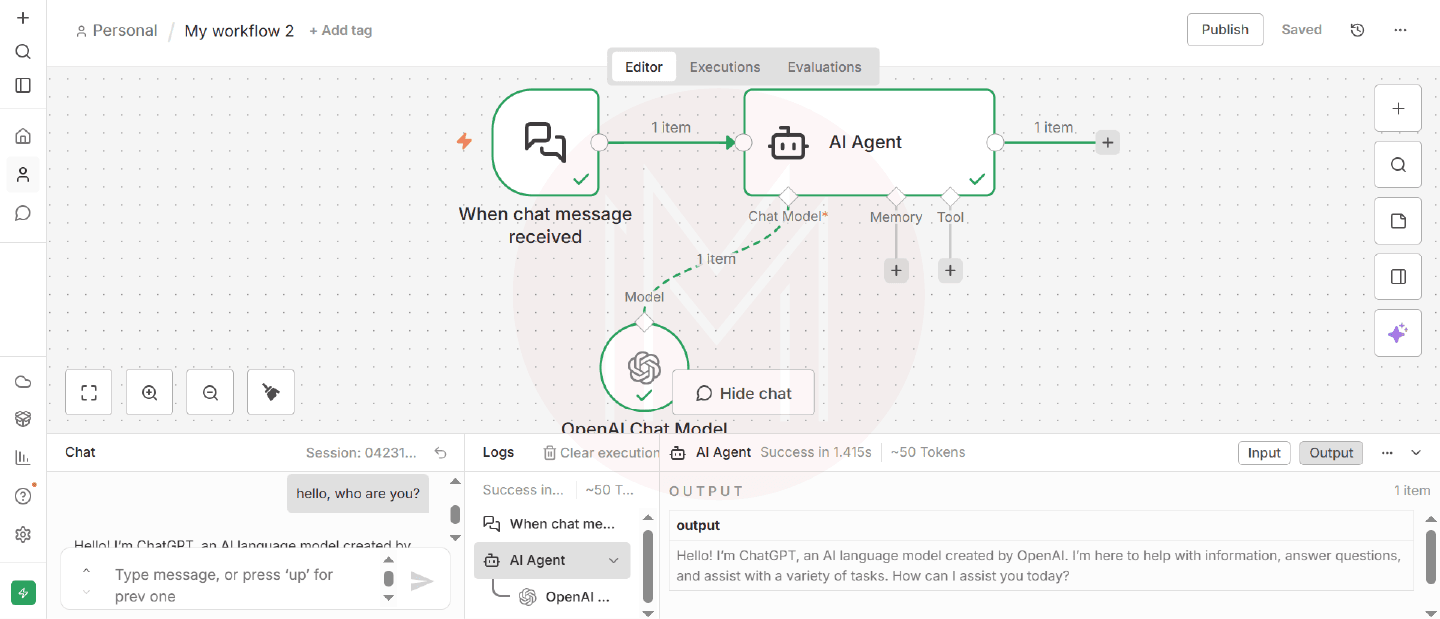
- Click the chat button near the bottom of the canvas to open a local chat window.
- Type your message, press enter, and get the response
- Now, you can see the inputs to and outputs from the AI agent.
Saving the workflow
- Click on the save button located at the top of the editor window
- Now, your workflow is saved
- The saved workflow allows you to chat again or add new features.
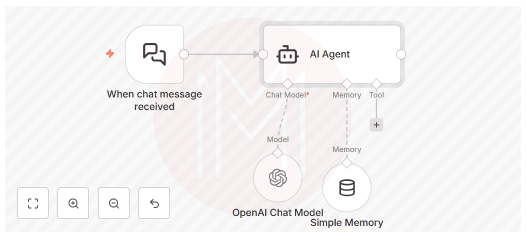
Congrats! You have built your first workflow with n8n. You have added an AI agent and a chat model.
Real-time Use Cases of n8n automation
Let’s go through some of the real-time applications of the n8n automation tool.
- Cybersecurity – Vodafone employed n8n to leverage its SOAR capabilities and build complex workflows and integrations. n8n also helped the company improve version control and log streaming.
- IT operations – Delivery Hero used n8n to enhance IT operational efficiency. A single IT Ops workflow enabled them to save over 200 hours of lockout time per month.
Moreover, the company automated manual processes with n8n, including account offboarding and software license assignments.
- Email management – Unbabel reports a 55% reduction in peak-related emails through a workflow developed with n8n.
Best Practices for n8n Workflow Automation
Here, we will explore some best practices you can apply in real-world environments to achieve efficient n8n workflow automation.
- Break down large workflows into smaller ones that are easy to reuse and manage
- Validate all the incoming data before your workflows process it
- Audit workflow permissions regularly to control who can view, edit, and run your workflows securely
- Leverage JSON exports to move workflows between accounts
- Ensure that Webhook paths are unique across the entire instance
Career Scope for n8n Automation Engineers
Let’s get into the career scope for n8n automation engineers.
Job Roles
Once you gain mastery in n8n, you can apply for the following job roles.
- Automation engineer
- Workflow engineer
- Automation workflow builder
- N8n specialist
- Solutions architect
Companies hire n8n automation professionals
According to TheirStack, you can get jobs in the following companies.
- Vista
- UpGuard
- Leadtech Group
- Compass Group
Salary Range
According to Indeed, automation engineers can earn an average of 6 LPA in India. Indeed also reports that they can earn an average of $104k per year in the USA.
Summary
- n8n is a workflow automation tool for automating repetitive tasks.
- It adopts the node-based user interface. You can connect nodes visually to define the automation logic.
- It includes many built-in integrations and provides the Function Node for building custom integrations.
- It supports self-hosting, satisfying data privacy requirements.
- It offers advanced access control, as well as version and security controls.
Conclusion
In summary, n8n lets you build scalable, intelligent workflows through its visual interface. We hope that you have gained an in-depth understanding of n8n nodes, triggers, and integrations. You have acquired hands-on experience in building AI chat agents through this n8n tutorial.
If you want to learn more about the n8n automation tool, you can join MindMajix’s n8n training. The training will provide you with mastery in building workflows for complex real-time scenarios.
Frequently Asked Questions
1. Is learning n8n easy for beginners with no coding expertise?
Yes, beginners can learn n8n easily, as it offers a visual, drag-and-drop interface that simplifies workflow building.
2. What are the prerequisites to learn n8n?
A basic understanding of API and JSON is adequate to learn n8n easily.
3. What is the future scope for n8n automation professionals?
n8n Expert reports that industries such as e-commerce, SaaS, finance, healthcare, marketing, and education leverage n8n to improve efficiency and reduce operational costs.
4. How does n8n differ from tools like Zapier and Make?
n8n is open-source and self-hosted, unlike Zapier and Make. It offers complete control over data and high flexibility.
5. Can I use n8n for API-based automations?
Of course, you can. n8n integrates seamlessly with external APIs using the HTTP request nodes.
 On-Job Support Service
Online Work Support for your on-job roles.

Our work-support plans provide precise options as per your project tasks. Whether you are a newbie or an experienced professional seeking assistance in completing project tasks, we are here with the following plans to meet your custom needs:
- Pay Per Hour
- Pay Per Week
- Monthly
| Name | Dates | |
|---|---|---|
| Artificial Intelligence Course | Oct 27 to Nov 11 | View Details |
| Artificial Intelligence Course | Oct 31 to Nov 15 | View Details |
| Artificial Intelligence Course | Nov 03 to Nov 18 | View Details |
| Artificial Intelligence Course | Nov 07 to Nov 22 | View Details |