- Home
- Blog
- Microsoft Azure
- Microsoft Azure Services

- Azure Active Directory
- Azure Active Directory B2C
- Azure Active Directory Domain Services
- Azure Analysis Services
- Azure App Services
- What is Azure Application Insights?
- Azure Arc
- Azure Automation - Benefits and Special Features
- A Complete Guide On Microsoft Azure Batch
- Azure Cognitive Services
- Azure Data Catalog
- Azure Data Factory - Data Processing Services
- Microsoft Azure Data Factory Tutorial (2024)
- Everything You Need To Know About Azure Data Lake
- Azure DNS - Azure Domain Name System
- Azure ExpressRoute
- Azure Functions - Serverless Compute
- Azure Interview Questions and Answers (2026)
- Azure IoT Edge Overview
- Azure IoT Hub
- What Is Azure Key Vault??
- Azure Load Balancer
- Azure Logic Apps - The Lego Bricks to Serverless Architecture
- Azure Machine Learning
- Microsoft Azure Media Services
- Azure Monitor
- Introduction To Azure SaaS
- Azure Security Center
- Azure Service Bus
- Overview of Azure Service Fabric
- Azure Site Recovery
- Azure SQL Data Warehouse
- Azure Stack - Cloud Services
- Azure Stream Analytics
- Azure Virtual Machine
- Azure’s Public Cloud
- Microsoft Azure Application Gateway
- Microsoft Azure Certification Path
- Microsoft Azure - Exactly What You Are Looking For!
- Microsoft Azure Fabric Interview Questions
- HDInsight Of Azure
- IS Microsoft Azure Help To Grow?
- Microsoft Azure Portal
- Microsoft Azure Traffic Manager
- Microsoft Azure Tutorial
- Overview of Azure Logic Apps
- Top 10 Reasons Why You Should Learn Azure And Get Certified
- Server-Less Architecture In Azure
- What is Microsoft Azure
- Why Azure Machine Learning?
- Azure DevOps Interview Questions
- Azure Active Directory Interview Questions
- Azure DevOps vs Jira
- What is Azure Service Fabric
- What is Azure Databricks?
- Azure Databricks Interview Questions
- Azure Data Factory Interview Questions
- Azure Architect Interview Questions
- Azure Administrator Interview Questions
- Azure Data Studio vs SSMS
- Microsoft Interview Questions
- What is Azure Data Studio - How to Install Azure Data Studio?
- Azure DevOps Projects and Use Cases
- Azure Data Factory (ADF) Integration Runtime
- Azure DevOps Delivery Plans
- Azure DevOps Variables
- Azure DevOps vs GitHub
- Azure DevOps Pipeline
- Microsoft Azure Services
Azure is Microsoft’s cloud computing platform that offers a range of services to help organizations build, deploy, and manage applications. With Azure, you can analyze and store data, host websites, run virtual machines, improve security, and much more.
Among Azure's many features, Azure Foundry Tools, App Services, and Analysis Services are crucial. This article discusses these services and the key tools used with them in detail.
Table of Contents
- Foundry Tools
- Azure APIs
- Azure Machine Learning (Azure ML) Service
- Azure App Services
- Azure Analysis Services
- Azure Video Indexer
- FAQs
- Conclusion
1. Foundry Tools (Formerly Azure AI Services)
Foundry Tools, previously known as Azure AI services, is a suite of intelligent Application Programming Interfaces (APIs) designed for cloud-based apps. Foundry Tools combines machine learning, analytics, artificial intelligence, and a variety of vision-based tools.
Foundry Tools is an excellent suite to create an automated, interactive model for an application.
- It enables developers to infuse superior intelligence capabilities into apps to deliver natural, contextual interactions.
- It supports the development of applications with powerful algorithms through minimal coding.
- It is easy to get Foundry Tools up and running, with a range of options for continuous enhancements across platforms and devices.
- It includes many components, such as Azure OpenAI Service, speech, language, vision, and decision.
Next, we’ll discuss the following components of Foundry Tools:
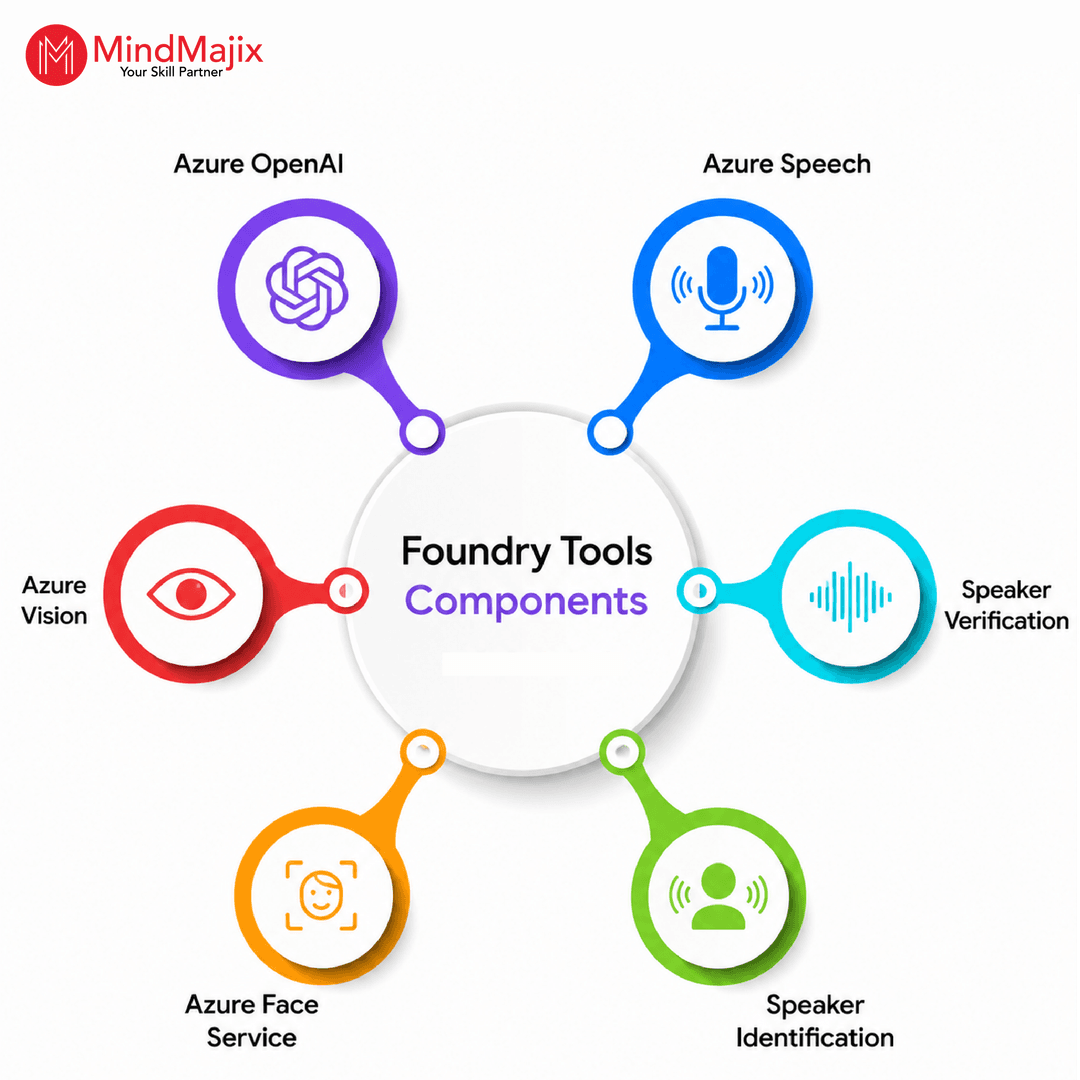
#1. Azure OpenAI
It is Microsoft’s managed service for using OpenAI models on Azure infrastructure. It allows organizations to build AI applications using GPTs and reasoning models while integrating Azure’s security and compliance features.
It uses GPTs for text generation, reasoning models for complex math analysis, embeddings for semantic search and RAG, and so on.
#2. Azure Speech
You can use Azure Speech to build voice-enabled, multilingual generative AI apps with natural-sounding voices.
It is a cloud-based service that enables you to convert speech to text (STT), convert text to natural-language speech (TTS), recognize speakers, and more.
It utilizes speech to detect and authenticate individual speakers. It provides applications with the power to understand and recognize the person talking.
#3. Speaker Verification
Speaker Verification verifies and authenticates the speaker through a defined passphrase.
#4. Speaker Identification
Speaker Identification is an intelligent tool that identifies speakers in applications. It matches speech with the speaker. The tool can easily identify speech and voice from a set of already known speakers.
#5. Azure Face Service
This service uses powerful AI algorithms that detect, recognize, and analyze human faces in images. You can use this service in multiple scenarios, including touchless access control, automatic face blurring for security, liveness detection, and more.
Access it via SDKs (Python, C#, JavaScript, Java) or REST API.
#6. Azure Vision
Image/Vision processing algorithms in Foundry Tools help to automate content moderation. The powerful algorithms enable the development of more personalized applications with smart insights on facial recognition, emotions, and images.
The Computer Vision API extracts information from images. Thereafter, it processes and classifies the visual data to protect users from undesired content.
Computer Vision API can:
- Analyze images - For example, the API can extract information about visual content in a photo.
- Generate thumbnails - The Computer Vision API can generate high-quality thumbnails from an input image.
- Read the text in images - The API, integrated with OCR (Optical Character Recognition), can identify text in images.
#7. Foundry Local
Foundry Local runs AI models locally on user devices, with no cloud calls, making it useful for offline scenarios, privacy-critical workloads, and edge devices with limited connectivity.
Key features: local-first execution, pre-optimized model library, edge deployment support, and optional cloud sync for telemetry.
Azure APIs
The core APIs that power most production apps:
#1. Language API
The Language API in Foundry Tools enables applications to process natural language, evaluate user sentiment, learn, recognize, and adapt to users' varying needs and behaviors.
#2. Conversational Language Understanding (CLU)
CLU helps applications understand specific user commands. It has been designed by Microsoft to accommodate the easy development of models, enabling applications to recognize user commands.
#3. Text Analytics API
The Text Analytics API logically analyzes topics and sentiment to interpret user commands. The API, developed by Microsoft, seamlessly detects language, topics, key phrases, and text sentiment.
The Text Analytics API is a suite of text analytics web services built on Azure Machine Learning. The API employs best-in-class natural language processing techniques to leverage top-grade predictions.
#4. Translator Text API
The Translator Text API in Foundry Tools is an automatic cloud-based translation service that supports multiple languages. The API easily performs real-time text translation with a simple REST API call.
The Translator Text API can be deployed to build websites, tools, applications, or other solutions that support multiple languages.
Azure Machine Learning (Azure ML) Service
AzureML is a fully managed cloud service that enables you to build, deploy, and manage ML models. It supports the entire ML lifecycle from data preparation to deployment and monitoring.
Common use cases: demand forecasting, fraud detection, predictive maintenance, NLP tasks, and financial risk modeling.

2. Azure App Services
Azure App Service is a cloud service that lets you rapidly and easily build enterprise-ready mobile and web apps for any device or platform. You can deploy them on a reliable and scalable cloud infrastructure.
It is a Platform as a Service (PaaS) offering in the Azure cloud that allows you to focus on your business logic while Azure manages the infrastructure to run and scale your apps.
It is a fully managed compute platform optimized for hosting websites and web applications. When to use App Service: You want managed hosting without infrastructure operations.
The Key features of this service include:
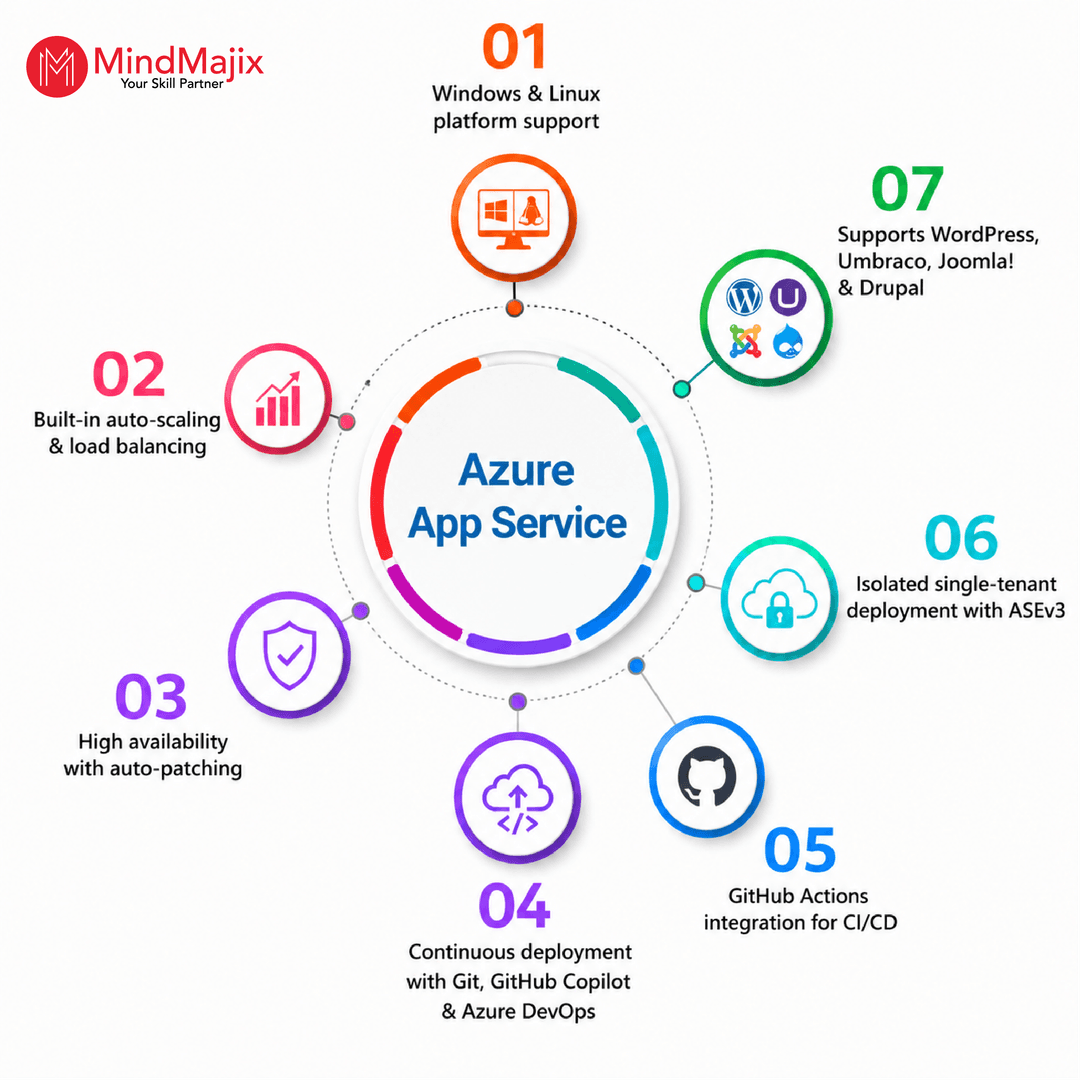
This Service integrates easily with SaaS solutions, including Office 365, Dynamics CRM, Salesforce, and Twilio. It easily connects to on-premises applications such as SAP, Oracle, and Siebel. It easily automates business processes while meeting stringent security, reliability, and scalability needs.
App Service Pricing
App Service has no upfront cost and follows a pay-as-you-go model.
The App Service has many pricing plans, as shown in the image below.
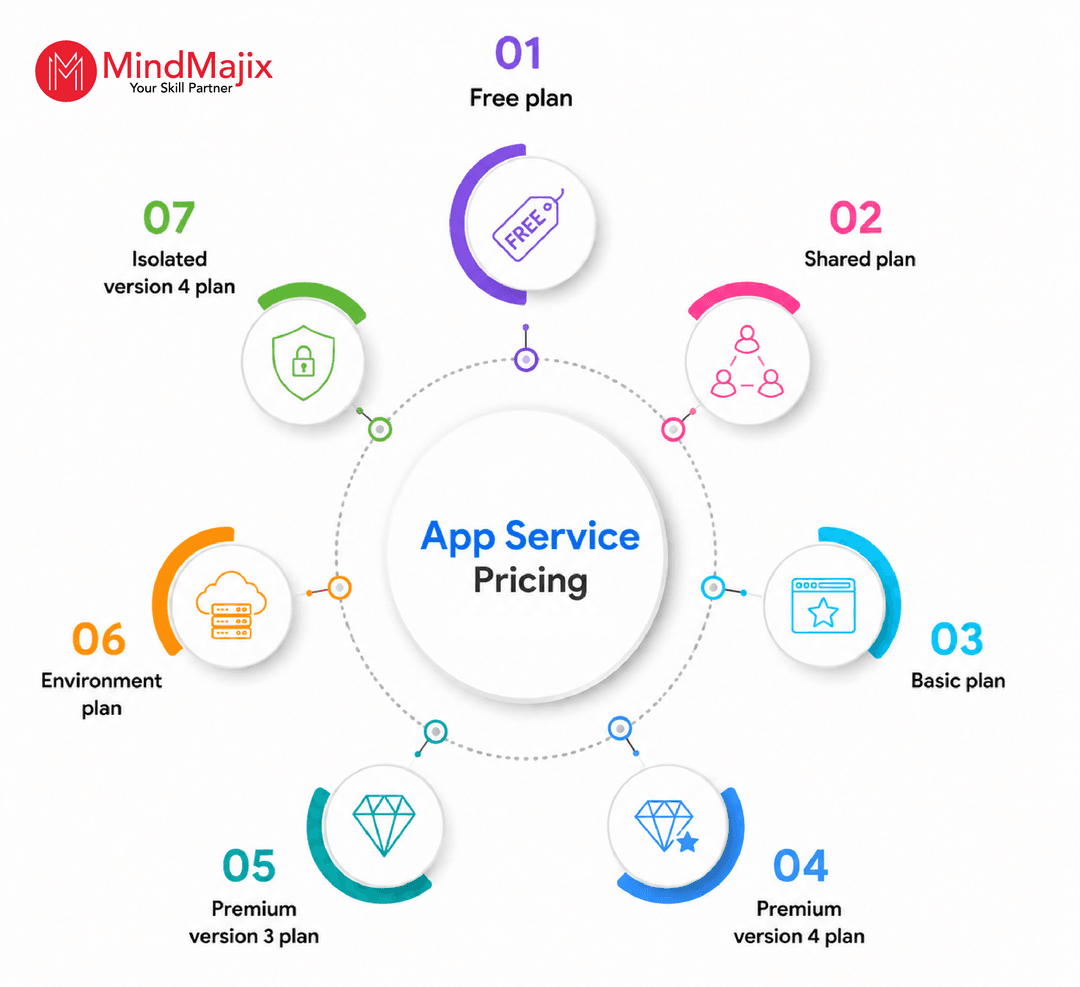
Free, Shared, and Basic plans offer different options for testing your apps within your budget. You can use this plan for learning purposes. Standard and Premium plans are for production workloads and run on dedicated Virtual Machine instances.
Depending on the plan and pricing, the App Service supports automatic or manual scaling and container isolation for high security.
Each instance can support multiple applications and domains. The Isolated plan hosts your apps in a private, dedicated Azure environment. It is ideal for apps that require secure connections with your on-premises network or additional performance and scale.
Web Apps and Logic Apps in Azure App Services
Azure App Service includes the following application development and hosting environments.
- Web Apps
- Logic Apps
- Web Apps
The web app was previously known as Azure Websites. The new Logic App introduces a serverless architecture that integrates various services into an app without writing code, and the API App has built-in connectors that make it easy to build logic workflows.
Microsoft offers connectors for these services. This app provides a flexible pay-as-you-go model and enhanced workflow support.
App Service automatically manages apps and runs them in isolated VMs. App Service has an auto-scaling feature, so when your app usage increases, it automatically scales out to prevent downtime or latency.
Key features of web apps include the following:
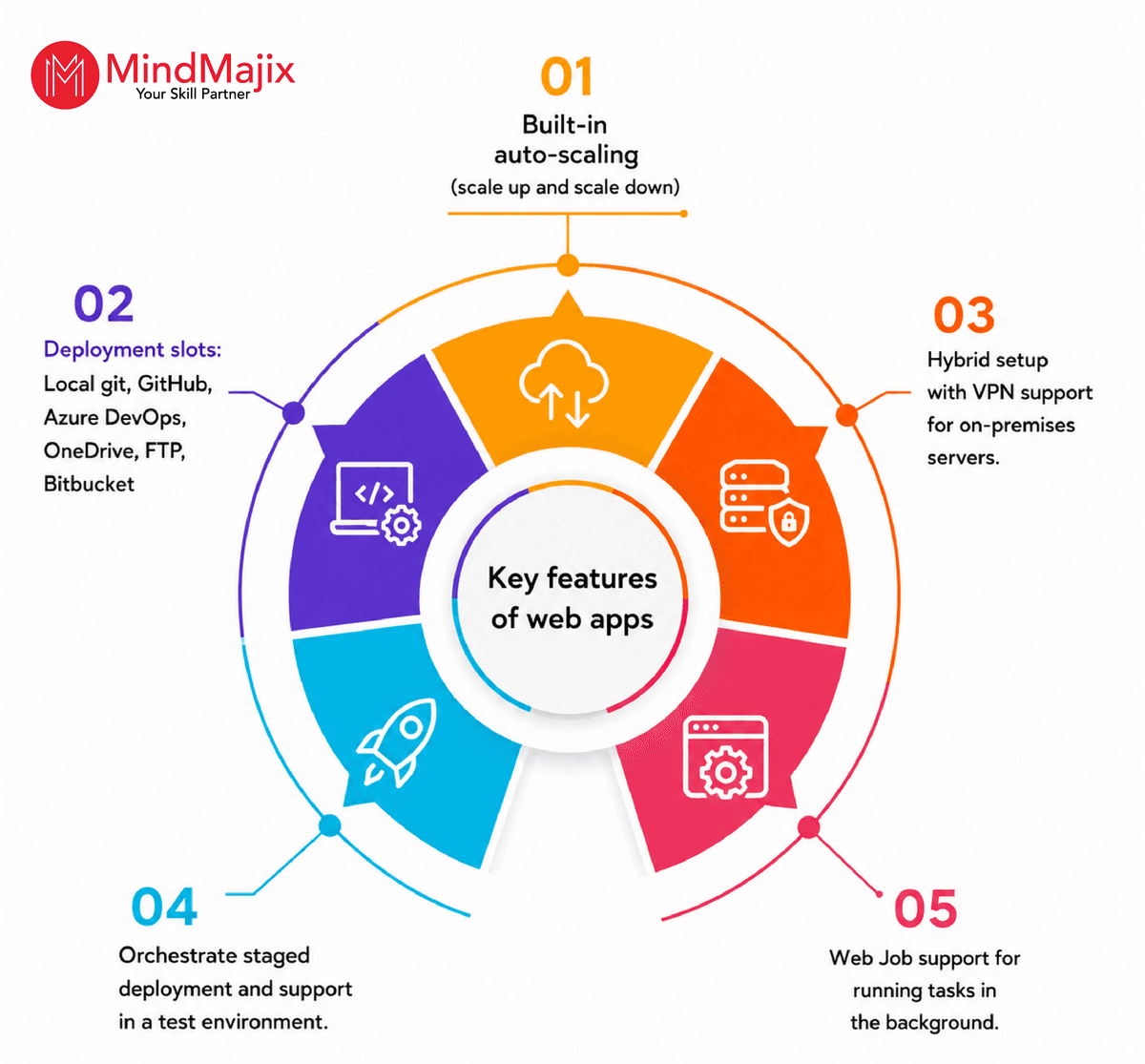
Web Apps come with the default azurewebsites.net domain. But you can configure your own domain in the portal. Web apps can use Azure storage and database. Besides, they support both static and dynamic sites.
The static Web Apps have evolved as a separate App service that enables front-end hosting with serverless APIs.
Building and Deploying a PHP Web App in Azure
PHP is a popular server-side web scripting language used to build dynamic web applications. Azure supports PHP, and you can create a PHP web app as an in-app service.
Now, we will learn how to build a web app using PHP and deploy it to Azure App Service via Git.
- First, Install PHP and Git
- Create a Git folder and initialize it with a README
- Create a PHP file in Notepad and save it as
index.php - Then run the PHP built-in server to run the file locally:php -S localhost:8080
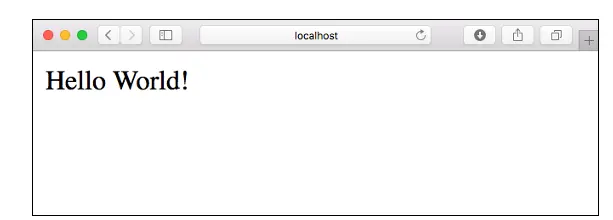
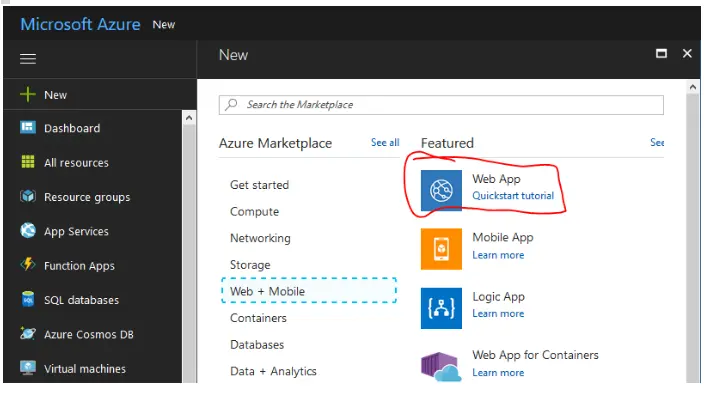
- Go to your Azure portal, go to Web + Mobile, then create a web app.
- Next, create your app.
- Enter application name
- Choose an existing subscription. If you do not have a subscription, you have to sign up for one.
- Create a resource group for your app, or choose an existing one.
- Choose the OS you want to use.
- Select your App Service plan.
- Option to use Application Insights.
- Click the create button. It will start the deployment.
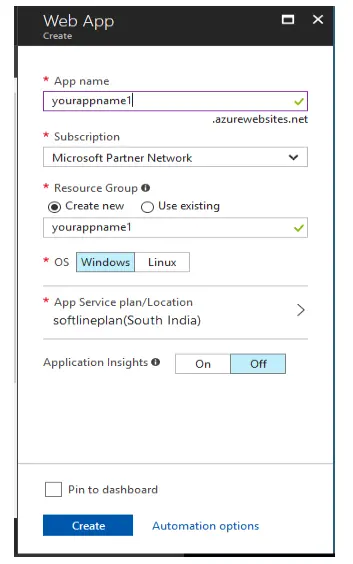
In this way, you can use the graphical user interface and configure the runtime and deployment model.
Using Azure CLI
- Open Cloud Shell.
- Create an App Service plan named
myAppServicePlanusing the az webapp create command. - Create a user for the Web App.
- The az webapp create command returns a JSON result confirming your web app was created in the PHP runtime, with the deployment method set to local Git. That JSON includes a "
deploymentLocalGitUrl" field — copy that exact URL; it will look like the pattern below, with<app-name>replaced by the name you chose:
https://<app-name>.scm.azurewebsites.net/<app-name>.git
- Now add Azure Remote to Git so you can push your source to the app's source code.
git remote add azure https://<app-name>.scm.azurewebsites.net/<app-name>.git- Then, push your main branch to an Azure app using the following command.
You will get a result like this.
Making Changes and Redeployment
You can change the local copy of your source code and redeploy it to Azure using Git. However, before redeploying, it is recommended that you run your app locally and check for issues.
- Change the index.php and save it.
echo "Hello Azure!";- Open the terminal and run the git commit and git push commands to Azure.
git commit -am "updated output"
git push azure master- Again, you will see the result, and after successful deployment, you can browse your app in a browser.
2. Logic Apps
Logic Apps allow developers to design workflows that are triggered by a condition and a series of steps, each invoking an App Service API app while securely handling authentication and following best practices such as durable execution.
Logic Apps can be designed end-to-end in the browser. You can start with a trigger - from a simple schedule to whenever a tweet appears about your company. Then orchestrate any number of actions using the rich gallery of connectors.
Logic Apps are part of the App Service suite and are designed to work with API apps; you can easily create your own API app to use as a connector.
Azure App Services - Architecture
Azure App Service runs on top of Microsoft’s PaaS offering. Applications can be containerized and packaged to be scalable and platform-independent. Microsoft provides built-in connectors, code integrations, CDN, and a default ‘azurewebsites.net’ domain for all App Service applications.
App Service applications and all Azure Resource Manager objects, such as databases and Application Insights, can be grouped into an Azure Resource Manager. They can be deployed to an Azure region near your customer base.
App Service provides a CDN for cross-geographic delivery of your application, automatic backups, an application firewall, and health and performance monitoring tools. It accepts SSL for security.
There are two types of SSL connections supported by the Azure App Service.
- Server Name Indication (SNI) SSL Connections
- IP Address SSL Connections.
SNI-based SSL works on modern browsers, while IP-based SSL works on all browsers. This connection is free. Standard and Premium service plans include the right to use one IP SSL at no additional charge. Free and shared service plans do not support SSL.
Customers can purchase custom domains and assign them to their Azure services, such as Web Apps or Azure Virtual Machines. Custom domains can be managed within the Azure portal. The top-level domains available are com, net, co.uk, org, nl, in, biz, org.uk, and co.in.
Container Apps
It is a fully managed serverless container service that you can use to run containerized applications without managing virtual machines,kubernetes clusters, and more.
You can use this service to deploy Docker without managing kubernetes. You can also use this service to build microservices and event-driven applications. It integrates with Azure Container Registry and other OCI-compliant registries.
Depending on the plan and pricing, the App Service supports automatic or manual scaling and container isolation for high security.
Each instance can support multiple applications and domains. The Isolated plan hosts your apps in a private, dedicated Azure environment. It is ideal for apps that require secure connections with your on-premises network or additional performance and scale.
Azure App Service - Best Practices
Let’s go through the Azure App Service best practices here.
1. Co-location
If your web app communicates with a database in a different region, or your app resource group depends on another DB server in another Azure region, you may encounter the issues below in communication between the database and the application.
2. More data charges for outbound traffic
To avoid such issues, it is recommended to use a resource group that includes your app and database in the same region unless you have a specific business need.
3. Socket Resource Exhaustion
If your app uses client libraries that do not reuse TCP connections, you might experience outbound TCP socket exhaustion. In such a case, you must use HTTP-keep-alive.
With Node.js apps, you must use the http-keep-alive npm module.
4. Backup Configuration
It is important to set up an automatic backup of your application in the cloud. With the right configuration for storage and the database, you can enable automatic scheduled backups for your application.
5. Next-Gen Web App Firewall
Although Azure provides default security and policies, you should use a Web Application Firewall (WAF) to protect user data and application data. For an in-app service, you should configure inbound and outbound IP addresses to control access.
Azure Analysis Services
Azure Analysis Services combines enterprise-grade business intelligence semantic modeling with the cloud's scalability, flexibility, and management. It can help transform complex data into actionable information.
Although Azure Analysis Services are not deprecated, Microsoft recommends that its users leverage Microsoft Fabric with semantic models or Power BI Premium for analysis workloads.
Added specific when-to-use guidance for each service (see below):
- Microsoft's Azure Analysis Services offers enterprise-grade data modeling in the cloud.
- It is a fully managed PaaS (Platform as a Service) service integrated with Azure Data Platform services.
- With Azure Analysis Services, you can easily combine and mash up data from diverse sources, define metrics, and secure data within a single semantic data structure.
- Its data model offers a faster way for users to navigate large volumes of data through applications such as Reporting Services, Excel, Power BI, third-party applications, and custom apps.
Key Features
1. Integrates with SQL Server Analysis Services
Microsoft's Azure Analysis Services integrates with the Enterprise Edition of SQL Server Analysis Services. It provides strong support for tabular models, bidirectional associations, row-level security, partitions, and translations.
Query and In-memory modes facilitate accelerated query processing over complex, massive datasets. The tabular models offer the opportunity for highly customizable, rapid development.
The tabular models incorporate TOM (Tabular Object Model) to define model objects. It can be exposed in JavaScript Object Notation (JSON) through AMO data definition language and TMSL (Tabular Model Scripting Language).
2. Integrates with Azure services
The AzureAzure Analysis Services integrate with various Microsoft Azure services, enabling users to develop critical analytics solutions. Integration with Azure Active Directory (Azure AD) provides a secure platform that enables users to define role-based access for critical data.
In addition, users can integrate Azure Analysis Services with Azure Data Factory, a cloud service, by adding a data loading activity. Azure Functions and Azure Automation can also be deployed in Azure Analysis Services for an ultra-light model arrangement utilizing custom code.
Furthermore, users can provision servers using a default template with PowerShell and Azure Resource Manager. By using a single template, many services can be deployed simultaneously, along with numerous Microsoft Azure features.
Once the server is created, users can generate a tabular model within the Azure portal. Additionally, importing a .pbix file or establishing a connection to Azure Synapse Analytics or an Azure SQL Database can be easily accomplished with the Web Designer component.
Links between tables are automatically created, and users can modify the model.bim file or create measures directly in the JSON in the browser.
3. Flexible Pricing
Azure Analysis Services is available in the Standard, Basic, and Developer tiers. The plan costs for each tier vary based on memory size, QPU, and processing power.
When a server is created, users can select their preferred plan within the tier, with the flexibility to change the plan up or down. Upgrading from a lower tier to a higher tier is permitted, but downgrading from a higher tier to a lower tier isn't allowed.
The pricing is based on a pay-as-you-go model, so users pay for only what they use. The right mix of tiers and plans can be determined using the pricing calculator or by visiting Azure Analysis Services Pricing on the Microsoft website.
Users can scale down, scale up, or even pause the server. Total control can be achieved using the Azure portal or PowerShell.
4. Easy Migration
If a user already has an on-premises SQL Server Analysis Services (SSAS) model, they can effortlessly migrate to Microsoft Azure Analysis Services with minimal modifications.
To migrate, users will need to install Visual Studio 2022 and Tabular Editor to implement the desired model on their server. Otherwise, the Tabular Model Scripting Language (TMSL) can be used in SQL Server Management Studio (SSMS) to register the changes.
If the role members and roles are already defined and configured, the roles automatically migrate, but the role members must be re-added using PowerShell or SSMS.
5. Seamless Connection to Data Sources
Azure Analysis Services supports connecting to on-premises and cloud data sources. Users can mix both cloud and on-premises data sources to create a hybrid model.
The new 1400 tabular models apply the latest Get Data format in SQL Server Data Tools, based on the M formula query language.
Users can use Get Data to enhance their ability to develop and edit complex M formula language queries, with more mashup and data transformation features.
6. Data Security
Azure Analysis Services provides comprehensive data protection using Microsoft Azure Blob Storage. Data stored in Azure Blob Storage is fully encrypted using Server-Side Encryption (SSE).
Azure Blob stores only metadata in the Direct Query mode. The stored data can be accessed from data sources during query execution.
Azure Video Indexer
Azure Media Services was retired in 2024, and Azure Video Indexer now works independently.
Azure Video Indexer is an AI-powered service you can use to analyze video and audio files. You can use this service to generate metadata, transcripts, scene segmentation, keywords, and more.
The advantages of using this service are that it reduces manual video review, generates accurate subtitles and transcripts, and processes large video libraries.
Frequently Asked Questions
1. What are Azure services?
Azure Services are Microsoft’s cloud computing services. It allows you to build, deploy, and manage applications without using physical servers. Azure virtual machines, Azure App Service, and Azure Foundry tools are some of the Azure services.
2. Is Azure Cognitive Services the same as Azure AI Services?
No, they are not the same. Azure AI Services is the rebranded name of Azure Cognitive Services.
3. Is Azure Media Services still available?
No, Azure Media Services are no longer available. It was retired in June 2024.
4. Azure App Service vs Container Apps — which should I use?
You can use Azure App Service for web applications and APIs. On the other hand, you can use Container Apps for containerized applications and microservices.
5. Is Azure Analysis Services being deprecated?
No, it isn't deprecated, existing deployments are still fully supported. Microsoft is steering new projects toward Microsoft Fabric or Power BI Premium semantic models instead, so that's where you should start if you're building something new.
Conclusion
This article covered key Azure services, including Azure App Service, Foundry Tools, and Azure Analysis Services, in depth. You have also gained extensive knowledge of various Azure platform tools from this blog.
If you want to learn more about Azure services, you can register for a Microsoft Azure AZ-104 certification course from MindMajix. It will help you gain in-depth knowledge of Microsoft Azure through hands-on practice and help you climb your career ladder faster.
 On-Job Support Service
Online Work Support for your on-job roles.

Our work-support plans provide precise options as per your project tasks. Whether you are a newbie or an experienced professional seeking assistance in completing project tasks, we are here with the following plans to meet your custom needs:
- Pay Per Hour
- Pay Per Week
- Monthly
| Name | Dates | |
|---|---|---|
| Azure Training | Oct 24 to Nov 08 | View Details |
| Azure Training | Oct 27 to Nov 11 | View Details |
| Azure Training | Oct 31 to Nov 15 | View Details |
| Azure Training | Nov 03 to Nov 18 | View Details |