- Home
- Blog
- Salesforce
- Salesforce Data Modeling and Relationships

- Apex Class in Salesforce
- Approval Process In Salesforce
- Step By Step Guide to Becoming a Certified Salesforce Developer
- Bulkification in Salesforce
- Code Coverage In Salesforce
- Context Variables In Salesforce
- Controller Extension in Salesforce
- Controlling the program flow in Salesforce
- How To Create Data Modeling In Salesforce?
- Custom Controller in Salesforce
- Custom Reports In Salesforce
- DML Operations In Salesforce
- Top 10 Features of Salesforce Lightning
- Governor Limits in Salesforce
- How Salesforce Certification Can Boost Your Career?
- Salesforce Lookup Relationship
- Master-detail Relationship in Salesforce
- User Management And Object Level Security In Salesforce
- Price Book in Salesforce CPQ
- Product Bundle in Salesforce CPQ
- Quote Line Editor In Salesforce CPQ
- Why Learn Salesforce?
- Record Level Security In Salesforce
- Report Building in Salesforce
- Salesforce Automation Testing With Selenium
- Salesforce Collection of Map
- Salesforce Collection of Set
- Salesforce CPQ Implementation Guide
- Salesforce CPQ Tutorial
- How to create dashboard in Salesforce
- Salesforce Developer Certification, Jobs And Salary Trends
- An Overview of Salesforce Development Environment
- Salesforce Interview Questions
- Salesforce Lightning Interview Questions
- Salesforce Lightning Tutorial
- Salesforce Enhances Its Marketing Cloud With AI And Google Partnership
- Salesforce Job Roles And Certifications
- Salesforce Tutorial
- Salesforce vs ServiceNow
- Salesforce Vs Siebel CRM'S
- Access Specifiers in SalesForce Cloud Computing - Salesforce
- An Introduction to Exception Handling – SalesForce
- An Introduction to Visualforce – SalesForce
- An Overview of Salesforce Security
- Annotation in SalesForce
- Classes, Inheritance and Overriding in SalesForce
- Configuring Salesforce Web-To-Lead Form
- Creating Visualforce Page using AJAX Programming - Salesforce
- How to Create Field Dependence in SalesForce
- How to Create Sample Apex Trigger in SalesForce
- How to Define Validation Rules in SalesForce
- Object Relationships Overview – SalesForce
- SalesForce Integration and Environment in Cloud Computing
- SalesForce Deployment and Assertions
- Shallow copy and Deep Copy in Cloud Computing - Salesforce
- Security and Audit Trail in Salesforce
- Salesforce SOQL
- SOSL Of Salesforce
- Standard Controller In Salesforce
- Test Class in Salesforce With Example
- Testing APEX In Salesforce
- Time Dependent Workflow Rule - Action
- Trigger Scenarios in Salesforce
- What is CRM? - A Complete Beginners Tutorial
- What is Salesforce Administrator?
- What is Salesforce CRM?
- Why You Should Learn Salesforce Skills
- Workflow Rules In Salesforce
- Configuring Tasks in Workflow Rules
- How to call APEX Class
- Context Variables
- Configuring Email alert in Workflow Rules
- Salesforce Web Services
- Salesforce Vlocity Interview Questions
- Salesforce CPQ Interview Questions
- Visualforce Interview Questions
- Salesforce Tools
- Salesforce Integration Interview Questions
- Custom Settings in Salesforce
- What is Salesforce Database?
- Salesforce Data Loader
- Salesforce Platform Events
- What is Salesforce Marketing Cloud - Definitive Guide
- Bucket Field In Salesforce - Bucket Column Salesforce
- What is Junction Object In Salesforce?
- Sharing Rules in Salesforce
- What is Salesforce Architecture?
- Salesforce Projects and Use Cases
- Salesforce Marketing Cloud Integration
- Microsoft Dynamics VS Salesforce
- Salesforce Admin Projects and Use Cases
- Salesforce Apex Tutorial
- Salesforce Apex Development Tutorial
- Apex Testing and Deployment
- Salesforce Data Operations
- Salesforce Security
- Salesforce Integrations
- Salesforce Reporting and Data Loader
- Salesforce Career Guidance
- Salesforce Comparisons
- Salesforce Administrator Tutorial
- Salesforce Database and Custom Settings
- Salesforce Automation: Workflow Rules, Approval Processes, Governor Limits, and Bulkification
- Salesforce Development
- What is Salesforce Agentforce
- Salesforce Agentforce vs Salesforce Service Cloud
- Salesforce Agentforce Architecture
Salesforce is a leading customer relationship management platform that enables organisations to enhance customer interactions and increase efficiency. The platform integrates applications, data, and AI agents, allowing people and agents to collaborate effectively and drive customer success.
Salesforce data modelling and relationships underpin a robust CRM system. They enhance data interoperability and enable mapping between connected data sources. This tutorial examines Salesforce data modelling and relationships using clear examples.
Let’s get started.
Table of Contents
- How to Create Data Modelling in Salesforce?
- Object Relationships in Salesforce
- Salesforce Lookup Relationship
- Master-detail Relationship in Salesforce
- What is a Junction Object in Salesforce?
- Frequently Asked Questions
How to Create Data Modelling in Salesforce?
-
Data Model – An Overview
A data model is a method for representing database tables in a human-readable language. You can use tables in a database to represent relationships among objects.
Furthermore, a data model is a collection of objects. From a database perspective, a table and an object are similar. Fields in an object correspond to table columns, and a table row is a record.
-
Types of Objects in Salesforce
Salesforce supports various types of objects; they are:
-
Standard Objects
-
Custom Objects
-
External Objects
-
Standard Objects
Standard objects are created and used by Salesforce CRM. Regular CRM-related objects are already present in Salesforce.
-
Custom Objects
When standard objects cannot meet a business requirement, you can use custom objects. You can create custom objects according to your needs. Custom objects can be student objects, property objects, etc.
The data related to objects can be stored in four types of fields, as follows:
-
Identity – an automatically generated 15- to 18-character identifier.
-
System – This field is read-only. It provides information such as who created the record and who edited it.
-
Name – This is the only mandatory field for custom objects. It can be filled with text or an auto-number.
-
Custom – Any field not among the above-mentioned fields is called a custom domain. It has a custom data type associated with it.
-
External Objects
If anyone wants to use external data in Salesforce, you can do so through external objects.
-
Relationships in external objects
Lookup Relationship - This relationship connects a child custom, external, or standard object to a parent custom or standard object.
External Lookup Relationship - This relationship connects a child's external, custom, or standard object to a parent's external object.
Master Salesforce skills and advance your career by learning Salesforce Certification Training from industry experts at MindMajix.
Object Relationships in Salesforce
In Salesforce, the data relationships between objects are usually complex. Here, we’ll discuss the types of relationships in Salesforce and which relationship should be used when extending your Salesforce data model.
-
Relationships in Salesforce
A relationship is a two-way association between two objects. You can create relationships between objects to view records and related data. You can define different types of relationships by creating custom relationship fields on an object.
Using relationships, you can display data about related objects and records on a particular record’s detail page. You need relationships to derive values and to eliminate repetition and inconsistency.
-
Custom Relationship Fields
You can define a relationship between two objects using common fields on the platform. Alternatively, you can create a custom relationship field to associate one object with another.
A relationship field is a custom field on an object record that contains a link to another record. When you place a relationship custom field on an object, you can create a many-to-one relationship with that object. Many-to-many relationships allow for greater flexibility.
-
Types of Relationship fields
There are different types of relationship fields, each with different implications, as follows:
-
Hierarchical Relationship → 1:1
-
Look-up Relationship → 1:M
-
Master-details Relationship → 1:M
-
Many-to-many Relationship → M:M
-
Hierarchical Relationship
A hierarchical relationship is a special lookup relationship available only for the user object. It allows you to use a lookup field to associate one user with another that does not directly or indirectly refer to itself.
For example, you can create a custom hierarchical relationship field to store each user’s direct manager.
A hierarchical relationship is a one-to-one relationship. You can create it only with a single user object in the approval process to specify who reports to whom.
-
Many - Many Relationship
You cannot create this relationship directly; it results from two master objects having a common child object.
Child objects are known as function objects. The relationship between the two master objects is many-to-many.
Example:
A single position can appear on multiple websites. You can have multiple positions on a single website.
-
Rollup Summary
A roll-up summary field calculates values from related records, such as those in a related list. You can create this field to display a value in a master record based on the values of fields in a detail record. The detailed record must be related to the master through a master-detail relationship.
The read-only field displays the count of child records as the sum, count, min, or max of a field in the child object.
A rollup summary field is automatically activated when an object becomes a master object.
In simple words, a roll-up summary determines the values of related records, whereas a related list determines the values of the records themselves. You can create a roll-up summary that displays the master record values based on field values in the detailed record, provided the record is related to MDR.
-
How to Design the Data Model
Once you know how the data is used, we can model it. One of the best practices for data modelling is to reduce reliance on custom objects and rely more on standard objects. This procedure is not applicable when we have to store integrated data.
When you load external data into the standard object, you need to see how it is used in the standard objects.
In Salesforce, data modelling is used to represent the data in the database. To understand the relationship between the objects, you can use tables. In data modeling, we have different types of objects and relations among them. Salesforce professionals have to study data modelling to handle the data.
-
Data Management
Salesforce, or any other CRM, is data-oriented; it is the environment's responsibility to manage data-related tasks, such as importing and exporting data. To maintain the data, various built-in features are present in Salesforce, they are:
In Salesforce, we can import data using two techniques.
-
Data import wizard
This technique is used when the import size is 50000 records. It provides a simple interface for configuring parameters and comparing fields in a file.
-
Data Loader
Data Loader is a client application for loading up to 5 million records. Any type of file or object is loaded using the data loader. Through this technique, data loading and field mapping tasks are automated.
Importing and exporting data involves several steps, including pre-import, post-import, pre-export, and post-export tasks.
-
Data Import
Steps to be taken for data importing are as follows:
-
The export file is created.
-
Search for duplicate records and delete any found duplicates.
-
Match the fields in the file with Salesforce.
-
Provide the required changes to match Salesforce.
-
Data Export
For data export purposes, you can use trusted third-party applications, such as data loaders. The natural data export allows you to export all the data into Salesforce.

Salesforce Lookup Relationship
When two objects are connected through a Lookup relationship, the fields of one object can be accessed by the other.
Lookup relationships are implemented in two ways:
-
One-to-one
-
One-to-many
Objects with Lookup relationships are sometimes connected and sometimes not.
-
It is a one-to-many relationship that links one record to another record.
-
It can link standard to custom objects and vice versa,
-
It can link to the same object type (e.g., a parent account).
The field of objects gets its values from the object record. If the record in object 1 is deleted, the field in object 2 becomes empty.
In a one-to-many relationship, deleting the parent record does not delete the child records. It connects loosely linked objects. Deleting one object does not affect the other.
A Salesforce lookup relationship is not related to other records. It does not depend on any other objects, whereas a master-detail relationship has an association with other records.
Example:
Think of the “Agent’s Table”. It has a few header fields: “Manager Assigned” and “Agent name”. It also has additional fields for agent declarations, such as “ID, First Name, Second Name”.
The ‘master’ Manager record also holds the header data. The others hold the agent declaration fields. Every other area has to connect to other master records. And the “Agent” has the master-detail relationship with the “Manager table.
On the other hand, the lookup relationship is just a reference. It can be even blank or NULL. In the database, we can easily retrieve data from specific fields using reference keys. In Salesforce, the object reference is the fundamental segmentation in data relationships.
Master-Detail Relationship in Salesforce
A master-detail relationship defines the relationship between the parent and the child. The master table defines the parent relation, and the detail defines the child relation. If the master table is deleted, the child records are also deleted. The RUS(Roll-Up Summary) fields are also created on master records.
In this type, one object serves as the Master and the other as the Detail. This relationship is similar to that of a parent and child. When a record in the Master object is deleted, the related record in the Detail object is also deleted.
The parent record manages attributes such as the child's visibility in a Master-Detail Relationship.
When two objects are connected through a Master-Detail relationship, one object serves as the master, and the other as the detail. In other words, one object is a parent and the other is a child.
In this relationship, the child object's behaviour is monitored by the parent object. A child object must mention its parent object before storing it in the database.
-
Every child record should be associated with a parent; a child record can’t exist on its own.
-
Manual sharing and sharing rules are not allowed for the child record.
-
You can’t have standard objects on the child side; only custom objects are allowed.
Records of certain items may be related to numerous instances of other things in a many-to-many relationship, and vice versa. Since Salesforce does not support many-to-many relationships by default, two Master-Detail Relationships tied to a single object can be used to create one. A Junction Object is a common term for the shared item that connects two relationships.
-
Lookup Relationship Vs Master-Detail Relationship
-
Lookup Fields
-
25 to 40 lookup fields are allowed per Object.
-
The fields are not mandatory.
-
If the parent is deleted, the child is not affected.
-
The Object has an owner field.
-
The child has independent sharing & security.
-
It does not allow rollup summary fields.
-
Master Detail Fields
-
Two master detail fields are allowed per object.
-
The fields are always mandatory.
-
The object does not have an owner field.
-
If the parent is deleted, the child records are also deleted.
-
The child inherits their parents' sense of security and tendency to share.
-
It allows roll-up summary fields.
-
Master-Detail Relationship - A deep dive
-
The relationship is used when we need to connect 2 objects in a strong bonding mode.
-
The dependency is specified so that the primary record controls the secondary record.
-
If the primary record is deleted, the secondary records are also deleted; it is called “Cascading Delete”.
-
It provides a roll-up summary that helps summarise child records.
What is a Junction Object In Salesforce?
Junction objects come under Custom objects and can link or connect two objects. They connect two objects through a Master-detail relationship. This feature's main objective is to strengthen the objects' connectivity in many ways.
By default, Salesforce only allows one-to-many and many-to-one relationships via various triggers. But what if an organisation tries to access information from both the sales and service teams?
They will be able to accomplish this if granted access to the sales and support teams' databases via many-to-many or master-detail relationships in Salesforce. This can be done using Salesforce's Junction Object. This blog explores in depth what a Junction object is in Salesforce, with examples.
-
Junction Object in Salesforce – A Deep Dive
In Salesforce, a Junction Object is a custom object with two master-detail relationships to two different record types. It is used to represent a many-to-many relationship in which several junction objects can link one record instance to many children, and each child can be linked to the same record.
You can build Many-to-Many relationships using Junction Objects on the Salesforce platform. The Junction Object is a custom object that enables you to link a single custom object to many child records, and each child record to many parent objects. The junction object keeps track of how the two things are connected.
You can take a subset of data from a Junction Object and add data to a Junction Object. However, data upserts are not supported by the Junction Object.
Let’s look at a few examples:
-
Examples of Junction Object
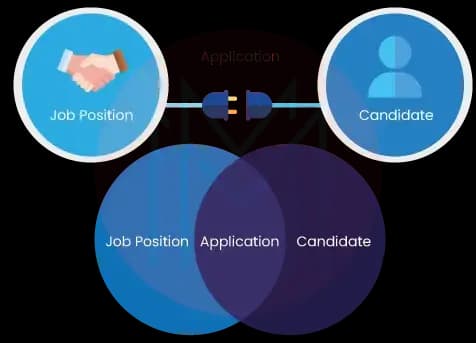
Consider a hiring process in which a position is open and a candidate objects. A typical parent-child relationship will not work, as applicants must submit applications for many job openings. To enable several people to apply to multiple open positions, you need a junction object named "Application."
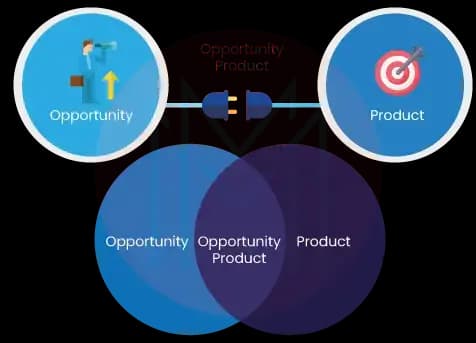
Additionally, one of the typical Salesforce objects provides an example using Opportunity Products. Use the Opportunity Line Items object, which is a junction object, if you want to link Products to a specific Salesforce Opportunity. Without the Junction Object, you could link only one product to one opportunity; it's essential.
-
Best Practices for the Creation of Junction Objects in Salesforce
-
Primary master refers to the junction object’s first master-detail.
-
Secondary master refers to the junction object’s second master-detail.
-
Anyone who owns the primary master will also own the associated child records.
-
If anyone deletes the master records, associated child records will also be deleted.
-
Points to Remember While Creating a Junction Object in Salesforce
-
First, you need to customise an object to use it as a junction object. The process of object customisation varies from edition to edition.
-
Check whether the related objects already exist.
-
Check for the lists in the master object’s page layouts.
-
The key objective is to improve the performance of the relationships.
-
The process of creating many-to-many relationships is supported only in the following editions: Salesforce Lightning Experience, Salesforce Classic, Contact Manager, Group, Professional, Enterprise, Unlimited, Developer, and Performance.
-
How to Create a Junction Object in Salesforce?
It's easy to design a junction item, and once you've done it once, the idea will come naturally. To simplify matters, I'll use the recruitment procedure mentioned above as an example:
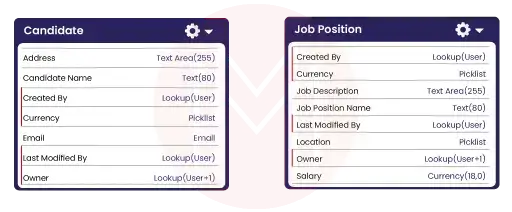
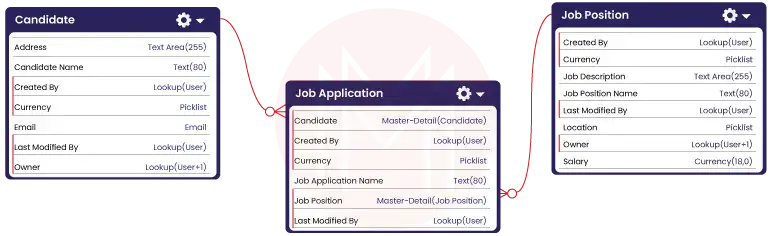
Step #1. First, check whether the two items you want to join with a junction object are readily available. Job Position and Candidate will be my first two bespoke objects. You can see that these are now disconnected from Salesforce Schema Builder. We require our junction object to ensure that multiple candidates can apply for multiple positions.
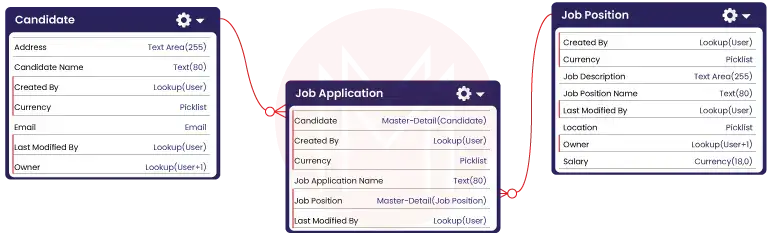
Step #2. As our junction object, a new custom object must be created as the next stage. We can connect the Job Position objects and the Candidate. Thanks to a special object I made called "Job Application."
Step #3. A candidate object and a job position must now be configured as two master-detail relationships in the Job Application object. Create a field on your Job Application object first (as per usual) and then select the proper objects and master-detail relationship field type to achieve this. Returning to the Schema Builder will allow us to verify that our many-to-many junction object is finished.
Step #4. We can now allocate many candidates to various employment opportunities thanks to the structure mentioned above. Let's have a look at how Salesforce displays this.
Conclusion
We hope this blog helped you understand Salesforce data modelling and relationships as well as possible. By making efficient data modelling and relationships, you can ensure data integrity, improve reporting, and seamless business processes.
If you are interested in uncovering more about data modelling, you can register for a Salesforce course in MindMajix. By the end of the training, you will acquire the skills and knowledge to build scalable and high-performing Salesforce solutions.
FAQs
1. I have no technical background. Can I learn Salesforce easily?
Yes, you can learn Salesforce easily regardless of your technical expertise. Your learning process will be quicker if you have a basic understanding of sales, marketing, and other key business processes.
2. What are objects in Salesforce?
An object is a database table that stores data. They can be standard objects and custom objects.
3. How long will it take to learn Salesforce?
You can learn Salesforce within four weeks. If you keep on practising more real-time projects, it will help you become a skilled Salesforce professional.
4. Why is data modelling crucial in Salesforce?
You can ensure data accuracy, improve reporting, and enable automation with data modelling.
 On-Job Support Service
Online Work Support for your on-job roles.

Our work-support plans provide precise options as per your project tasks. Whether you are a newbie or an experienced professional seeking assistance in completing project tasks, we are here with the following plans to meet your custom needs:
- Pay Per Hour
- Pay Per Week
- Monthly
| Name | Dates | |
|---|---|---|
| Salesforce Training | Oct 20 to Nov 04 | View Details |
| Salesforce Training | Oct 24 to Nov 08 | View Details |
| Salesforce Training | Oct 27 to Nov 11 | View Details |
| Salesforce Training | Oct 31 to Nov 15 | View Details |

As a Senior Writer for Mindmajix, Saikumar has a great understanding of today’s data-driven environment, which includes key aspects such as Business Intelligence and data management. He manages the task of creating great content in the areas of Programming, Microsoft Power BI, Tableau, Oracle BI, Cognos, and Alteryx. Connect with him on LinkedIn and Twitter.


